109
System Network Considerations
The computer must have a 10/100 BaseT network card (NIC) installed. When connecting directly to the
Ethernet port on single Audia
®
unit, a 'cross-over' CAT5 cable is used. When connecting to a network (or
system) of multiple Audia
units, a 'straight-through' CAT5 cable is used (via an Ethernet switch). A
separate switched Ethernet network is strongly recommended for CobraNet™, and is mandatory when
using multicast bundles. Ethernet switches (not 'hubs') must be 10/100 BaseT compatible, with sufficient
ports for connection to each Audia
unit (multiple switches may be used). If Ethernet switches are
'managed', be careful to assign all CobraNet connections to 100 BaseT, and all Ethernet connections to 10
BaseT. These connections also use 'straight-through' CAT5 cables. When a system using only two Audia
devices has been configured, and the computer connection is removed, both Ethernet and CobraNet
connections may be made directly between the two units using 'cross-over' CAT5 cables.
Ethernet and CobraNet both have a cable length limitation of 100 meters, between the Ethernet switch and
an Audia device. However, fiber-optic cable may be used to extend this distance limitation to 2 km. Fiber-
optic cable can be used with switches that have fiber-optic ports, or media converters can be used to
interface fiber-optic cable with standard RJ-45 ports.
Due to network delay, CobraNet has a limitation of seven (7) 'hops' (one-way transmissions) within a
network. Additionally, because CobraNet transmits (32) channels of digital audio on (4) 'bundles' of (8)
channels, each Audia device can transmit digital audio to no more than (4) other Audia devices within a
network. The same is true for receiving digital audio over CobraNet. When utilizing CobraNet Latency of
1.33mS (see Equipment Table), the total
number of bundles (transmit + receive) for an Audia device is
reduced to four.
Version 3.3 of Audia software introduced the concept of "flexible CobraNet bundles". Flexible bundles can
comprise any number of channels in the range of one to eight. Their size is adjusted automatically by the
compiler on a case by case basis according to the number of channels passed between different Audia
devices in the system. Accordingly, the total number of bundles that can be used in any Audia device is
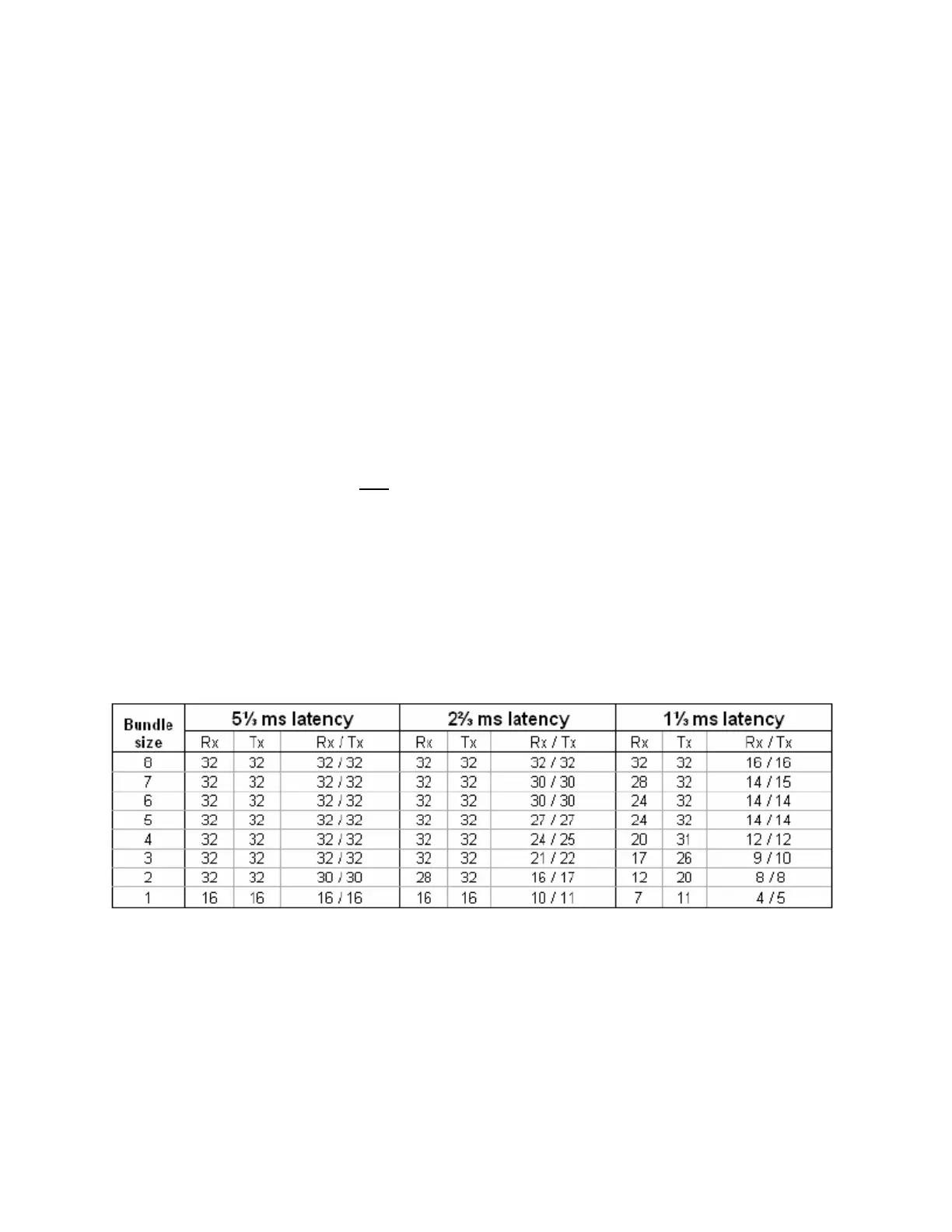
larger, up to sixteen, but depends upon the number of channels being transferred. The table below gives
some guidelines about the communication bandwidth of an Audia device when using flexible bundles.
Columns Rx and Tx indicate the absolute maximal number of channels that can be received or transmitted.
Column Rx / Tx gives the maximum number of channels that can be received and transmitted at the same
time. Flexible bundles are used only in Extended compilation mode.
The computer must be assigned an IP address (under Network Card Settings>Properties). Most computers
set TCP/IP address automatically, but Audia devices require manual assignment. Initially, the computer IP
addresses should be assigned as 192.168.1.X (where range of X = 1~254). Each Audia
device must also
be assigned a unique IP address (see Device Maintenance). The factory default IP address for all Audia
devices is 192.168.1.101.
Many system designs require only a single Audia
device. These would be systems where the number of
inputs/outputs, and the amount of DSP processing, does not exceed that of a standard configuration (see
Hardware Overview). When a single unit is used, network considerations are simplified. A 'non-CobraNet'
unit may be used, and no Ethernet switch is required. Therefore, all CobraNet connections, and most
Ethernet connections go away, as well. The only Ethernet connection is that between the computer and the
Audia
device ('cross-over' CAT5 cable). A 'cross-over' cable is included with each Audia device.



 To Next Page