119
RS-232 and Telnet Protocol
Overview
Audia
®
can be controlled via customized control dialogs in the Audia software, or via third-party controllers
using RS-232 or Telnet.
For RS-232 or Ethernet (Telnet) control of Audia, Biamp created ATP (Audia Text Protocol). This simply
means that Audia will accept strings of ASCII characters to control and read settings of gain, mute, logic
state, frequency, audio levels, and other parameters of DSP blocks that exist in Audia products.
ATP strings can be sent via third-party controllers using RS-232 or Telnet via TCP/IP. A line feed needs to
be sent after each command string sent. (RS-232 Control) (Telnet Control)
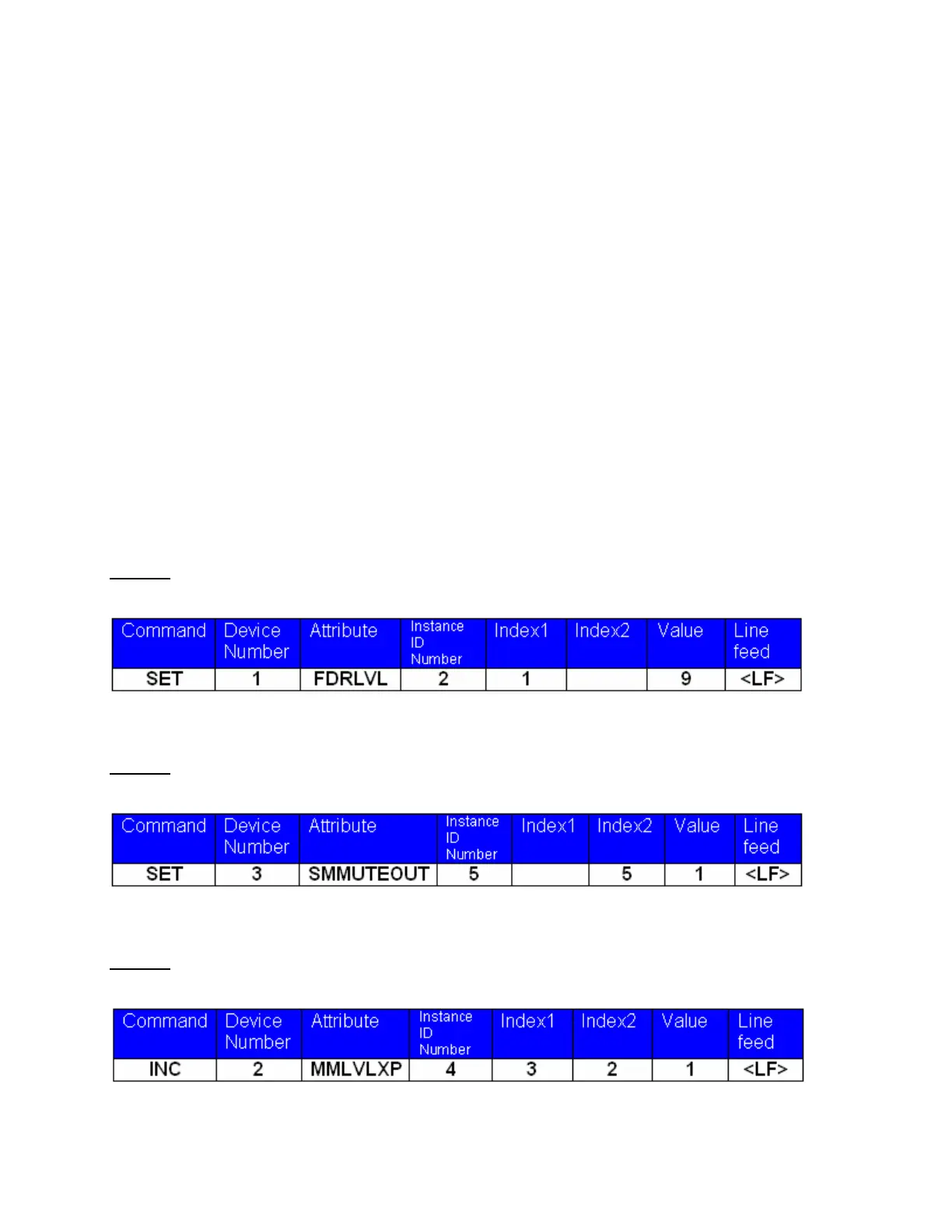
The ATP string is structured in the following order: Command Device Number Attribute Instance ID
Number Index1 Index2 Value <LF>
ATP strings require a space between each parameter; the last character in the string needs to be a line
feed <LF>.
For each control string a few components will need to be derived from the Audia software; Device Number,
Instance ID Number, and Index. Command and Attribute are derived from this document. In a SET
command, Value is used to specify what the DSP block is to be set to. In an increment or decrement (INC
or DEC) command Value is used to specify how much the DSP block is to be changed by.
**Note** Audia software will assign an Instance ID Number to each DSP block on the initial Compile of the
system. Subsequent Compiles will not change the Instance ID Numbers unless the "Reassign Instance
IDs" check box is selected under Compile Options.
Example
: A string to control a fader might look like this:
SET 1 FDRLVL 2 1 9 <LF>. The individual components for this string are:
Notice that Index2 is not used since there is nothing entered in this parameter.
Example
: A string to mute a standard mixer output might look like this:
SET 3 SMMUTEOUT 5 5 1 <LF> The individual components for this string are:
Notice that Index1 is not used since there is nothing entered in this parameter.
Example
: A string to turn up a cross point on a matrix mixer might look like this:
INC 2 MMLVLXP 4 3 2 1 <LF> The individual components for this string are:
In this example Index1 and Index2 are both used; together they specify which cross point is to be changed.



 To Next Page