34
Custom Blocks Menu
Multiple component objects may be merged into a single custom block.
Custom Blocks can simplify the design process by integrating frequently
used component combinations, and provide password protection for
intellectual property such as unique processing and component settings.
Create Custom Block Document
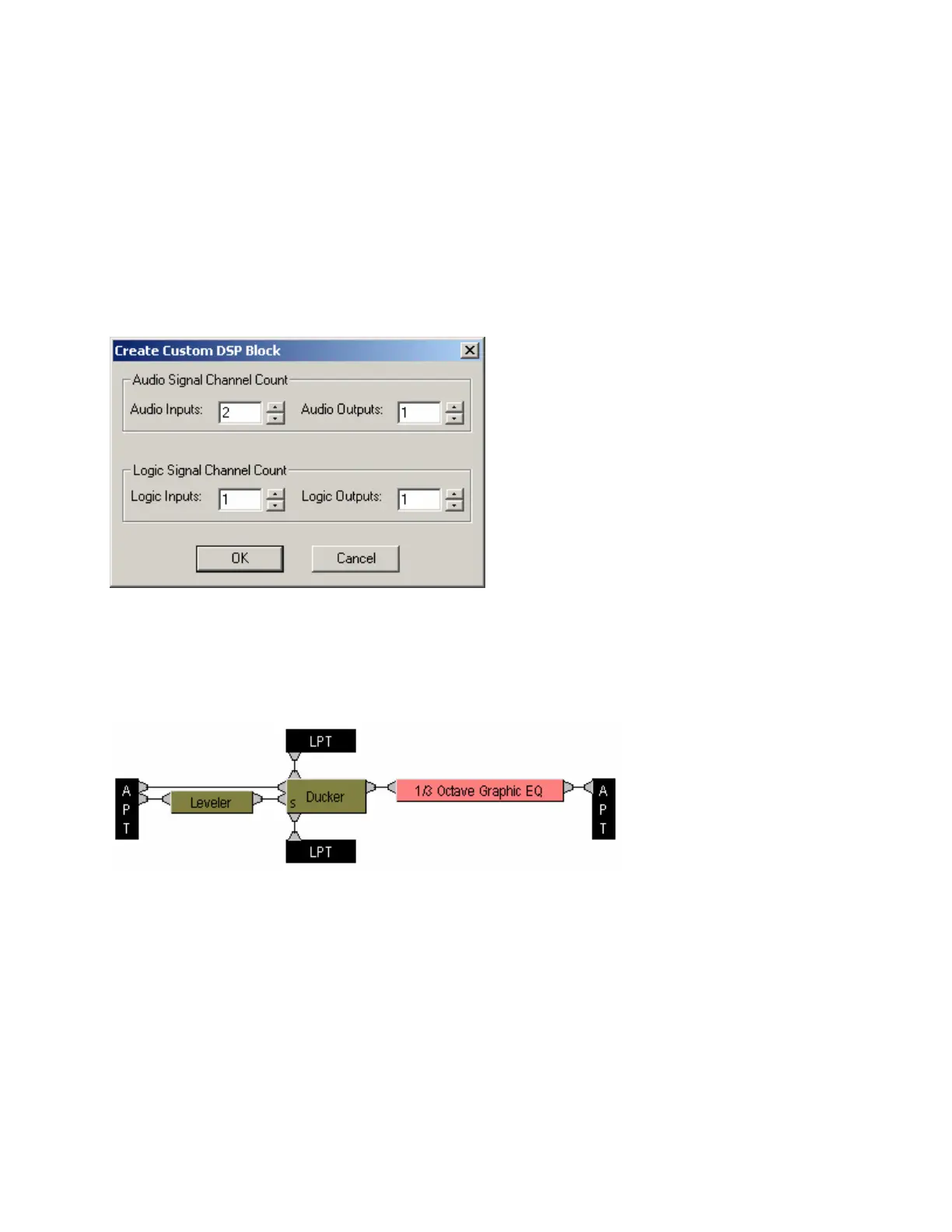
Create Custom Block Document opens a new
DAP file, and a Create Custom DSP Block
screen determines the quantities of audio and
logic inputs/outputs necessary for the custom
block. These quantities should match the
combined totals from all components to be
included in the custom block. Once quantities
are selected, appropriate APT (Audio Pass-
Through) and LPT (Logic Pass-Through)
blocks are placed into the layout. The desired
components are then placed within, and
connected to, the APT and LPT blocks.
Components may be added individually, or
copied as a group from a separate DAP file.
Certain components (such as Inputs/Outputs and Control Devices) cannot be placed within custom blocks.
The number of components in a custom block is limited only by DSP resources available within a single
hardware unit. Once the components are placed and connected, select Merge Into Custom Block from the
menu.



 To Next Page