91
Control Dialogs
Signal Present Meter
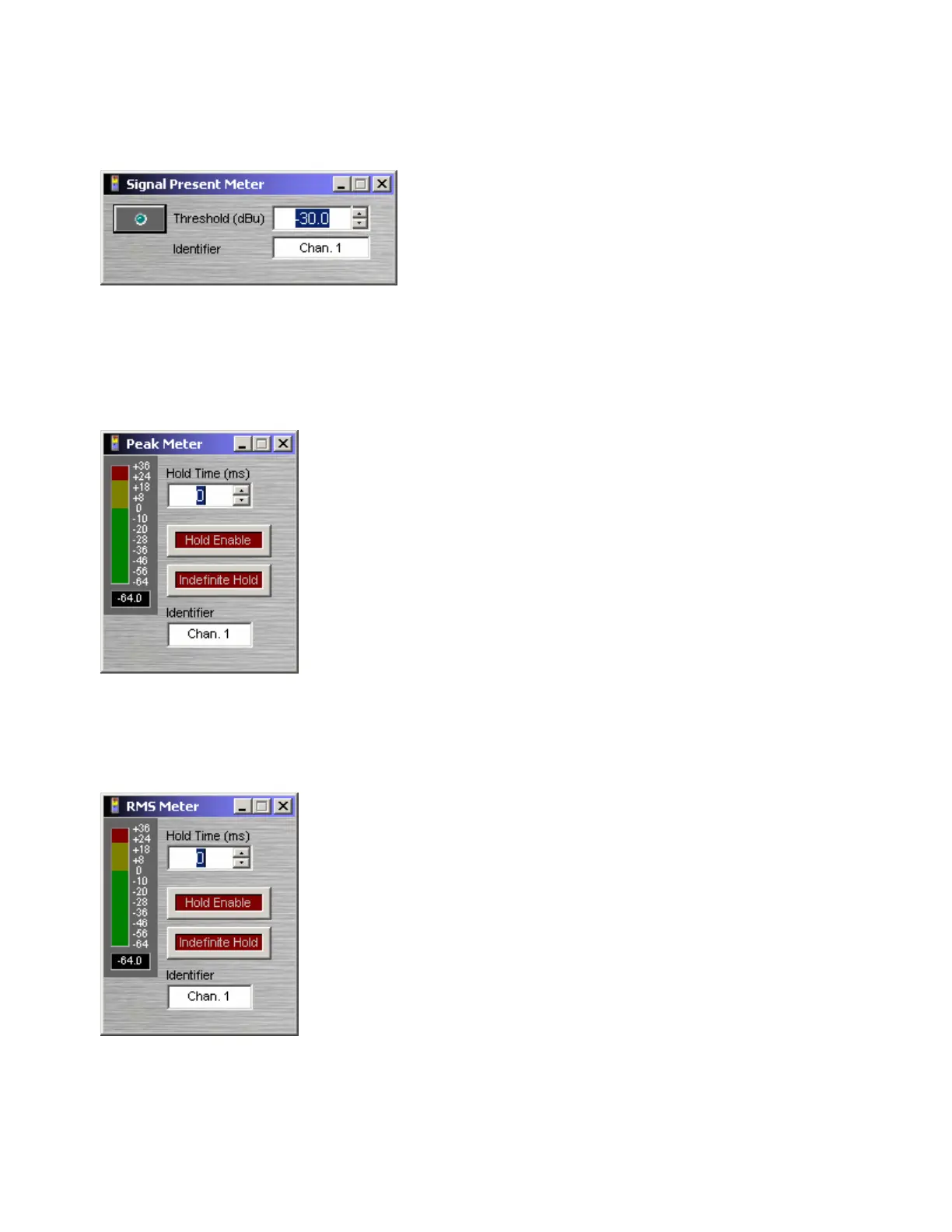
Threshold determines at what level the signal present
indicator will light. Identifier provides a custom label,
when dialog box is minimized (see below).
Right-clicking over certain settings will provide a menu of
additional options. Control Dialog Boxes for Meters
components can be minimized to create user control
surfaces (see Customizing Component Objects).
Peak Meter
A peak-reading meter & numeric display indicate signal level. Hold Time
determines how long the meter will display the most recent level
increase. Hold Enable turns the Hold Time function on/off. Indefinite
Hold causes the Hold function to be continuous, updating the display
only when levels increase beyond the current reading. Identifier
provides a custom label, when dialog box is minimized (see below).
Right-clicking over certain settings will provide a menu of additional
options. Control Dialog Boxes for Meters components can be minimized
to create user control surfaces (see Customizing Component Objects).
RMS Meter
An RMS-reading meter & numeric display indicate signal level. Hold
Time determines how long the meter will display the most recent level
increase. Hold Enable turns the Hold Time function on/off. Indefinite
Hold causes the Hold function to be continuous, updating the display
only when levels increase beyond the current reading. Identifier
provides a custom label, when dialog box is minimized (see below).
Right-clicking over certain settings will provide a menu of additional
options. Control Dialog Boxes for Meters components can be minimized
to create user control surfaces (see Customizing Component Objects).



 To Next Page