CB (E7) 06/2018 Page 71/174
9.7 Value entry for a program section
Path: Main menu > Programs > Time program
Select the desired program and section.
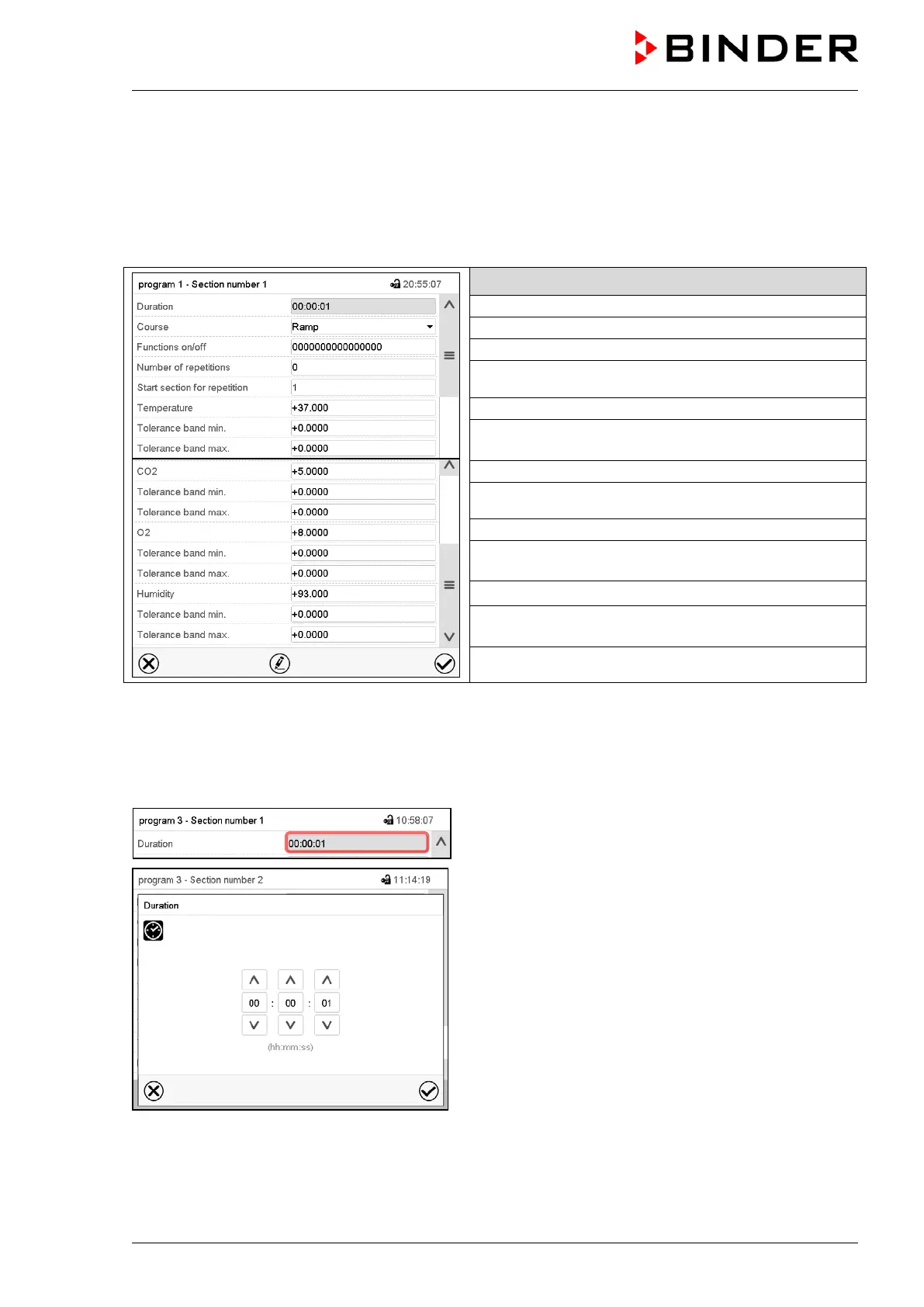
The section view gives access to all parameters of a program section. You can enter or modify the
values.
Program name and section number
Type of setpoint transition: ramp or step
Repeating one or several sections within a program
Temperature tolerance range: minimum and maximum
CO
2
tolerance range: minimum and maximum
O
2
setpoint (chamber with O
2
control)
O
2
tolerance range: minimum and maximum
Humidity setpoint (chamber with active humidification)
Humidity tolerance range: minimum and maximum
The setting and control ranges for the individual parameters are the same as for “Fixed value” operating
mode (chap. 7).
9.7.1 Section duration
Section view (partial view).
Select the field “Duration” indicating the time.
“Duration” entry menu.
Enter the desired section duration with the arrow keys
and press the Confirm icon.
Setting range: 0 up to 99 hours 59 min 59 sec.









 To Next Page