CB (E7) 06/2018 Page 91/174
11.4 Activating / deactivating the audible alarm (alarm buzzer)
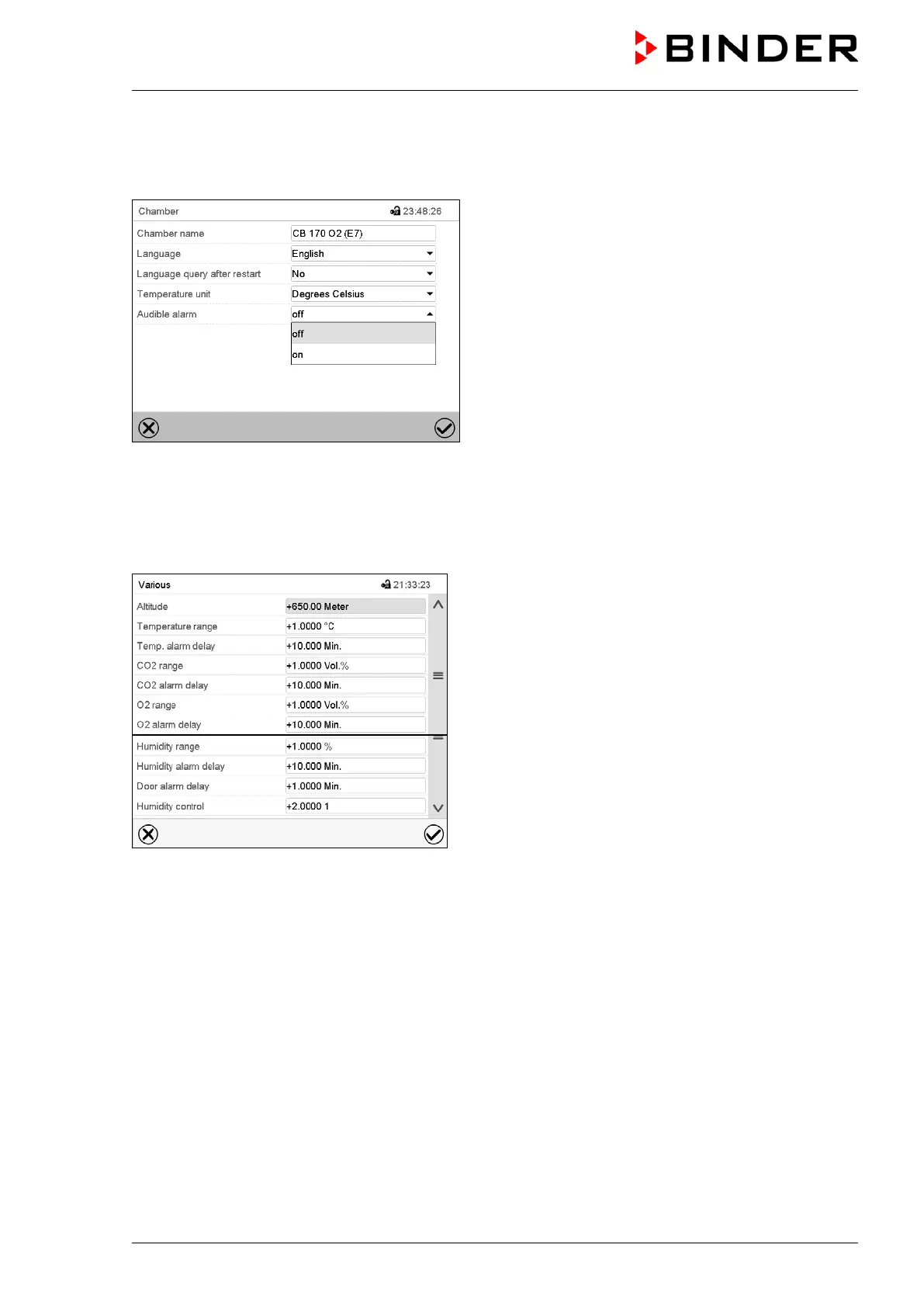
Path: Main menu > Settings > Chamber
“Chamber” submenu (example).
In the field “Audible alarm” select the desired setting
“off“ or “on” and press the Confirm icon.
11.5 Tolerance range settings and alarm delay times
Path: Main menu > Settings > Various
Submenu “Various”.
Select the desired function.
In this menu you can set the deviation between the actual value and setpoint for temperature, CO
2
, O
2
(chamber with O
2
control) and humidity (chamber with active humidification) which that shall cause a
tolerance range alarm, and you can define the delay time after which the tolerance alarm will be triggered.
Also you can set the delay time after opening the door will trigger an alarm.
The entered value defines the tolerance range around the setpoint value. Example: Temperature setpoint:
37 °C, tolerance range value: +/- 2 °C, i.e. this defines a tolerance range from 35 °C up to 39 °C.
Alarms following deviations from the tolerance range or door opening
If the actual value, after having reached the setpoint, deviates by more than the set tolerance range value
and longer than 10 min. from the setpoint or the temperature doesn’t reach the tolerance range within 3
hours from turning on the chamber or closing the door, after the configured interval (e.g., “Temp range
alarm delay”) an alarm is triggered. It is visually indicated in Normal display. If the alarm buzzer is
activated (chap. 11.4) there is an audible alert. The zero-voltage relay alarm output (chap. 11.6) switches
to transmit the alarm. The alarm is shown in the list of active alarms (chap. 11.3).









 To Next Page