Chapter
3
7
Chapter 3 - Patient Harness Fitting Instructions
Patient Harness Fitting Instructions
The Vector Elite system is used with a patient harness. The sizing chart and fitting instructions in this
chapter are for the Maine Anti-Gravity Systems patient harness.
Selecting a Harness Size
It is important to make sure that the proper size harness is selected for a patient to ensure safety and
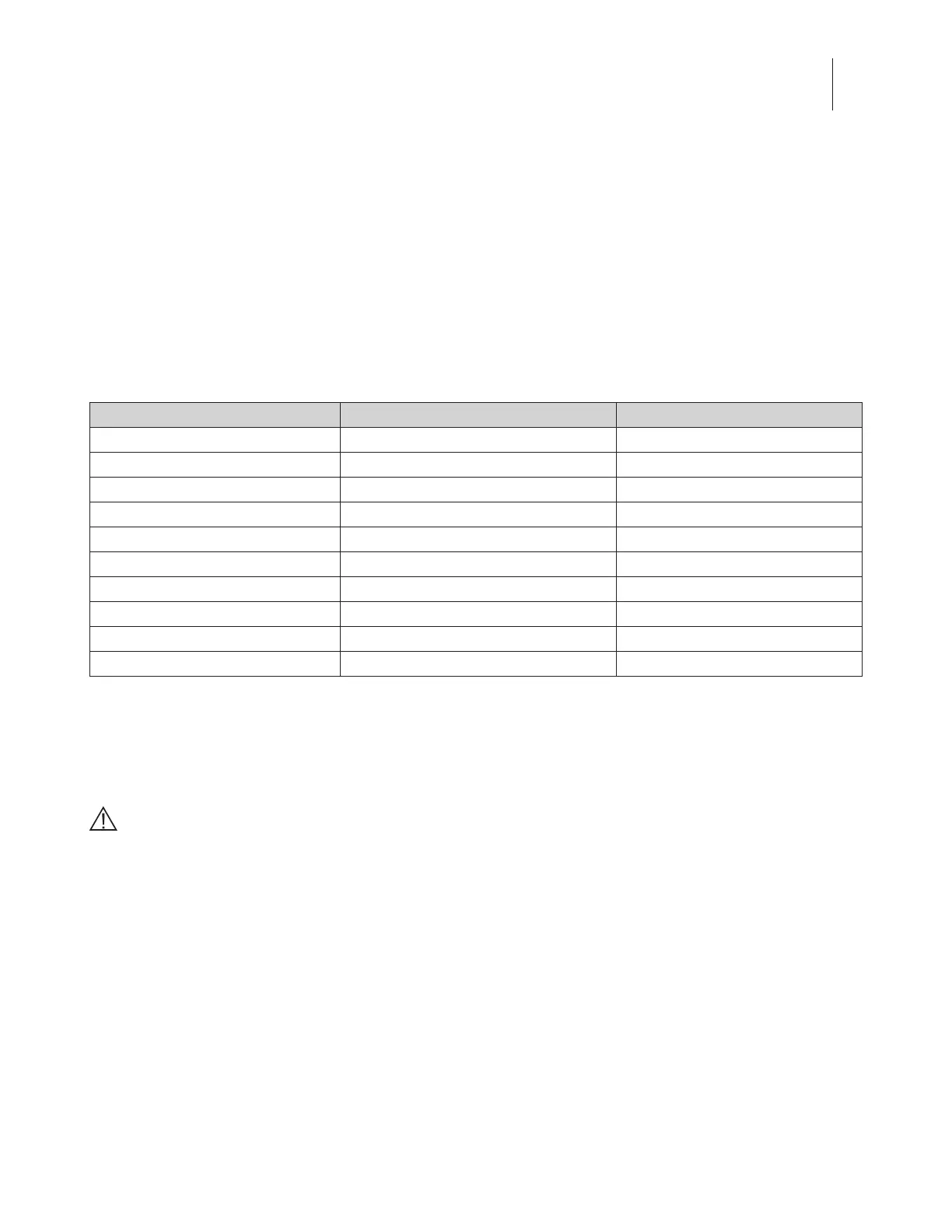
effectiveness while using the Vector Elite system. Refer to Table 3-1 for harness sizing.
Harness Size Waist Size
1
Harness Color Code
X-Small 24”-28” (60 cm - 71 cm) Gray
Small 28”-32” (71 cm - 81 cm) Yellow
Medium 32”-36” (81 cm - 91 cm) Red
Double Medium 34”-38” (86 cm - 96 cm) Purple
Large 36”-40” (91 cm - 101 cm) Blue
X-Large 40”-44” (101 cm - 111 cm) Green
2X-Large 44”-48” (111 cm - 121 cm) White
3X-Large 48”-52” (121 cm - 132 cm) Orange
4X-Large 52”-56” (132 cm - 142 cm) Brown
5X-Large 56”-60” (142 cm - 152 cm) Pink
1
Waist size is determined by measuring 2 in (5 cm) below the umbilicus (belly button) tightly around the torso.
Table 3-1: Maine Anti-Gravity Systems Patient Harness Sizing Chart
Donning a Patient Harness
CAUTION: Inspect the harness prior to use. Do not use if the harness straps are torn, if there is
separation in the harness stitching, or if the Velcro
®
is unable to adhere. Contact Bioness or your local
distributor to order a replacement harness.
1. Detach all Velcro
®
attachments to open the vest.
2. Make sure the patient is in a secured position.
3. Have the patient put their arms through the shoulder straps to put on the vest. The open side of
the vest will face the front.
4. Secure the lower abdominal support first by attaching the Velcro
®
. Make sure the support is as
tight as possible.
5. Secure the upper abdominal support by attaching the Velcro
®
. Note: This is the middle support
with the netting material on the back.
6. Securely attach the top torso support.



 To Next Page