21
Chapter 5: Patient Training Menu
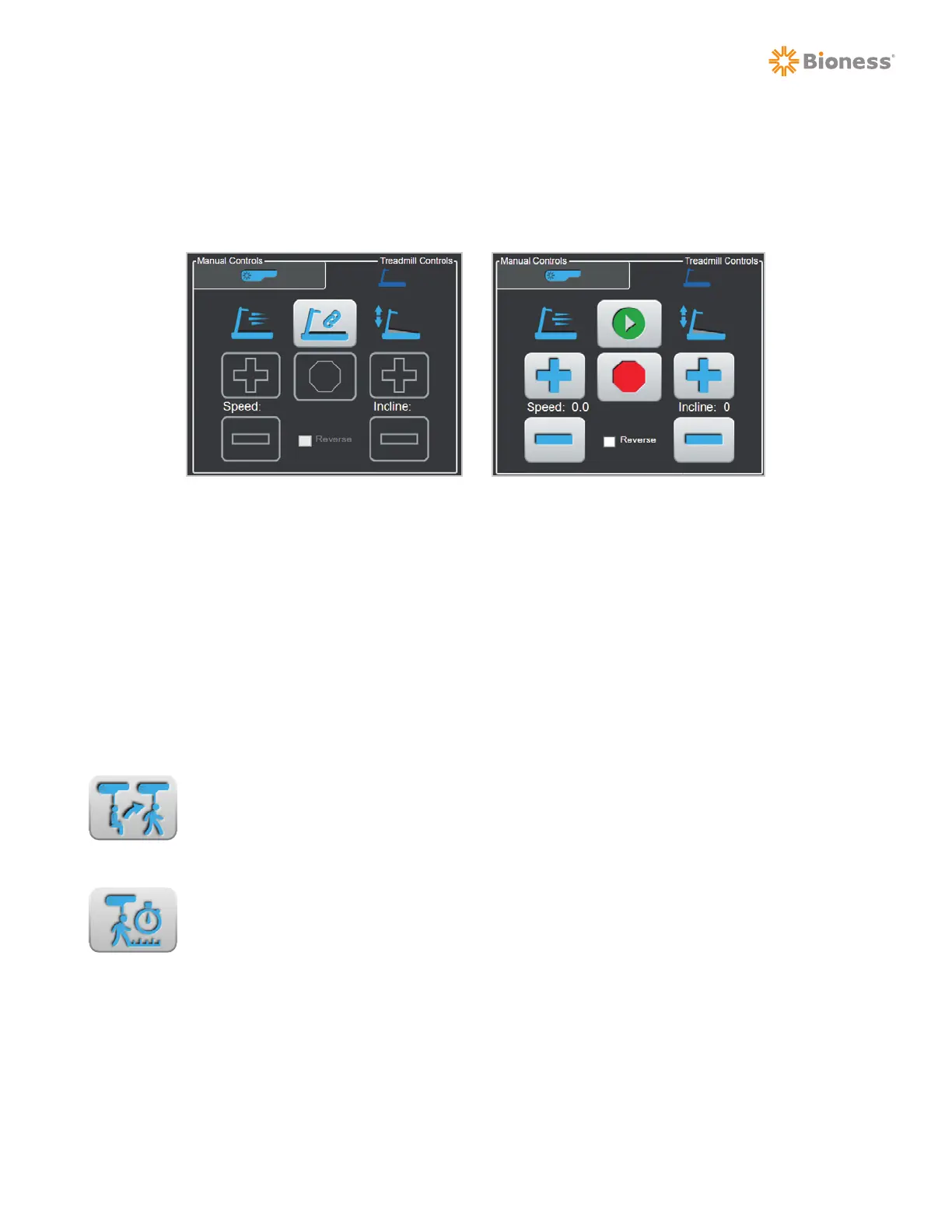
Treadmill Controls
The Vector software can be used to control a compatible treadmill from the Treadmill Controls Tab. After
connecting the treadmill to the Vector software, controls for start, stop, speed, incline, and belt direction
will be available. See Figure 5-16.
Outcome Measures
The Outcome Measures section is displayed on the Training Session screen. Outcome Measures features
two tests that may be launched during an ongoing training session. See Figure 5-4. The two Outcome
Measures tests are:
• Timed Up and Go (TUG) Test
• Walking Test
TUG Test Button
The TUG Test button is used to navigate to the Timed Up and Go (TUG) Test screen.
From this screen a TUG test may be initiated and recorded with the patient secured in
the Vector Elite system.
Walking Test Button
The Walking Test button is used to navigate to the Walking Test screen. From this screen
a 10 meter walk test, 5 meter walk test, 6 minute walk test, or 2 minute walk test may be
initiated and recorded with the patient secured in the Vector Elite system.
Session Status Section
The Session Status section displays real-time information during a training session, including: the amount
of weight unloaded, total session time, training time, walking speed, rope position, number of falls
prevented, and total distance walked during the training session.
Figure 5-12: Treadmill Controls Tab
with Treadmill Controls Enabled
Figure 5-11: Treadmill Controls Tab
without Treadmill Connected



 To Next Page