Front Panel Operation 31
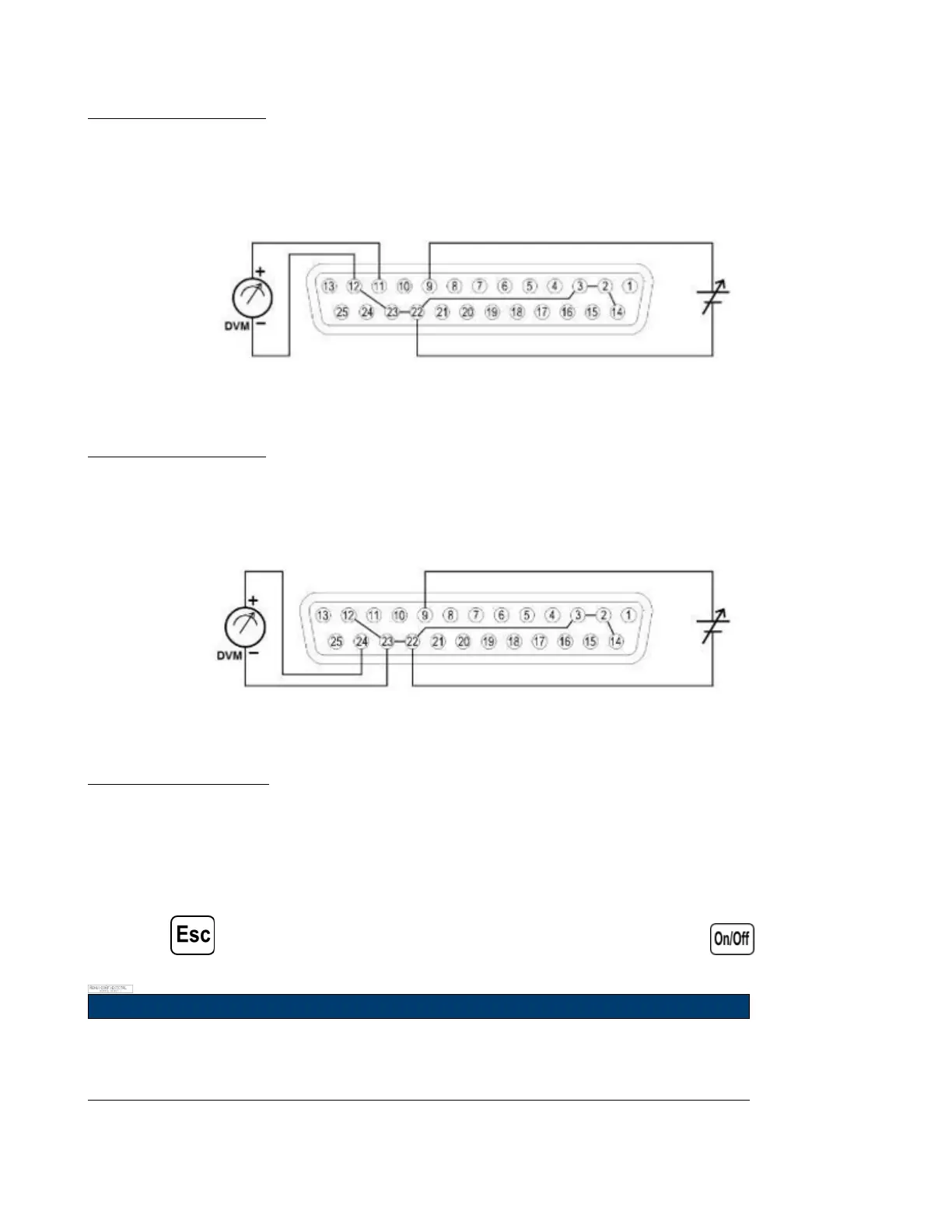
3.7.1 Voltage Monitor
This function is able to monitor the voltage output using Pin 11 and one of the ground pins (i.e. Pin 22), which can
be connected to a digital voltage meter (DVM) or other voltage monitoring device, as shown below. The output control
must be in analog mode to use this function. The monitoring of the output voltage range (which reects 0 to full scale
of the power supply’s output voltage) can be selected between 0-5 V and 0-10 V.
Figure 3.8 Voltage Monitor
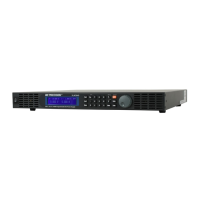
3.7.2 Current Monitor
This function is able to monitor the voltage output using Pin 24 and one of the ground pins (i.e. Pin 23), which can
be connected to a digital voltage meter (DVM) or other voltage monitoring device, as shown below. The output control
must be in analog mode to use this function. The monitoring of the output voltage range (which reects 0 to full scale
of the power supply’s output voltage) can be selected between 0-5 V and 0-10 V.
Figure 3.9 Current Monitor
3.7.3 Shut O Control
Shut o control allows Pin 15 of the DB25 interface to be used to shut o the power supply’s output, which is controlled
by an input trigger signal.
When shut o occurs, the output will be turned o immediately and REMOTE INHIBIT ! will appear on the display as
shown below. To enable the output again, rst set (Pin 15) open.
Then, press or sending the OUTPut:PROTection:CLEar command before pressing the button again to
enable the output.
Note:
Shut o can only occur when the power supply receives a trigger. Maintaining that pin
constantly open will not trigger a shut o.












 To Next Page