Calibration 61
9.2 Current Calibration
To perform a current calibration:
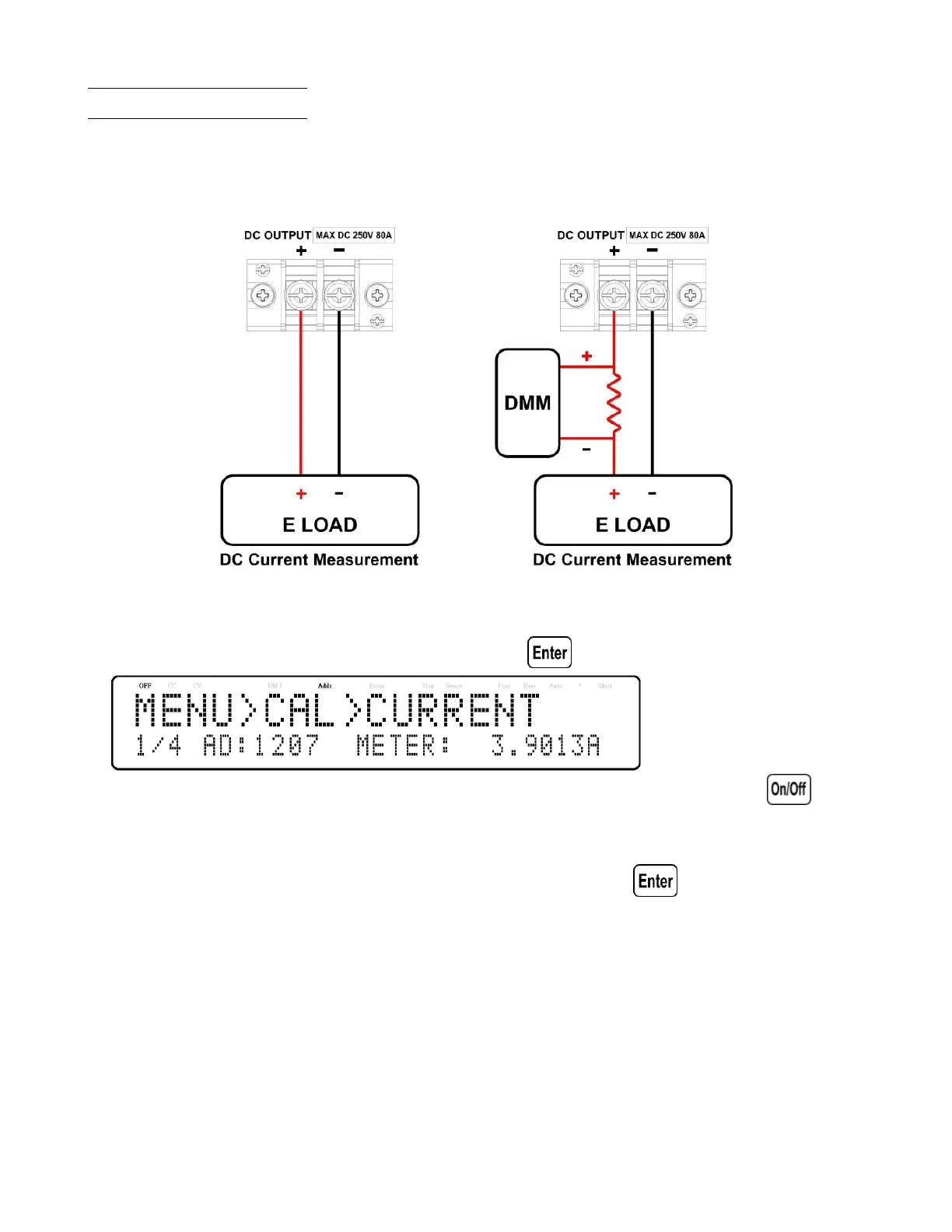
• Connect the shunt resistance, DMM and Electronic load to the output of the power supply as shown in the gure
below:
Figure 9.2 Current Calibration Diagram
• Set the DMM to a DC voltage measurement. Set the Electric Load in CV mode, the voltage set 5V. Select the
CURRENT parameter in the CALIBRATION menu and press . The following will be displayed:
The 1/4 signies there are 4 points to be calibrated, and the current calibration point is 1, and press to start
calibration.
• When METER parameter is blinking input the current, the voltage reading from the DMM divided by the shunt
resistance, in the METER parameter by using the numeric keypad and pressing .
• Repeat this procedure by entering the meter readings for points 2 – 4.












 To Next Page