1.12 Control functions
1.12.1 Priority of control
The iH system can be controlled by a number of modules: the Pump Display Terminal (see
Section 1.13); an iH Interface Module (see Section 8.5.3); or the iH Single Equipment Monitor
(see Section 8.5.4). Only one module can have control of the iH system at any one time. That
is, once a module has control of the iH system, control requests from another Module are
denied.
To allow another Module to control the iH system:
•
The Module which currently has control must 'release' control (that is, you must send the
appropriate message on the network or press the appropriate button to release control).
•
Any Module which requires control must then 'take' control (that is, you must send the
appropriate message to the iH system or press the appropriate button to take control).
1-20 iH Dry Pumping Systems
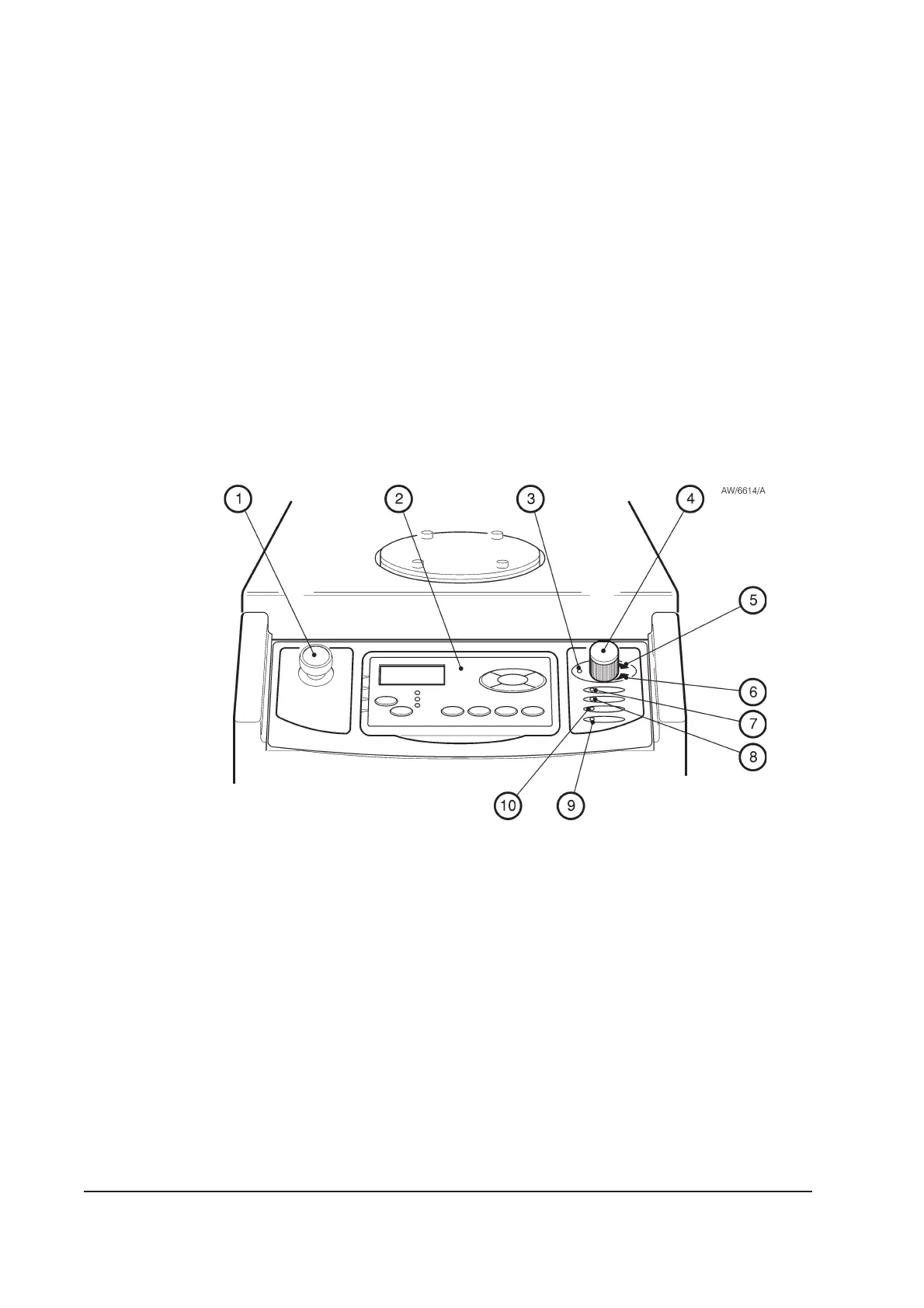
Figure 1-7 - Controls and indicators on the dashboard
1. Emergency stop switch
2. Pump Display Terminal
3. Shaft-seals purge pressure warning LED (yellow)
4. Nitrogen pressure regulator
5. Shaft-seals purge pressure high LED (green)
6. Shaft-seals purge pressure low LED (green)
7. Power OK LED (green)
8. Running LED (green)
9. Alarm LED (red)
10. Warning LED (yellow)



 To Next Page