4.2 General operation
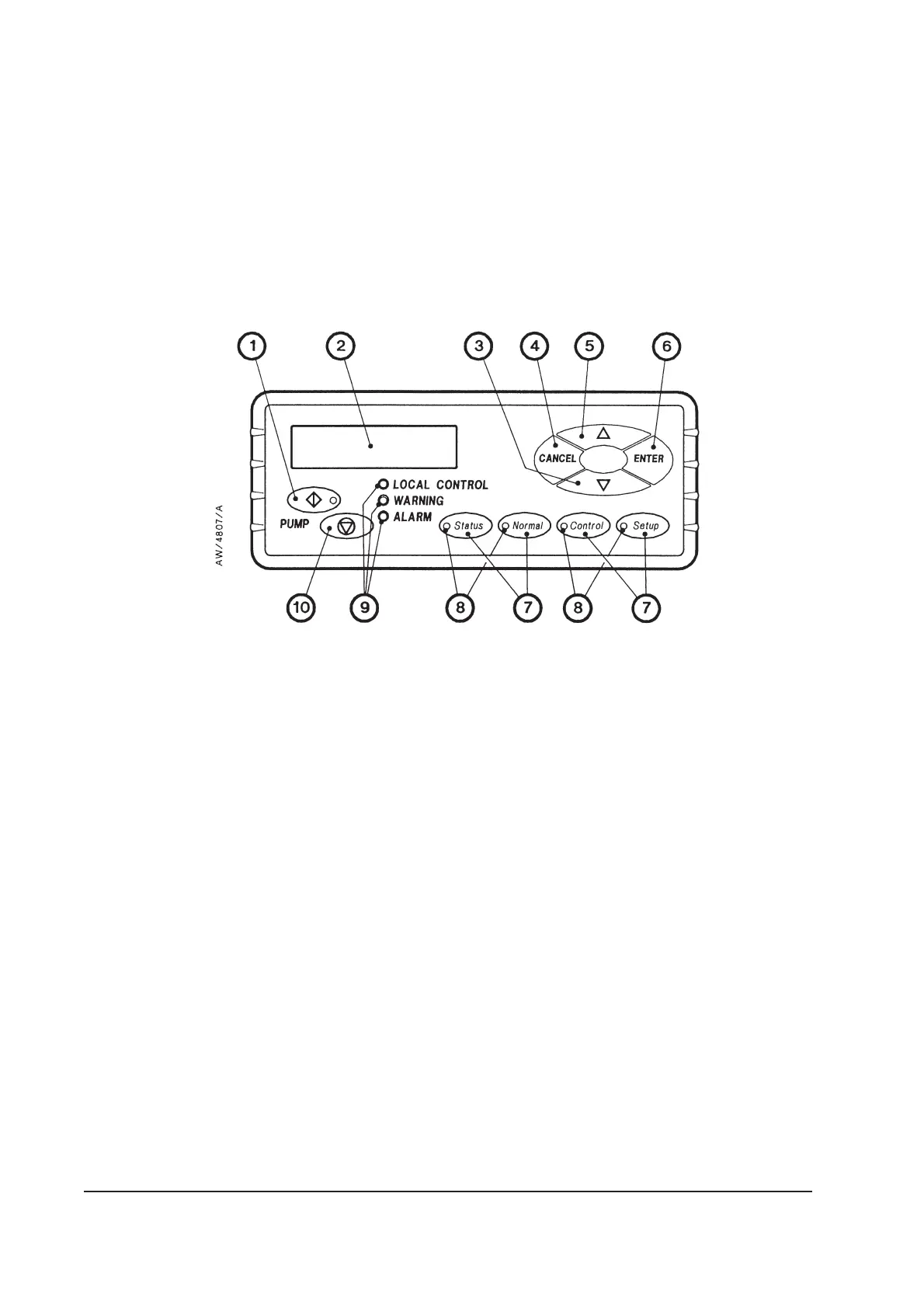
When you first switch on the iH system, the normal display is shown: see Figure 4-5. Refer to
Figure 4-1. You can then press the On or Off button (1 or 10) or any of the four menu buttons
(7) to enter the corresponding menu. Then, regardless of the current menu and display
status, when you press any of these buttons, you exit the current menu and enter the
corresponding new menu. Figure 4-2 shows this menu control logic.
4.3 The CANCEL button
You can press the CANCEL button at any time during menu operation. For this reason, we
have not shown the use of the CANCEL button on all of the menu diagrams, but we have
shown specific uses where there is no other obvious way to cancel the current menu option
and enter the previous menu option. In general, when you press the CANCEL button, the
current menu option is cancelled and the previous menu option is displayed.
4-2 iH Dry Pumping Systems
Figure 4-1 - Front panel of the pump display terminal
1. On button
2. Display
3. Down button
4. CANCEL button
5. Up button
6. ENTER button
7. Menu buttons
8. Menu selected LEDs
9. Status LEDs
10. Off button


 To Next Page