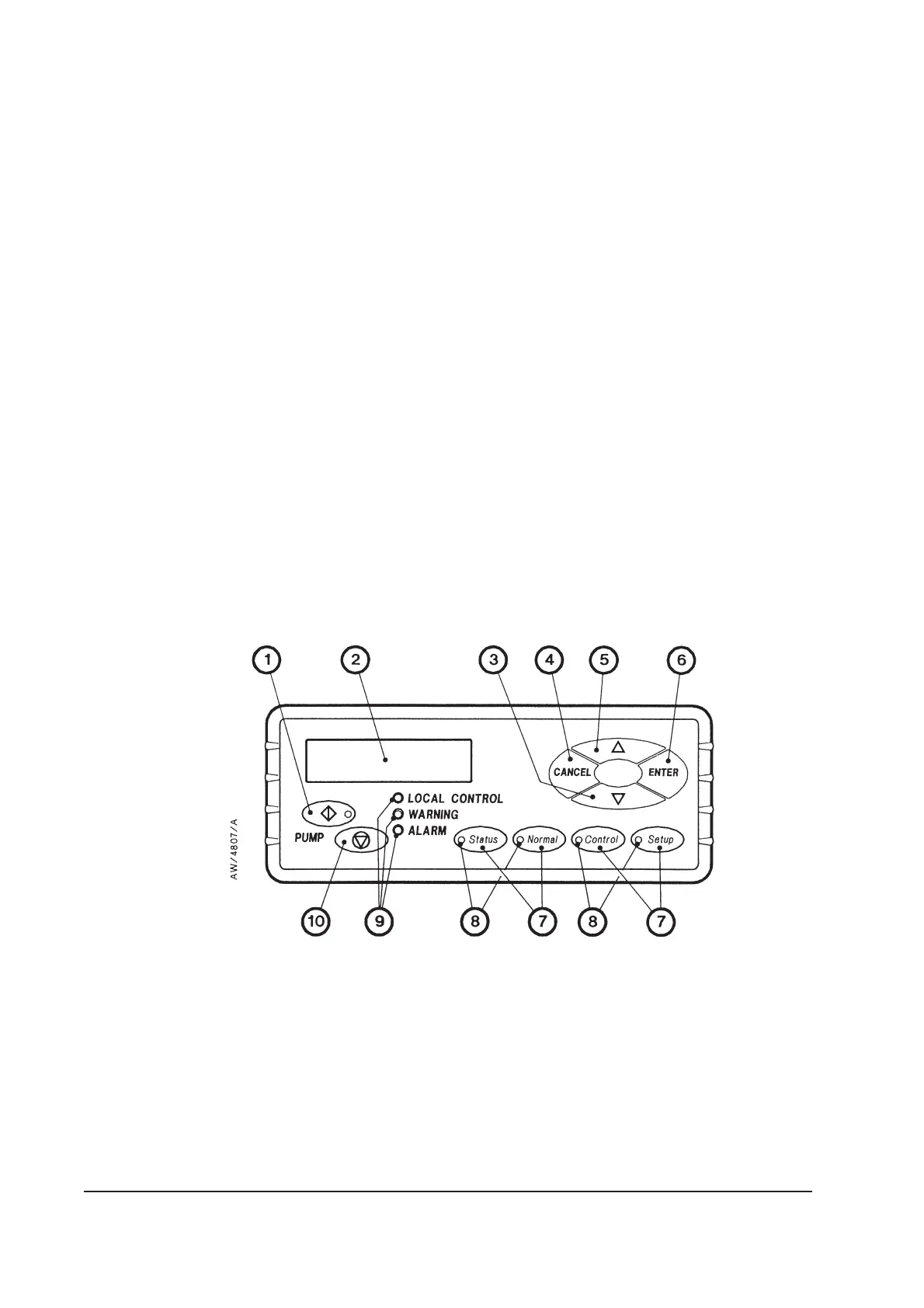
The status LEDs (9) show the current status of the iH system and the Pump Display Terminal:
LED LED colour Meaning
ALARM Red This LED shows when an alarm condition exists.
WARNING Amber This LED shows when a warning condition exists.
LOCAL
CONTROL
Green This LED is on when the Pump Display Terminal has control of the iH
system.
The ALARM and WARNING LEDs flash when the corresponding alarm or warning
condition first occurs. When you acknowledge the condition (refer to Section 5.9), the
corresponding LED goes on permanently. For most alarms and warnings, if the condition
clears (that is, the fault which caused the condition is no longer present), the corresponding
LED goes off; see Tables 6-1 and 6-2 for the warnings and alarms whose LEDs do not
automatically reset in this way.
If remote operation in excess of 25m is expected, a Pump Display Module should be used.
The functionality of the Pump Display Module is the same as that of the Pump Display
Terminal. Refer to Section 8.5.8 for ordering information.
1-24 iH Dry Pumping Systems
Figure 1-8 - Front panel of the pump display terminal
1. On button
2. Display
3. Down button
4. CANCEL button
5. Up button
6. ENTER button
7. Menu buttons
8. Menu selected LEDs
9. Status LEDs
10. Off button



 To Next Page