787 Flight Crew Operations Manual
DO NOT USE FOR FLIGHT
Flight Instruments, Displays -
Electronic Flight Bag - Controls
and Displays
Copyright © The Boeing Company. See title page for details.
10.70.62 D615Z003-TBC
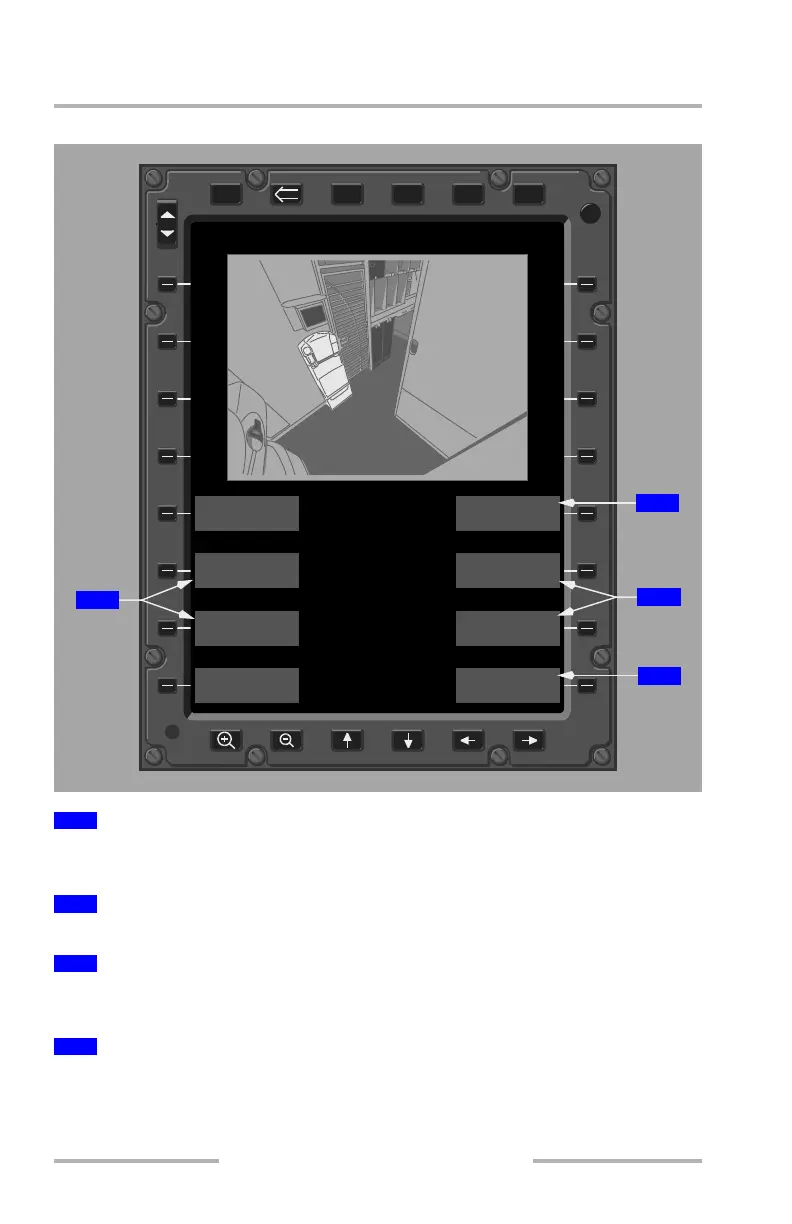
VIDEO SURVEILLANCE Show Menu Page
Changes the brightness of the image in the primary display as indicated by the +
and - selections.
Returns the brightness and contrast to the default settings.
Changes the contrast of the image in the primary display as indicated by the + and
- selections.
Displays the Maintenance page for maintenance personnel use.
1
BRIGHTNESS +/- Soft Keys
2
DEFAULT Soft Key
3
CONTRAST +/- Soft Keys
4
MAINTENANCE Soft Key
DSPL
DSPL
PWR
XFRPGDNPGUPMENU ENTER
BRT
DIM
VIDEO SURVEILLANCE
DOOR #1 RIGHT
FREEZE
BRIGHTNESS +
BRIGHTNESS -
HIDE MENU
MAINTENANCE
CONTRAST -
CONTRAST +
DEFAULT
2
4
1
3
February 15, 2010



 To Next Page