787 Flight Crew Operations Manual
DO NOT USE FOR FLIGHT
Airplane General, Emergency
Equipment, Doors, Windows -
Controls and Indicators
Copyright © The Boeing Company. See title page for details.
D615Z003-TBC 1.30.23
The individual control feature can be partially overridden at the Cabin Attendant
Panel. Only the two darker settings are available while in the cabin attendant
override mode.
When the switch is not in use, the LED turns off. Selecting the control again
illuminates the LED at the last position.
This indicates a clear window (no dimming) has been selected.
One of these three indications is displayed when an intermediate level (partial
dimming) has been selected.
This indicates a dark window (full dimming) has been selected.
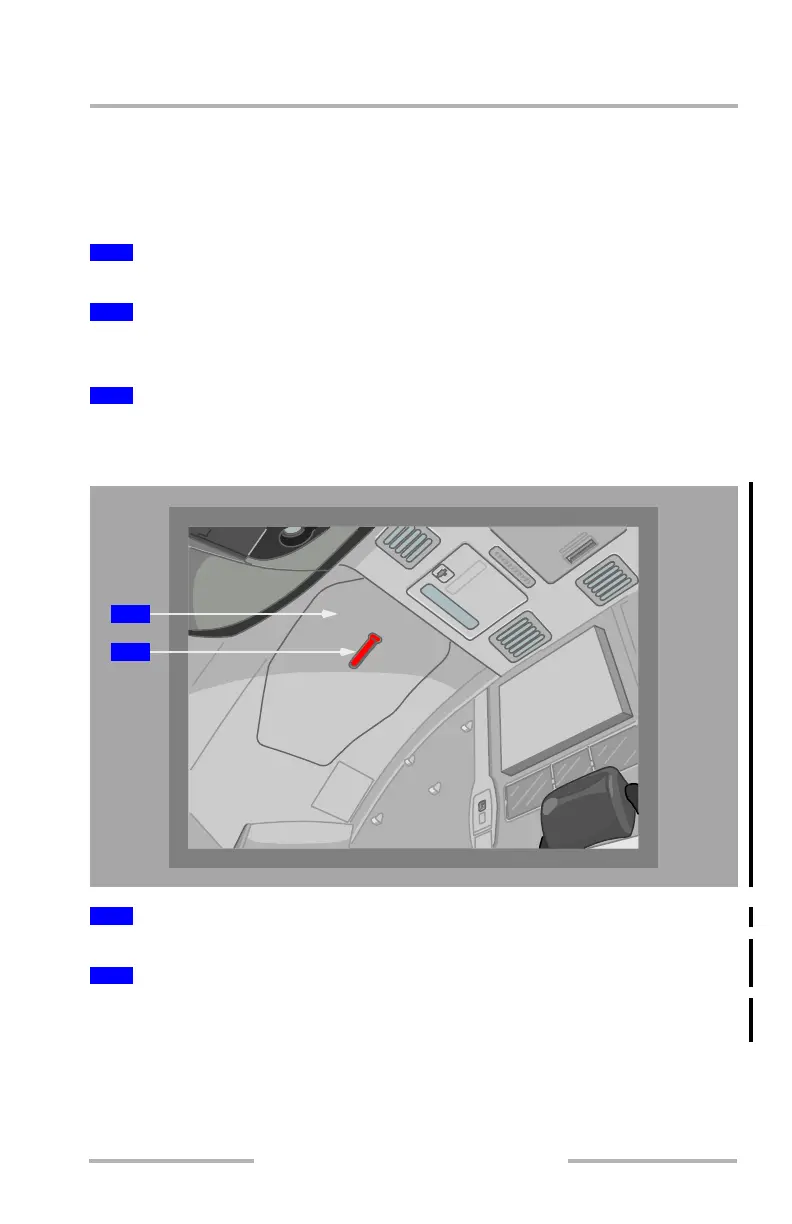
Flight Deck Overhead Door and Vent
The panel serves only as a cover for the overhead door and vent.
To remove the panel and access the overhead door and vent, pull down on red strap
handle.
2
Clear
3
Intermediate Levels
4
Dark
1
Overhead Door Cover
2
Overhead Door Cover Handle
2
1
February 15, 2010



 To Next Page