787 Flight Crew Operations Manual
DO NOT USE FOR FLIGHT
Communications -
MFD Communications Functions
Copyright © The Boeing Company. See title page for details.
5.40.10 D615Z003-TBC
Menu Entry Fields
Menu entry fields are used to make text entry selections from a list. Menu entry
fields distinguish mandatory versus optional entry in the same manner as CDU
entry field.
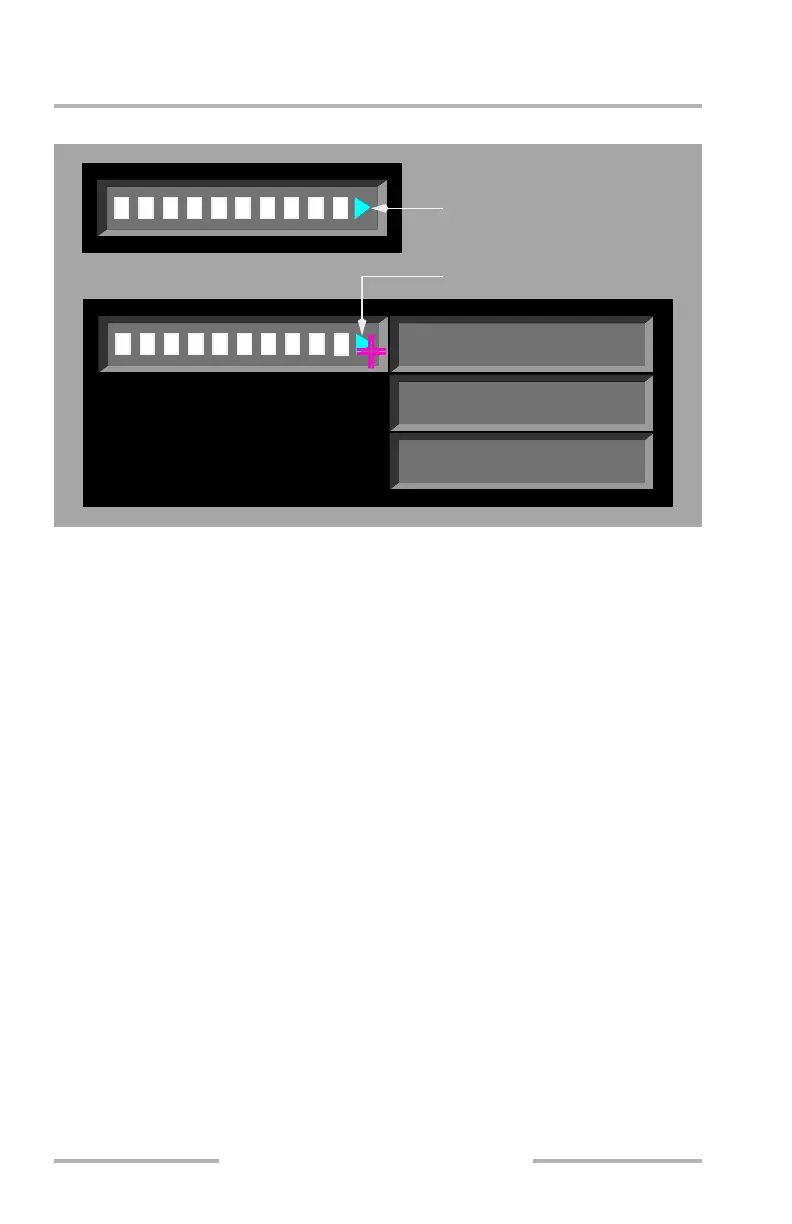
The menu entry field is distinguished from other entry fields by the pointer to the
right of the field.
When initially selected, a list of menu items is displayed to the side of the pointer.
If an item from the list is then selected using the cursor and cursor select switch,
that item is transferred to the entry field. If the menu prompt is selected again and
the scratchpad contains a valid value, that scratchpad value is transferred to the
entry field. Actions for invalid values, an empty scratchpad, space characters, and
the delete key are the same as for CDU entry fields. When the entry field is
selected with text already inserted, the menu list is removed from the display.
Help Window
A help window is provided in both COMM and CDU displays at the bottom of the
MFD to assist in resolving data entry errors and to display FMC information
messages. Some help window messages clear automatically when the condition is
removed. Others, such as INVALID ENTRY, INVALID DELETE and NOT IN
DATABASE must be manually cleared using the CLR MSG key.
LIST ITEM 1
LIST ITEM 2
LIST ITEM 3
Menu Entry Field
(not selected)
Menu Entry Field
(selected)
June 16, 2008



 To Next Page