787 Flight Crew Operations Manual
DO NOT USE FOR FLIGHT
Flight Instruments, Displays -
System Description
Copyright © The Boeing Company. See title page for details.
D615Z003-TBC 10.20.13
Cursor Control Device (CCD)
The CCD uses a touch pad. The cursor moves relative to finger movement across
the touch pad. Except for the four corners of the touch pad, lifting the finger off
the touch pad and touching a different location does not move the cursor. Only
finger motion in contact with the touch pad moves the cursor.
Tapping with a finger on a corner area immediately places the cursor in the
corresponding corner of the display. This helps the pilot quickly locate the cursor
and speeds access to the selections at the four corners of the display.
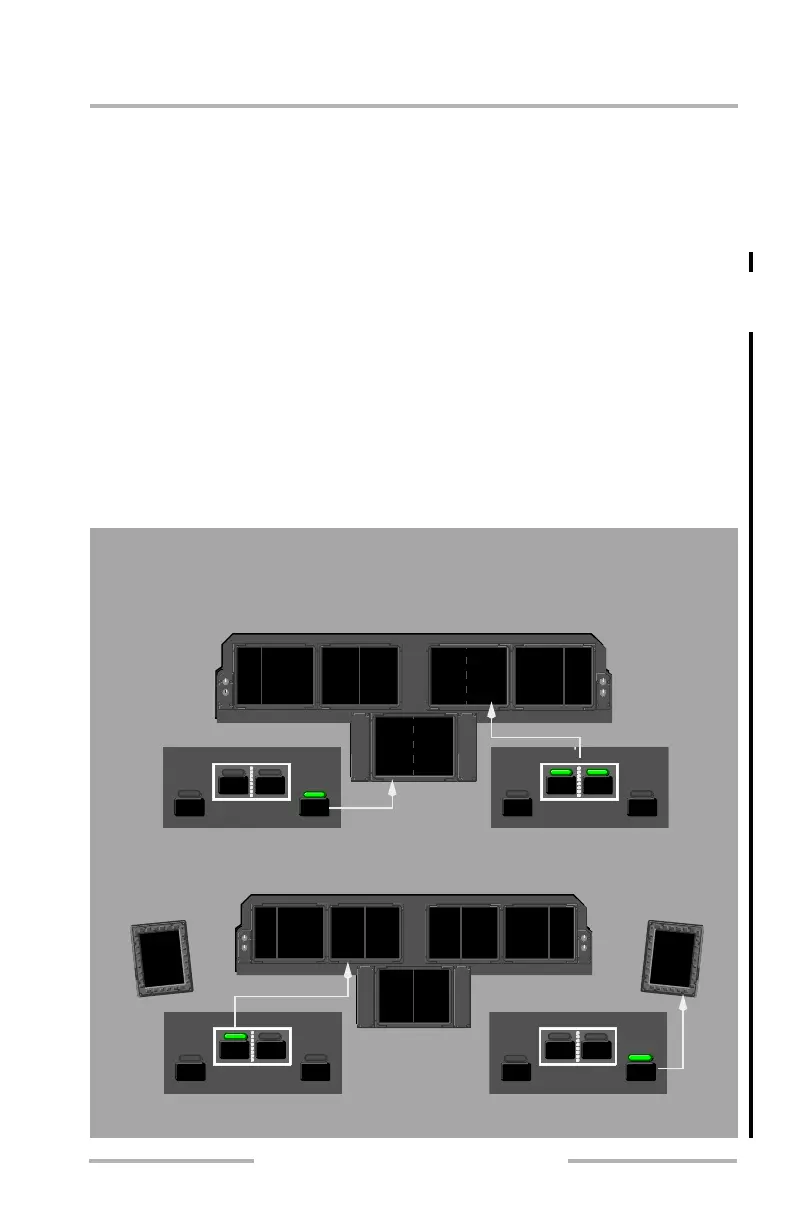
Each CCD also has four cursor location switches forward of the touch pad. They
can be used to move the cursor immediately to the on-side EFB, either left (L) or
right (R) upper MFD, or lower (LWR) MFD. An annunciator light illuminates to
show where the cursor appears. When a cursor location switch is used, the cursor
is placed on the home location of the corresponding MFD. This is usually on the
upper left-hand corner or soft key of the format being displayed on the MFD.
However, each application is also able to define the cursor position when the
cursor location switches are used.
The cursor location switches are used to immediately move the cursor to a
specific MFD or the EFB. An annunciator light illuminates to show where
PFDAUX EICAS PFDND ND
CDU CDU
AUX
PFDAUX EICAS PFDND ND
CDU CDU
AUX
PFDAUX EICAS PFDMFD ND
CDU CDU
AUX
EFBLWR
RL
PFDAUX EICAS PFDND ND
CDU CDU
AUX
PFDAUX EICAS PFDND ND
CDU CDU
AUX
PFDAUX EICAS PFDMFD ND
CDU CDU
AUX
LWREFB
RL
LWREFB
RL
the cursor is located even when the symbol is moved with the touchpad..
EFBLWR
RL
ECL
EFBEFB
February 15, 2010



 To Next Page