No. Name Article No.
②
Instrument Adapter Array Size M
Instrument Adapter Array Size ML
Instrument Adapter Array Size L
Instrument Adapter Array Size XL
41798
41799
41801
41802
③
Tool for Instrument Adapter 55061
NOTE: Any instrument adapter clamp can be attached to any array. If you exchange the array for
one of a different size during the procedure, recalibrate and verify the instrument before
continuing.
Proper Handling of Instrument Adapters
Warning
Ensure the adapter is large enough for the instrument. The larger the instrument, the larger
the adapter you should use. An adapter that is too small can result in imprecise calibration
or navigation.
How to Attach the Array to the Instrument Adapter Clamp
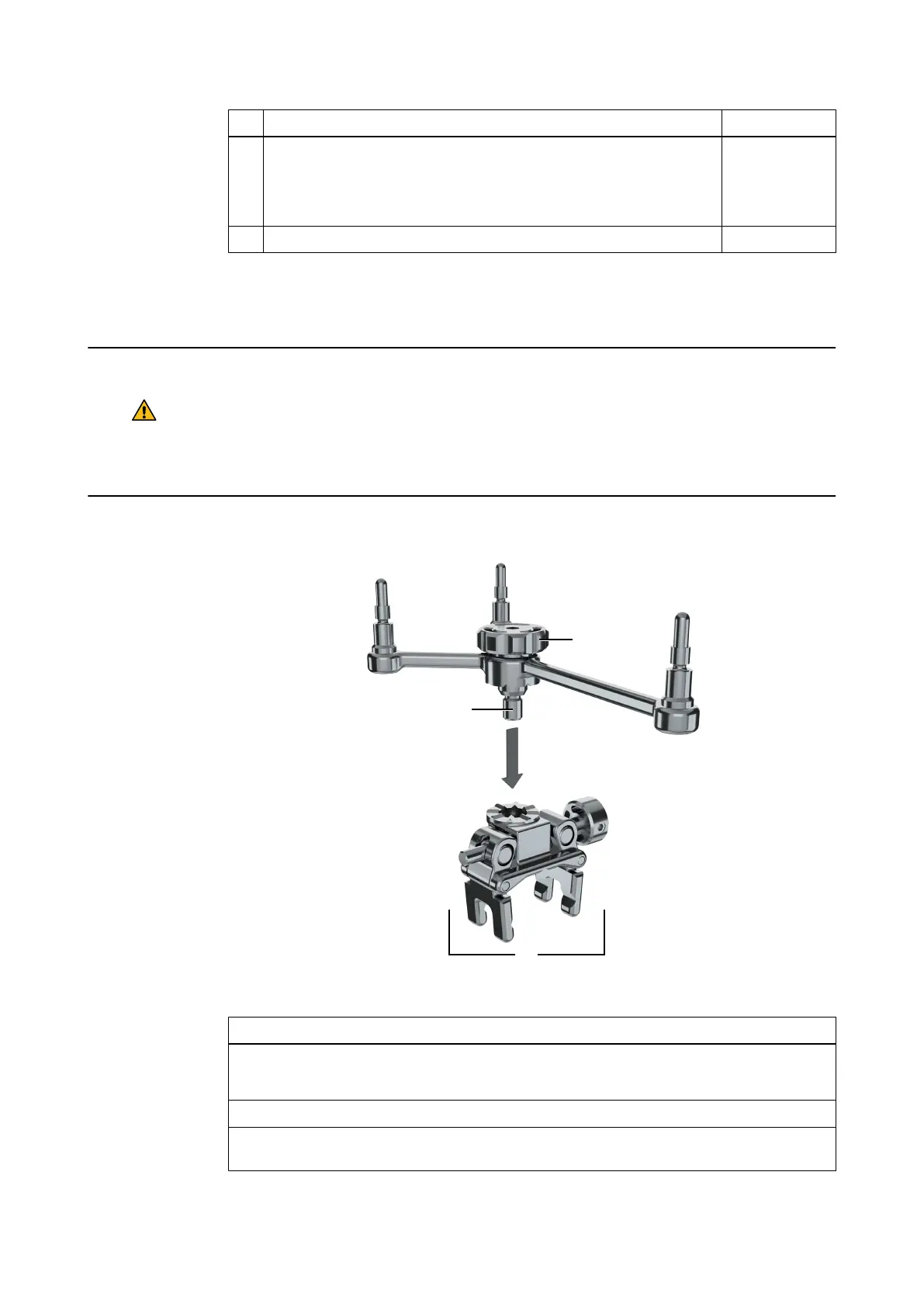
Figure 39
Step
1. Select the required Instrument Adapter Clamp and Instrument Adapter Array.
NOTE: The larger the instrument, the larger the array you should use.
2. Insert the array stem ② into the clamp ① and align the teeth on both components.
3. Tighten the screw knob ③ by hand or by using the Tool for Instrument Adapter, ensur-
ing that the array is securely attached to the clamp.
Instrument Adapter Package
80 Instrument User Guide Rev. 2.3 Cranial/ENT Optical



 To Next Page