SMART KTF 2000 – KTF/RW Operation
3B-38 - SMART KTF 2000
READ – Lettura Articolo da Dispositivi KTF/RW
SETUP
READ
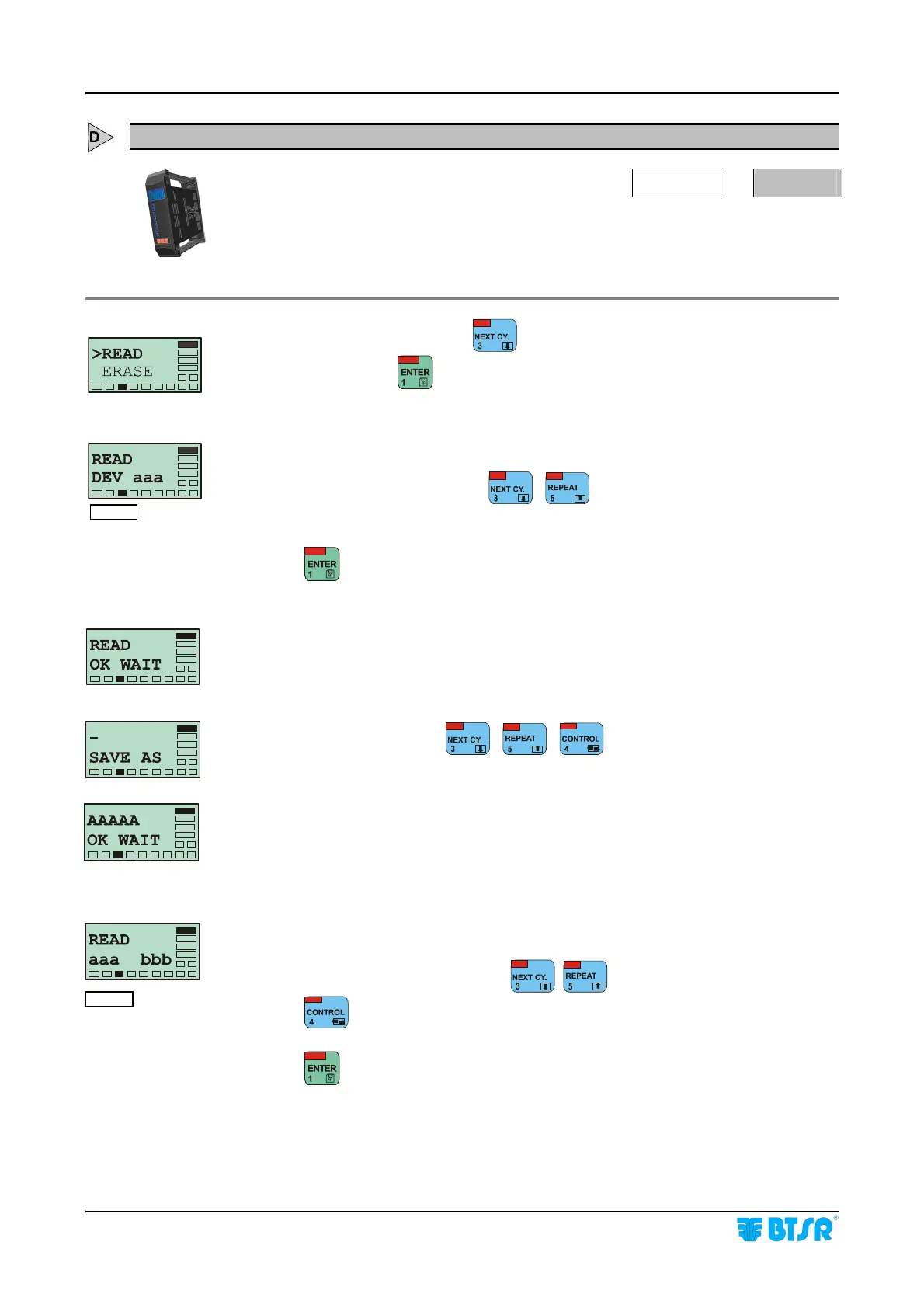
This function allows you to read the article currently loaded into KTF/RW devices,
and to save it with a new name into the SMART KTF 2000 terminal.
From the SETUP menu, press
until the >READ menu option is selected.
At this point, press
to access the function.
This screen allows you to select the device which you want to read the article from
database.
Choose the desired device using
,
Press
to start the reading operation.
This screen displayed for a few seconds, indicates that the reading operation is in
progress. At the end of operation a new screen will appear, allowing you to save
the article into the database with a new name.
Enter the new name using
, ,
This screen displayed for a few second indicates that the saving to database
operation is in progress; then the > READ menu will re-appear
NOTE:
If the WORK function has been disabled, this screen allows you to select the range
of devices (aaa – bbb) which you want to read the article from database.
Select the desired interval, pressing
, .
Press
to move from aaa field to bbb field and vice-versa.
Press
to start the reading operation.
WOR
Enabled
WOR
Disabled










 To Next Page