6 | Operating the interface pro BÜCHI Labortechnik AG
46/88 Operation Manual UniversalExtractor E-800
6 Operating the interface pro
6.1 Layout of the interface pro
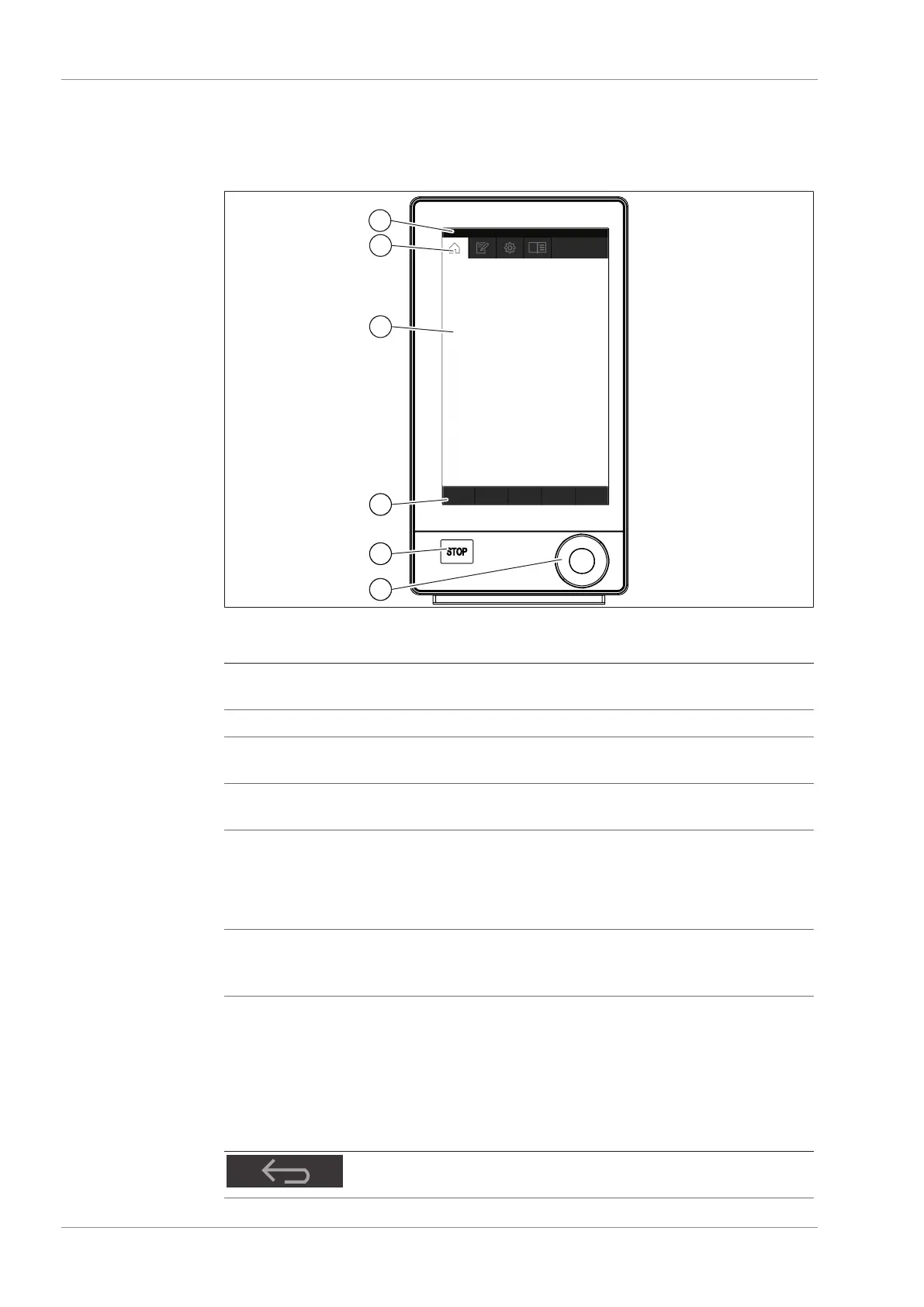
Fig.10: Interface pro
No. Description Function
1 Status bar Shows the currently used solvent and extrac-
tion method.
2 Menu bar Shows symbols representing the menus.
3 Content area Shows current settings, submenus or actions
depending on the current operation.
4 Function bar Shows functions that can be performed ac-
cording to the current operation.
5 Stop button The extraction stops.
The valves close.
The heaters switch off.
The coolant keep running 5 min.
6 Navigation control Used for navigating the user interface. Press-
ing the control performs the assigned func-
tion on the function bar.
6.2 Function bar
The function bar shows available functions according to the current operation.
The functions on the function bar are executed by tapping the relevant function but-
tons.
Symbol Description Meaning
[ Back ] The display reverts to the previous
view.


 To Next Page