EasyManua.ls Logo

Canon EOS 80D - Page 176

Canon EOS 80D
526 pages
Print Icon
To Next Page IconTo Next Page
To Previous Page IconTo Previous Page
Loading...
3
Correction of Lens Peripheral Illumination and Aberrations
N
176
1
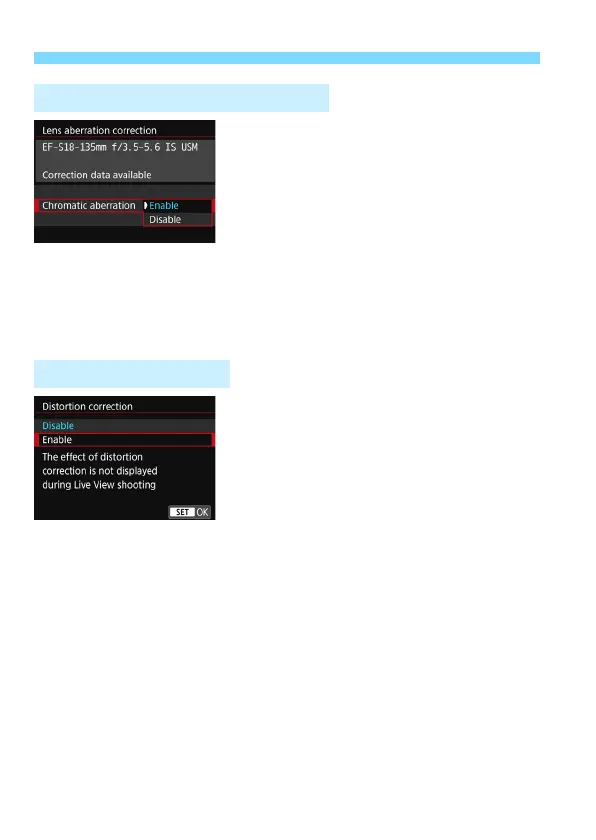
Select the setting.
Check that [
Correction data
available
] is displayed for the
attached lens.
Select [
Chromatic aberration
], then
press <
0
>.
Select [
Enable
], then press <
0
>.
2
Take the picture.
The image will be recorded with the
chromatic aberration corrected.
1
Select the setting.
Check that [
Correction data
available
] is displayed for the
attached lens.
Select [
Distortion correction
], then
press <
0
>.
Select [
Enable
], then press <
0
>.
2
Take the picture.
The image will be recorded with the
distortion corrected.
Chromatic Aberration Correction
Distortion Correction

Table of Contents

Other manuals for Canon EOS 80D

Related product manuals