228
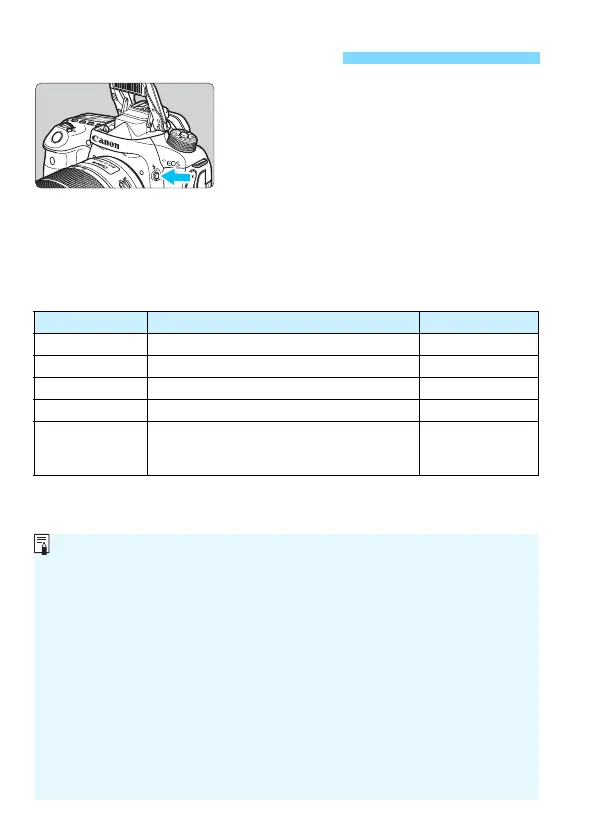
In Creative Zone modes, just press the
<
D
> button to raise the built-in flash for
flash photography.
Before shooting, check that [
D
] is
displayed in the viewfinder. After shooting,
push the built-in flash back down with your
fingers until it clicks into place.
In Basic Zone modes, depending on the shooting mode, you can set the
built-in flash with Quick Control (p.107).
The table below shows the shutter speed and aperture settings that will
be used with flash.
D Using the Built-in Flash
Shooting Mode Shutter Speed Aperture
d Automatically set (1/250 sec. - 1/60 sec.) Automatically set
s Manually set (1/250 sec. - 30 sec.) Automatically set
f Automatically set (1/250 sec. - 30 sec.) Manually set
a Manually set (1/250 sec. - 30 sec.) Manually set
F
Exposure continues while you hold down
the shutter button or while the bulb timer is
operating.
Manually set
Flash Photography in the <f> Mode
To obtain a correct flash exposure, the flash output will be set automatically
(autoflash exposure) to match the manually-set aperture. The shutter speed
will be set automatically between 1/250 sec. - 30 sec. to suit the scene’s
brightness.
In low light, the main subject is exposed with the auto flash metering, and
the background is exposed with a slow shutter speed set automatically. Both
the subject and background look properly exposed with a touch of
atmosphere (automatic slow-speed flash sync). If you are handholding the
camera, keep it steady to prevent camera shake. Using a tripod is
recommended.
To prevent a slow shutter speed, under [z1: Flash control], set [Flash
sync. speed in Av mode] to [1/250-1/60sec. auto] or [1/250 sec. (fixed)]
(p.236).



 To Next Page