433
You can assign often-used functions to camera buttons or dials
according to your preferences.
1
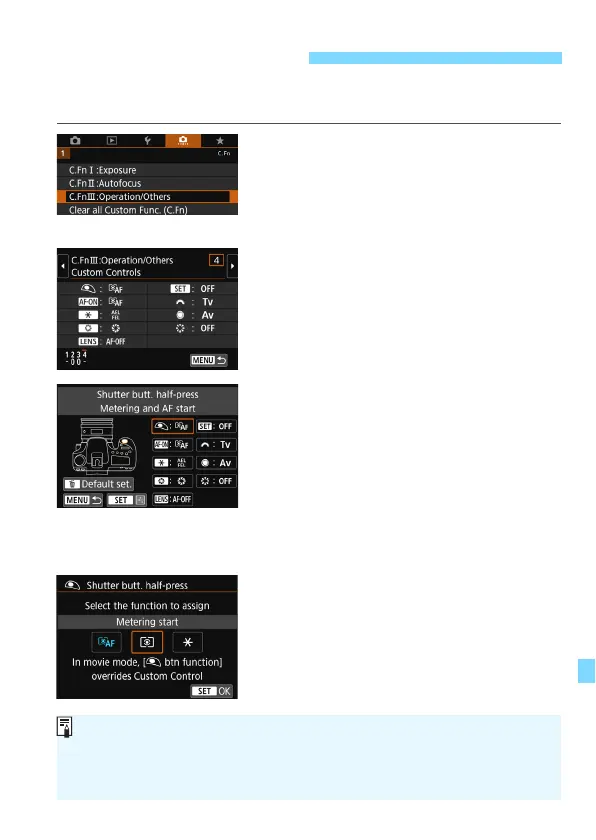
Select [C.Fn III: Operation/
Others].
Under the [
8
] tab, select [
C.Fn III:
Operation/Others
], then press
<
0
>.
2
Select [4: Custom Controls].
The Custom Controls screen will
appear.
3
Select a camera button or dial.
Select a camera button or dial, then
press <
0
>.
The name of the camera control and
the assignable functions will be
displayed.
The location of the camera control
can be checked in the illustration on
the left side of the screen.
4
Assign a function.
Select a function, then press <
0
>.
5
Exit the setting.
When you press <
0
> to exit the setting,
the screen in step 3 will reappear.
Press the <
M
> button to exit.
8
: Custom Controls
With the screen in step 3 displayed, you can press the <L> button to cancel
the Custom Control settings. Note that the [8C.Fn III-4: Custom Controls]
settings will not be canceled even if you select [8: Clear all Custom Func.
(C.Fn)].



 To Next Page