Before You Start
68
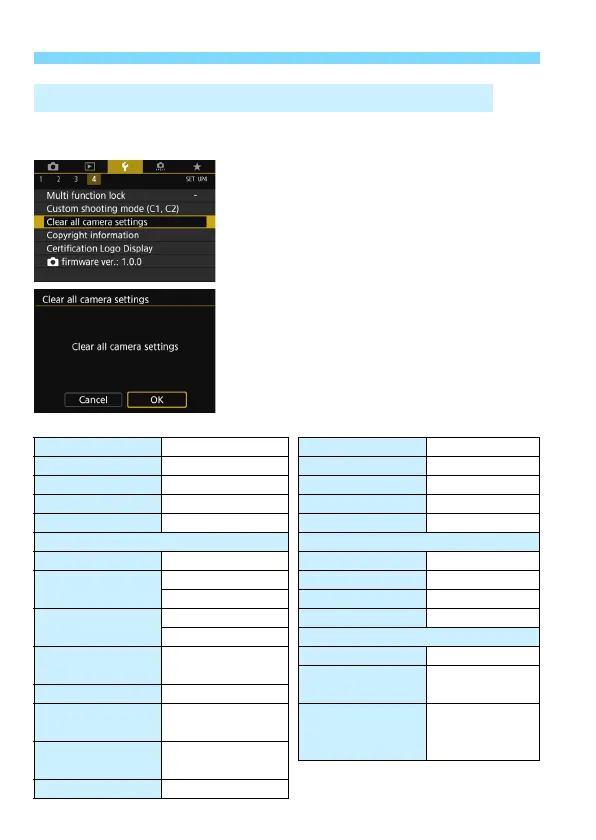
The camera’s shooting function settings and menu settings can be
reverted to their defaults.
1
Select [Clear all camera settings].
Under the [
54
] tab, select [
Clear all
camera settings
], then press <
0
>.
2
Select [OK].
Select [
OK
], then press <
0
>.
Setting [
Clear all camera settings
]
will reset the camera to the following
default settings:
3 Reverting the Camera to the Default SettingsN
Shooting Function Settings
<8> mode F
(Handheld Night Scene)
HDR Mode Disable HDR
<v> mode c
(Miniature effect)
Interval timer Disable
AF operation One-Shot AF Bulb timer Disable
AF area selection mode
Auto selection:45 pt AF
Anti-flicker shooting
Disable
Metering mode q
(Evaluative metering)
Mirror lockup Disable
ISO speed settings Viewfinder display
ISO Speed Setting
Automatic setting (Auto)
Electronic level Hide
Range for stills
Minimum: 100 Grid display Hide
Maximum: 16000
Flicker detection Show
Auto range
Minimum: 100
Custom Functions
Unchanged
Maximum: 6400 Flash control
Minimum shutter
speed for auto
Auto
Flash firing Enable
E-TTL II flash
metering
Evaluative flash
metering
Drive mode u
(Single shooting)
Exposure
compensation/AEB
Canceled
Flash sync.
speed in Av
mode
Auto
Flash exposure
compensation
Canceled
Multiple exposure Disable



 To Next Page