EasyManua.ls Logo

Canon EOS 80D - Slide Show (Auto Playback)

Canon EOS 80D
526 pages
Print Icon
To Next Page IconTo Next Page
To Previous Page IconTo Previous Page
Loading...
369
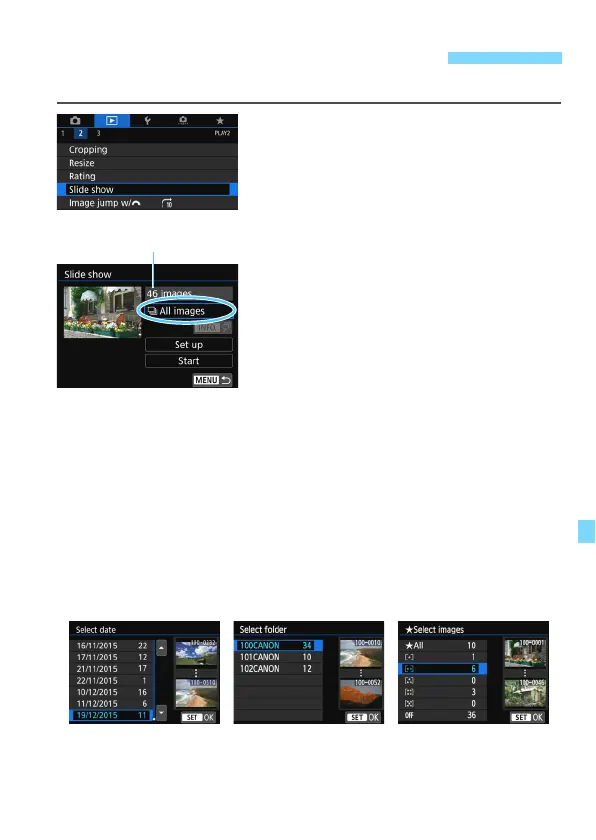
You can play back the images on the card as an automatic slide show.
1
Select [Slide show].
Under the [
3
2
] tab, select [
Slide
show
], then press <
0
>.
2
Select the images to be played
back.
Press the <
W
> <
X
> keys to select
the desired option, then press <
0
>.
All images/Movies/Stills
Press the <
W
> <
X
> keys to select
one of the following: [
j
All images
]
[
k
Movies
] [
z
Stills
]. Then press
<
0
>.
Date/Folder/Rating
Press the <
W
> <
X
> keys to select
one of the following: [
i
Date
]
[
n
Folder
] [
9
Rating
].
When <
zH
> is highlighted,
press the <
B
> button.
Press the <
W
> <
X
> keys to select an
option, then press <
0
>.
3
Slide Show (Auto Playback)
Number of images
to be played back
[
Date
][
Folder
][
Rating
]

Table of Contents

Other manuals for Canon EOS 80D

Related product manuals