Basic Operation
54
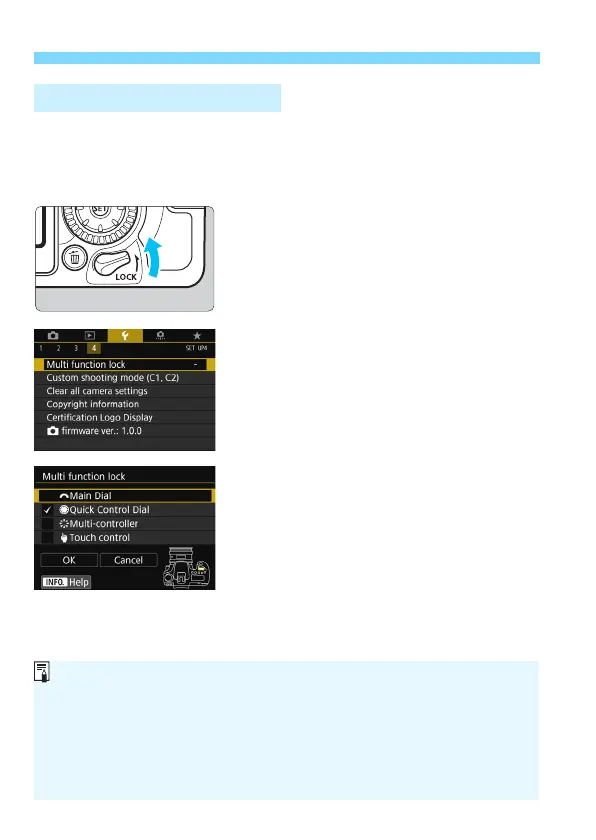
With [
54: Multi function lock
] set and the <
R
> switch set
upward, the camera prevents you from changing settings inadvertently
by moving the Main Dial, Quick Control Dial, and Multi-controller or by
touching the touch panel.
<
R
> switch set downward: Lock
released
<
R
> switch set upward: Lock
engaged
1
Select [Multi function lock].
Under the [
54
] tab, select [
Multi
function lock
], then press <
0
>.
2
Add a checkmark [X] to the
camera control to be locked.
Select a camera control and press
<
0
> to add a checkmark [
X
].
Select [
OK
].
The selected camera controls will be
locked when the multi function lock
switch is in the locked position.
R Multi Function Lock
If the <R> switch is set upward and you try to use one of the locked
camera controls (except when [hTouch control] is set), <L> will be
displayed in the viewfinder and on the LCD panel. On the shooting
function settings display (p.55), [LOCK] will be displayed. During Live
View shooting, [LOCK] will be displayed on the LCD monitor.
By default, when locked, the <5> dial will be locked.
In Basic Zone modes, only [hTouch control] is settable.



 To Next Page