Before You Start
66
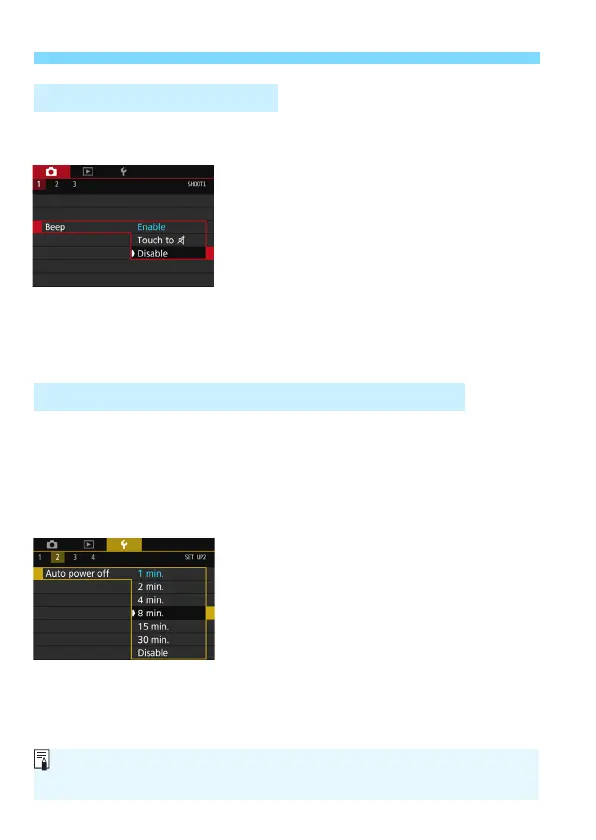
You can prevent the beeper from sounding when focus is achieved,
during self-timer shooting, and for touch screen operations.
1
Select [Beep].
Under the [
z1
] tab, select [
Beep
],
then press <
0
>.
2
Select [Disable].
Select [
Disable
], then press <
0
>.
The beeper will not sound.
If [
Touch to n
] is selected, the
beeper will be silent for touch screen
operations only.
To save battery power, the camera turns off automatically after a set
time of idle operation elapses. The default setting is 1 min., but this
setting can be changed. If you do not want the camera to turn off
automatically, set this to [
Disable
]. After the power turns off, you can
turn on the camera again by pressing the shutter button or other
buttons.
1
Select [Auto power off].
Under the [
52
] tab, select [
Auto
power off
], then press <
0
>.
2
Set the desired time.
Select the desired setting, then press
<
0
>.
3 Disabling the Beeper
3 Setting the Power-off Time/Auto Power Off
Even if [Disable] is set, the LCD monitor will turn off automatically after 30
min. to save power. (The camera’s power does not turn off.)



 To Next Page