237
3
Setting the Flash
N
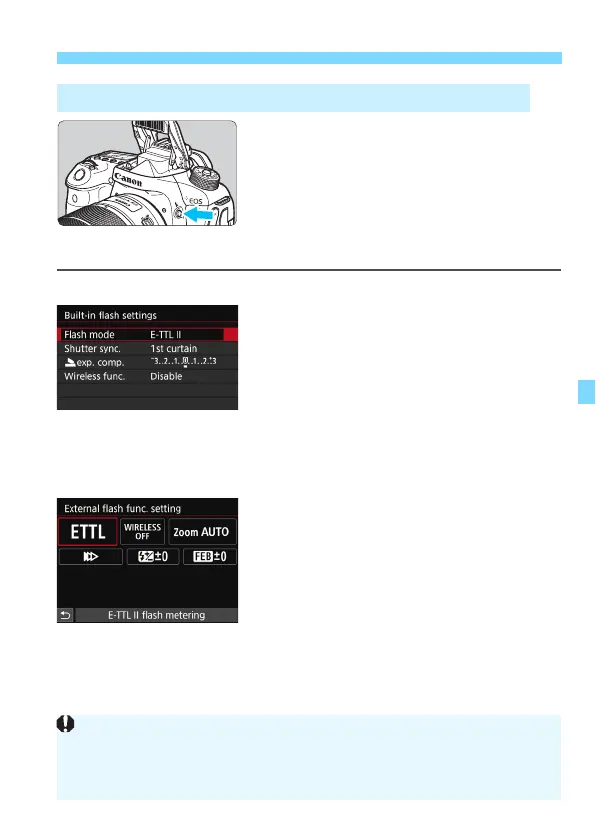
When you use the built-in flash or an
external, EX-series Speedlite compatible
with flash function settings, you can
press the <
D
> button to directly display
the [
Built-in flash settings
] or [
External
flash func. setting
] screen without first
displaying the menu screen.
With built-in flash
Press the <D> button twice.
Press the button to raise the built-in
flash.
Press the button again to display the
[
Built-in flash settings
] screen.
If [
Flash firing
] is set to [
Disable
], the
[
z
1: Flash control
] screen will
appear (p.235).
With external Speedlite
Press the <D> button.
With the external Speedlite turned on,
press the <
D
> button to display the
[
External flash func. setting
]
screen.
Displaying the Flash Function Setting Screen Directly
When you press the <D> button to display the flash function setting screen,
you cannot set [Flash firing], [E-TTL II meter.], [Flash sync. speed in Av
mode], or [External flash C.Fn setting]. Set these functions with [z1:
Flash control] instead.



 To Next Page