309
3
Setting the Movie Recording Size
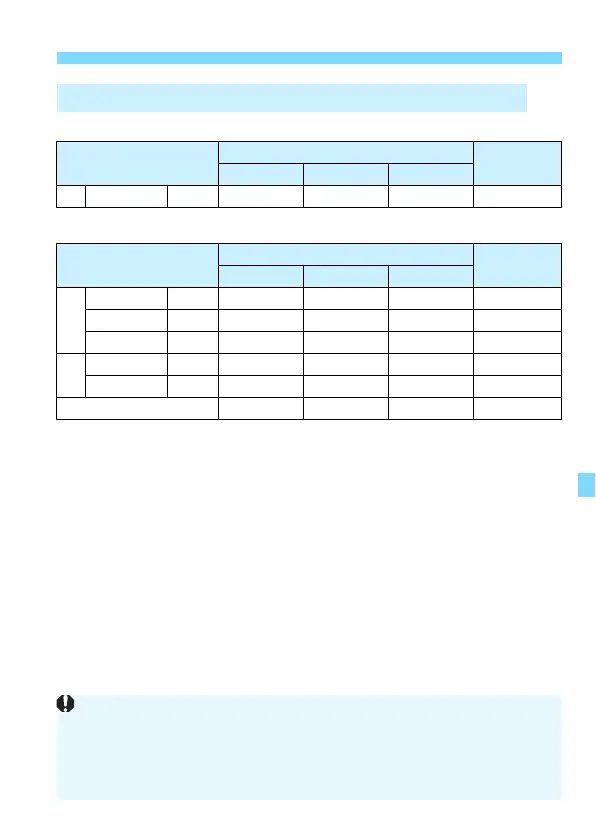
In MOV Format
(Approx.)
In MP4 Format
(Approx.)
Movie Files Exceeding 4 GB
Even if you shoot a movie exceeding 4 GB, you can keep shooting
without interruption.
During movie shooting, if the file size exceeds 4 GB, a new movie
file will be created automatically.
When you play back the movie, you will have to play each movie file
individually. Movie files cannot be played back automatically in
consecutive order. After the movie playback ends, select the next
movie to be played back.
Total Movie Recording Time and File Size Per Minute
Movie Recording
Quality
Total Recording Time on Card
File Size
4 GB 16 GB 64 GB
L 654 W
5 min. 23 min.
1 hr. 33 min.
654 MB/min.
Movie Recording
Quality
Total Recording Time on Card
File Size
4 GB 16 GB 64 GB
L
87 X
8 min. 35 min. 2 hr. 21 min. 431 MB/min.
654 X
17 min. 1 hr. 10 min. 4 hr. 41 min. 216 MB/min.
65 Xv
43 min. 2 hr. 53 min. 11 hr. 35 min. 87 MB/min.
w
87 X
20 min. 1 hr. 21 min. 5 hr. 24 min. 184 MB/min.
65 Xv
2 hr. 5 min. 8 hr. 20 min. 33 hr. 22 min. 30 MB/min.
HDR Movie Shooting
17 min. 1 hr. 10 min. 4 hr. 41 min. 216 MB/min.
An increase of the camera’s internal temperature may cause movie
shooting to stop before the maximum recording time shown in the table
(p.343).
If the file size exceeds 4 GB during movie shooting, “buSY” may be
displayed on the LCD panel for a while.


 To Next Page