N
Shooting Time-lapse Movies
320
4
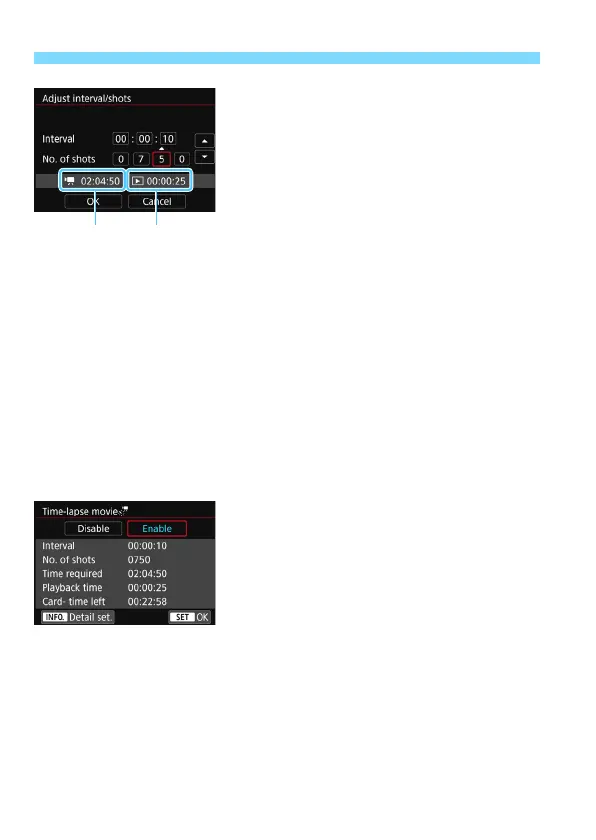
Set the shooting interval and
number of shots.
Check the [
k
: Time required
] and
[
3
: Playback time
] displayed at the
bottom of the screen to set the
shooting interval and number of shots.
Select the number to be set (hours:
minutes: seconds / number of shots).
Press <
0
> so <
r
> is displayed.
Set the desired number, then press
<
0
>. (Returns to <
s
>.)
Shooting interval
Settable from [
00:00:01
] to [
99:59:59
].
Number of shots
Settable from [
0002
] to [
3600
]. Set one digit at a time. If 3600 is set,
the time-lapse movie will be approx. 2 min. for NTSC and approx. 2
min. 24 sec. for PAL.
5
Select [OK].
The screen for step 2 will reappear.
6
Check the settings.
With [
Time-lapse movie
] selected on
the screen in step 2, press <
0
>.
The current settings will be displayed.
Time required
Indicates the time required to shoot the set number of shots with the
set interval. If it exceeds 24 hours, “*** days” will be displayed.
Playback time
Indicates the movie recording time (time required to play back the
movie) to create the time-lapse movie in
L 6W
(NTSC) or
L 5W
(PAL) from the still photos taken with the set intervals.
Time required
Playback
time



 To Next Page