8
: Fine Adjustment of AF’s Point of Focus
428
5
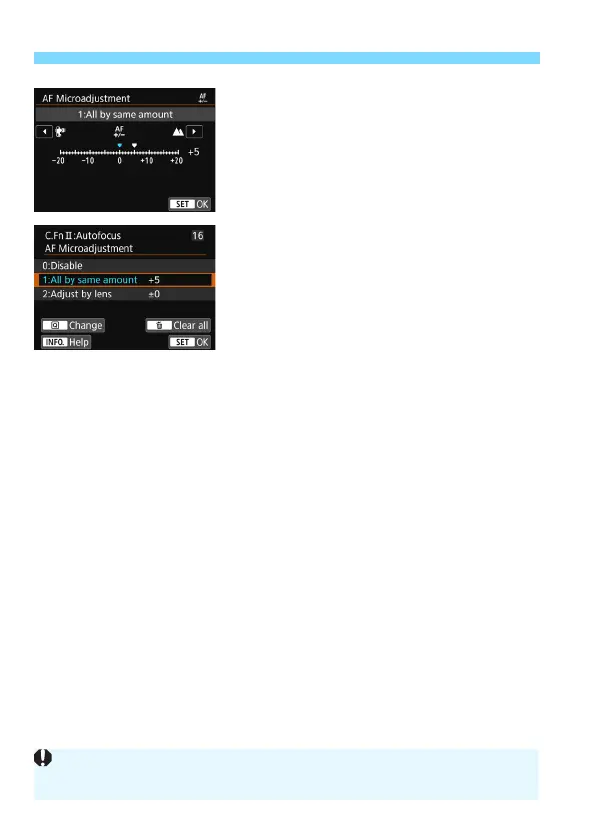
Make the adjustment.
Set the adjustment amount. The
adjustable range is ±20 steps.
Setting it toward “-:
a
” will shift the
point of focus in front of the standard
point of focus.
Setting it toward “+:
b
” will shift the
point of focus to the rear of the
standard point of focus.
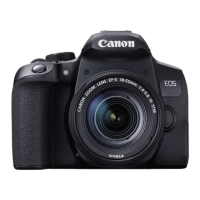
After making the adjustment, press
<
0
>.
Select [
1: All by same amount
], then
press <
0
>.
Press the <
M
> button to exit.
6
Check the result of the
adjustment.
Take a picture and play back the
image (p.346) to check the
adjustment result.
If the shooting result comes out with
focus in front of the targeted point,
adjust toward the “+:
b
” side. If it
comes out with focus behind the
targeted point, adjust toward the
“-:
a
” side.
If necessary, repeat the adjustment.
If [1: All by same amount] is selected, separate AF adjustment will not be
possible for the wide-angle and telephoto ends of zoom lenses.


 To Next Page