153
Advanced Guide
Basic Guide
1
Camera Basics
2
Auto Mode /
Hybrid Auto Mode
3
Other Shooting Modes
Tv, Av, and M Mode
6
Playback Mode
7
Wi-Fi Functions
8
Set-Up Menu
9
Accessories
10
Appendix
Index
4
P Mode
5
Tv, Av, M, and C Modes
Before Use
4
Turn on the camera and switch to
the camera or electronic viewnder
display.
● Bring your eye up to the electronic
viewnder, and the camera’s screen will
shut off.
● Remove your eye, and the camera will
shut off the nder display and turn the
camera screen back on.
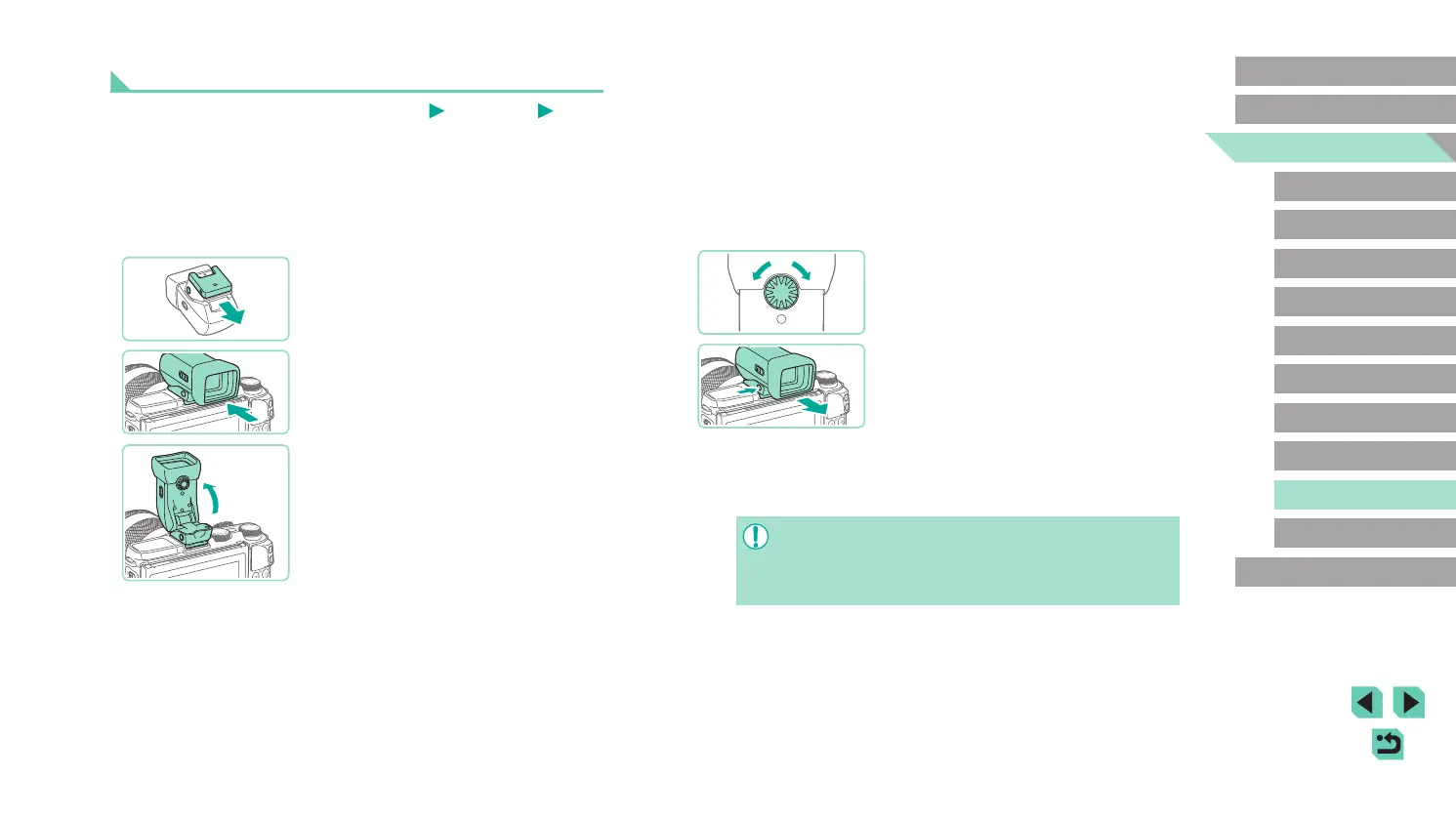
5
Adjust the view.
● Turn the dial until you can see the display
of the electronic viewnder clearly.
6
Remove from the camera.
● Once you are done, turn off the camera
and hold down the [UNLOCK] button of
the electronic viewnder as you remove
it.
● Remove the electronic viewnder from
the camera and store in a safe place
when not in use.
● The electronic viewnder and camera screen displays cannot be
active at the same time.
● Camera touch screen control is not available in electronic
viewnder display mode.
Using Electronic Viewnders (Sold Separately)
Still Images
Movies
Use an electronic viewnder (sold separately) to keep closer track of your
subject and make it easier to shoot.
When using an electronic viewnder, shooting time and number of
pictures are reduced compared to using the camera’s rear screen (LCD
monitor).
1
Make sure the camera is off.
2
Attach the electronic viewnder to
the hot shoe.
● Remove the cover of the electronic
viewnder.
● Insert the electronic viewnder into the
hot shoe (
=
152) in the direction shown
until it clicks into place.
3
Adjust the angle of the electronic
viewnder.
● Adjust the angle of the electronic
viewnder by up to approximately 90
degrees, as needed for your scene or
target.






 To Next Page