3
Before Use
Basic Guide
Advanced Guide
1
Camera Basics
2
Auto Mode /
Hybrid Auto Mode
3
Other Shooting Modes
Tv, Av, and M Mode
6
Playback Mode
7
Wi-Fi Functions
8
Set-Up Menu
9
Accessories
10
Appendix
Index
4
P Mode
5
Tv, Av, M, and C Modes
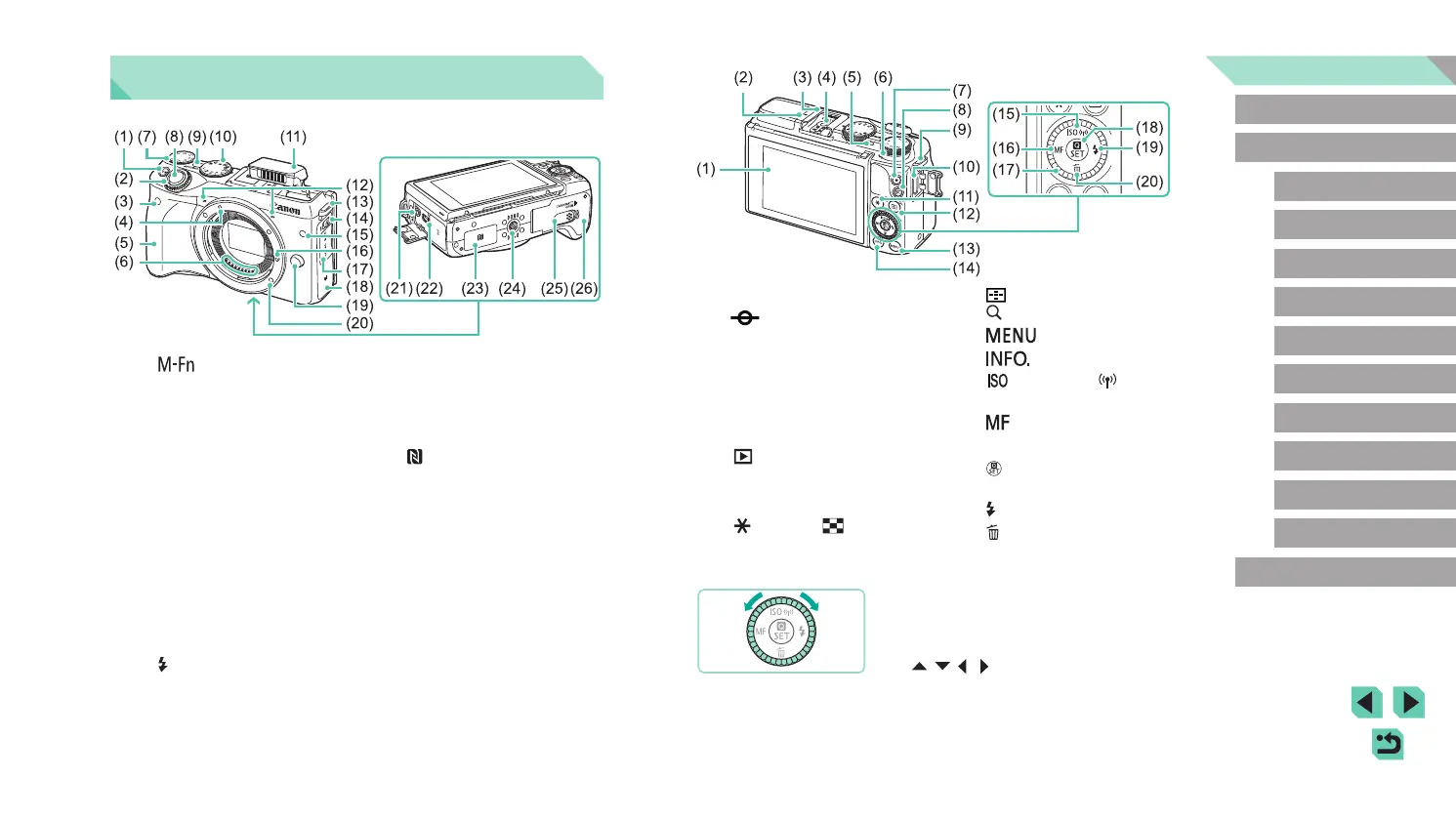
(1) LCD monitor / Touch screen*
(2)
Focal plane mark
(3) Hot shoe
(4) Flash sync contacts
(5) Indicator
(6) Speaker
(7) Movie button
(8) [
(Playback)] button
(9) Strap mount
(10) HDMI
TM
terminal
(11) [
(AE lock)] / [ (Index)]
button
(12) [
(AF Frame adjustment)] /
[
(Magnify)] button
(13) [
(Menu)] button
(14) [
(Information)] button
(15) [
(ISO speed)] / [ (Wi-Fi)] /
Up button
(16) [
(Manual focus)] / Left button
(17) Control dial
(18) [
(Quick setting menu)] / Set
button
(19) [
(Flash)] / Right button
(20) [
(Erase)] / Down button
* Touch may not be detected as easily if you apply a screen protector.
● Turning the control dial is one way to
choose setting items, switch images, and
perform other operations. Most of these
operations are also possible with the
[ ][ ][ ][ ] buttons.
Part Names
(1) [ (Multifunction)] button
(2) Front dial
(3) Remote control sensor
(4) EF-M lens mount index
(5) Grip
(6) Contacts
(7) Exposure compensation dial
(8) Shutter button
(9) Power button
(10) Mode dial
(11) Flash
(12) Microphone
(13) Strap mount
(14) [
(Flash pop-up)] switch
(15) Lamp
(16) Lens lock pin
(17) Terminal cover
(18) Wi-Fi antenna area
(19) Lens release button
(20) Lens mount
(21) External microphone IN terminal
(22) Digital terminal
(23)
(N-Mark)*
(24) Tripod socket
(25) DC coupler terminal cover
(26) Memory card slot / Battery pack
compartment cover
* Used with NFC features (
=
118).















 To Next Page