81
Advanced Guide
Basic Guide
1
Camera Basics
2
Auto Mode /
Hybrid Auto Mode
3
Other Shooting Modes
Tv, Av, and M Mode
6
Playback Mode
7
Wi-Fi Functions
8
Set-Up Menu
9
Accessories
10
Appendix
Index
4
P Mode
5
Tv, Av, M, and C Modes
Before Use
Reducing Noise at Slow Shutter Speeds
Still Images
Movies
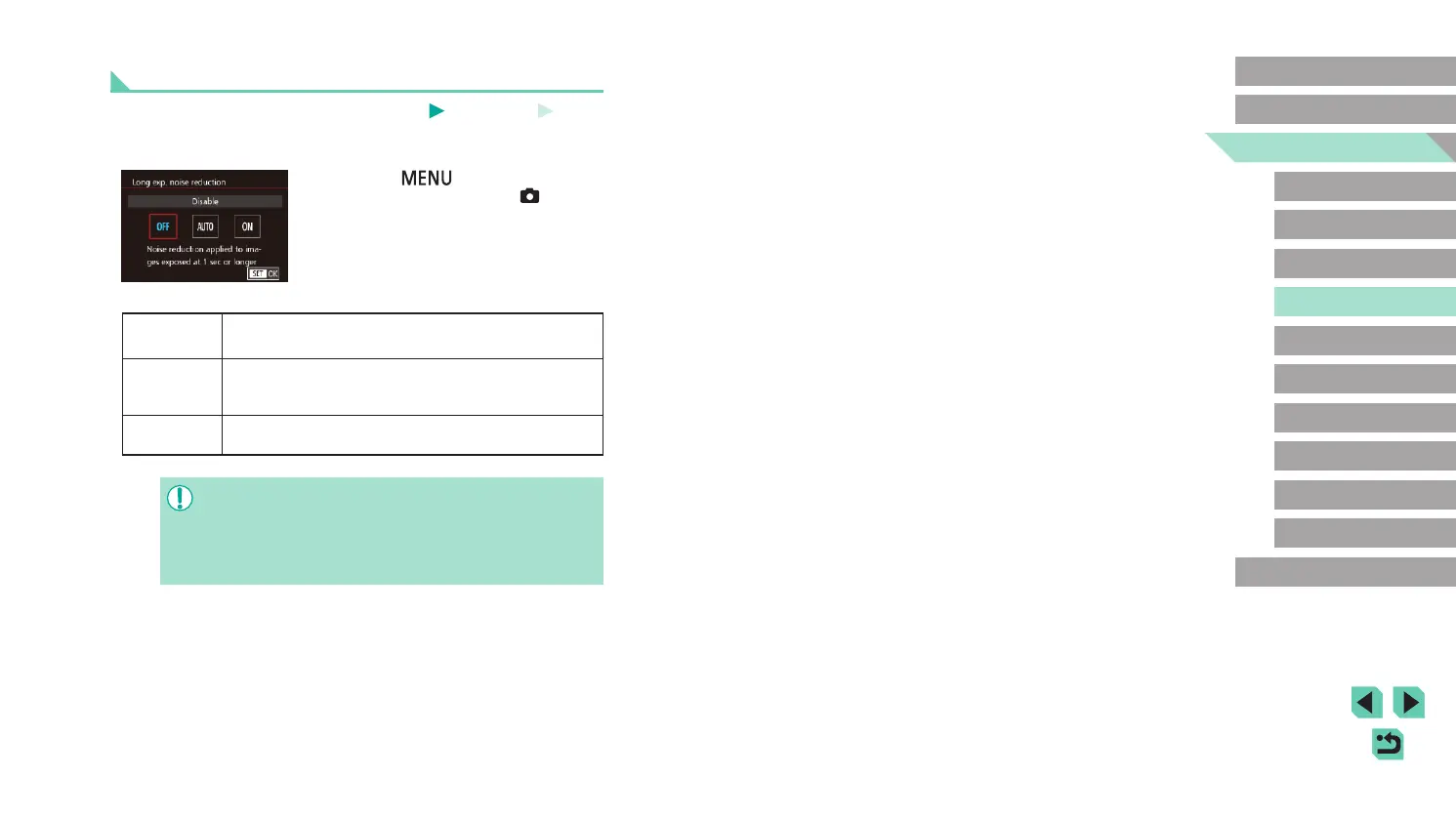
The camera can reduce the noise that occurs during long exposures at
shutter speeds of 1 second or slower.
● Press the [
] button, choose [Long
exp. noise reduction] on the [ 4] tab,
and then choose the desired option
(
=
32).
OFF (Disable)
Do not perform noise reduction during long exposures.
AUTO (Auto)
Perform noise reduction when noise is detected that is
specic to long exposures at shutter speeds of 1 second
or slower.
ON (Enable)
Always perform noise reduction at shutter speeds of 1
second or slower.
● There may be a delay before you can shoot again, as the camera
processes images to reduce noise.
● Shooting pictures at a speed of ISO1600 or higher with this option
set to [ON] may result in grainier images than setting the option to
[OFF] or [AUTO].










 To Next Page