50
Advanced Guide
Basic Guide
1
Camera Basics
2
Auto Mode /
Hybrid Auto Mode
3
Other Shooting Modes
Tv, Av, and M Mode
6
Playback Mode
7
Wi-Fi Functions
8
Set-Up Menu
9
Accessories
10
Appendix
Index
4
P Mode
5
Tv, Av, M, and C Modes
Before Use
Playing Back Images
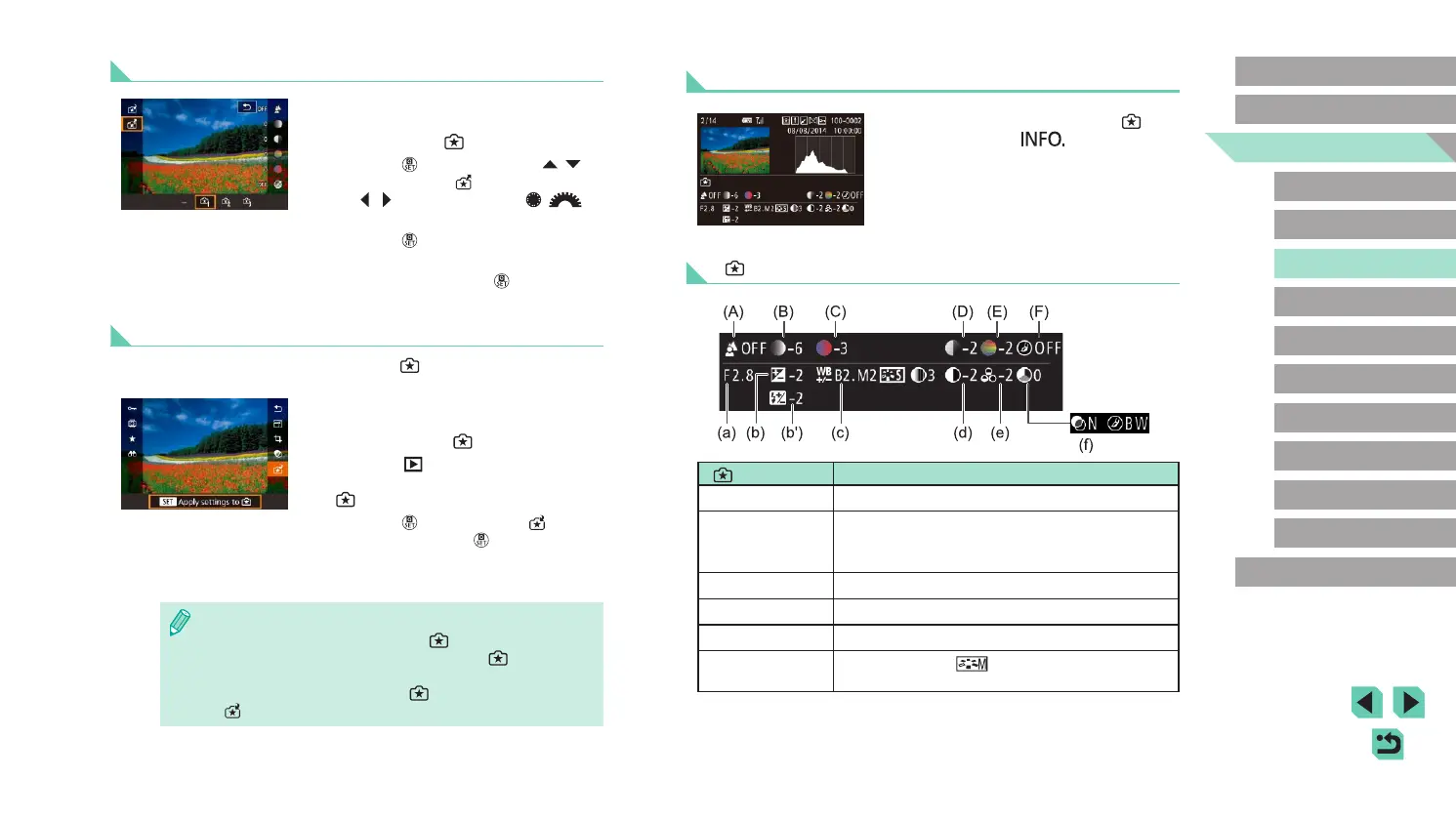
● When displaying images shot in [ ]
mode, press the [ ] button to display
the screen shown to the left, letting you
view the settings used when the picture
was taken.
[ ] Mode and Creative Zone Settings
[ ] mode setting
Creative Auto setting
(A) Background
(a) Aperture value (
=
83)
(B) Brightness
(b) Exposure compensation (
=
61)
Flash time is (b’) Flash exposure compensation
(
=
76)
(C) Color tone
(c) WB Correction (
=
65)
(D) Contrast
(d) Picture Style contrast (
=
68)
(E) Saturation
(e) Picture Style saturation (
=
68)
(F) Monochrome
(f) Picture Style
lter and toning effect
(
=
68)
Loading
● Follow step 1 in “Shooting with Your
Favorite Settings (Creative Assist)”
(
=
49) to select [ ].
● Press the [
] button, press the [ ][ ]
buttons to choose [ ], and then press
the [ ][ ] buttons or turn the [ ][ ]
dials to select the settings to load.
● Press the [
] button to apply the saved
settings.
● Select [–] and press the [
] button to go
back without applying any settings.
Using Screen Settings
You can load settings from images shot in [ ] mode and use them to
shoot your own pictures.
● Follow step 1 in “Shooting with Your
Favorite Settings (Creative Assist)”
(
=
49) to choose [ ].
● Press the [
] button to enter Playback
mode, and then select an image shot in
[ ] for display.
● Press the [
] button, choose [ ] in the
menu, and press the [ ] button again.
● The settings are applied and the camera
goes into shooting mode.
● A message is displayed if you try to apply settings when the
mode dial is set to anything besides [
]. The camera does not
return to shooting mode. Turn the mode dial to [
] to apply the
settings.
● Images shot in anything besides [
] mode will not be shown in
[
] mode.















 To Next Page