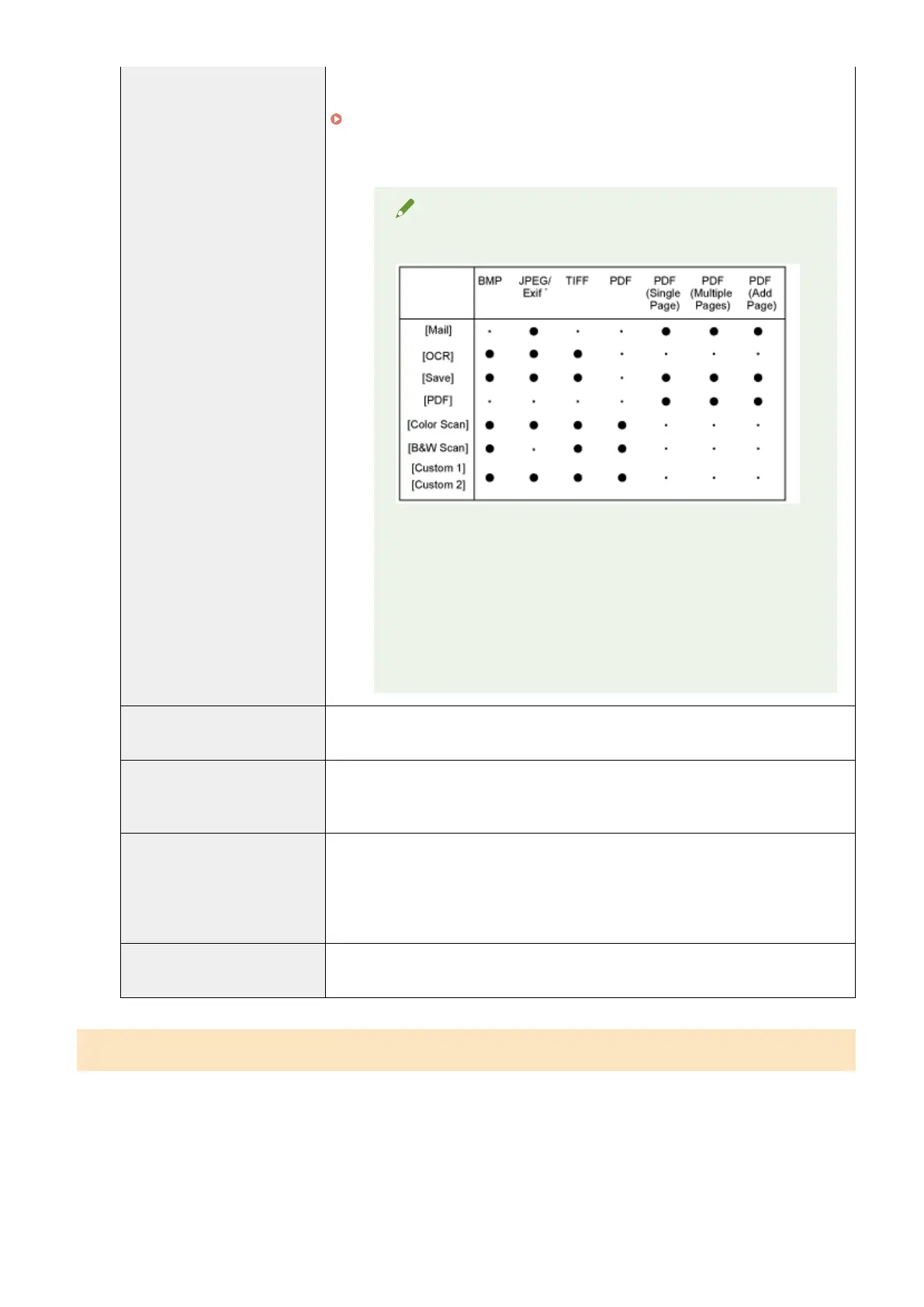
● [PDF (Multiple Pages)]
Combine multiple documents into one PDF le.
" Combining Multiple Documents into One PDF File
(P. 130) "
● [PDF (Add Page)]
Add the scanned image to the last page of a PDF le created by the MF Toolbox.
NOTE
File formats supported by command buttons
*
Y
ou can select the option when [Scan Mode] is set to [Grayscale],
[Color], or [Color (Magazine)].
When [PDF], [PDF (Single Page)], [PDF (Multiple
Pages)] or [PDF (Add Page)] is selected
The err
or message <Image size is too large to create File.> may
appear. If this happens, specify a smaller size for [Paper Size] and a
lower quality level for [Image Quality] to reduce the data size of the
scanned image.
[PDF Settings]
When [PDF], [PDF (Single Page)], [PDF (Multiple Pages)] or [PDF (Add Page)] is selected
for [Save as T
ype], you can specify advanced le settings.
[Save Scanned Image to]
Display the location where the scanned image is saved when a setting other than [PDF
(Add Page)] is selected for [Save as Type]. To save the image in a different location, click
[Browse], select a folder, and click [OK].
[Add Scanned Image to]
This item appears instead of [Save Scanned Image to] when [PDF (Add Page)] is selected
in [Save as Type]. You can select a PDF le to which the scanned image is added.
However, you may only add scanned images to PDF les that have been created using
MF Toolbox. You may not add scanned images to PDF les that have been created using
other applications.
[Save Pictures to a Subfolder with
Current Date]
Create a folder bearing the current date in the specied location to save the scanned
image in this folder.
Conguring an application (an e-mail client application)
Y
ou can specify a host application to view the scanned image.
Scan
126












 To Next Page