COPYRIGHT
©
2000 CANON INC. 2000 2000 2000 2000 CANON iR5000/iR6000 REV.0 JUNE 2000
CHAPTER 3 LASER EXPOSURE SYSTEM
3-12 P
5) Remove the tape fixing screw of the
right cover.
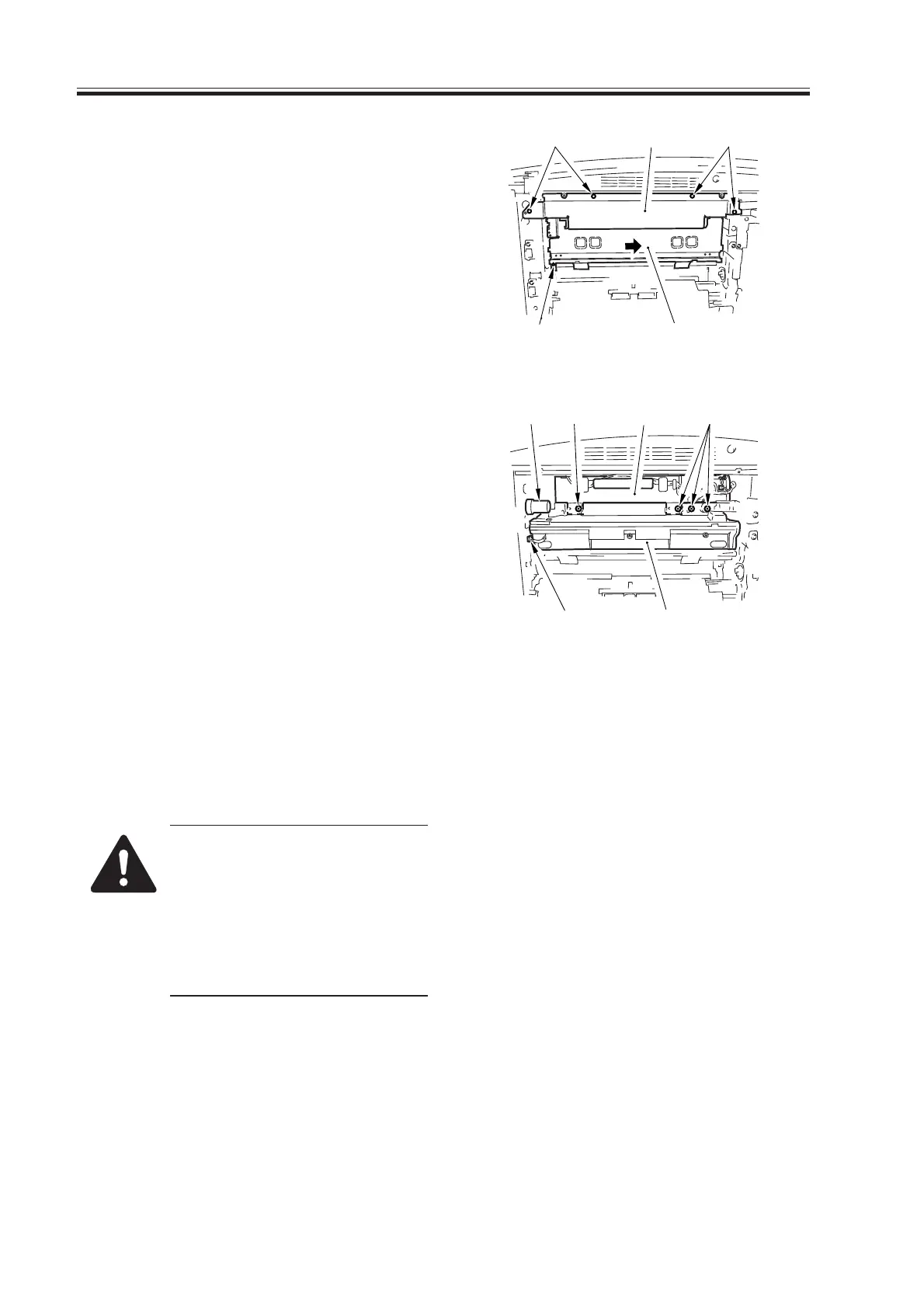
6) Remove the screw [7], and detach tje
developing assembly locking unit [8].
Remove the four screws [9], and detach
the scanner cover [10].
F03-501-04
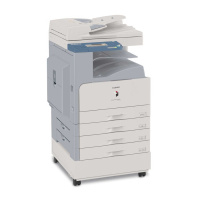
7) Disconnect the connector [11], and slide
out the developing assembly [12]; then,
detach the hopper slot [13].
Disconnect the four connectors, and re-
move the four screws [14]; then, slide
out the scanner unit [15].
F03-501-05
When replacing the scanner
unit, be sure to execute the fol-
lowing in service mode if the
fixing assembly is 150°C or
higher; otherwise, potential con-
trol will not be executed:
COPIER>FUNCTION>DPC>DPC.
[7]
[10] [9][9]
[8]
[11]
[13] [14] [14][15]
[12]
Download Free Service Manual at http://printer1.blogspot.com



 To Next Page