COPYRIGHT
©
2000 CANON INC. 2000 2000 2000 2000 CANON iR5000/iR6000 REV.0 JULY 2000
CHAPTER 1 GENERAL DESCRIPTION
1-17 S
4. Using the Machine
4.1 Turning On the Power Switches
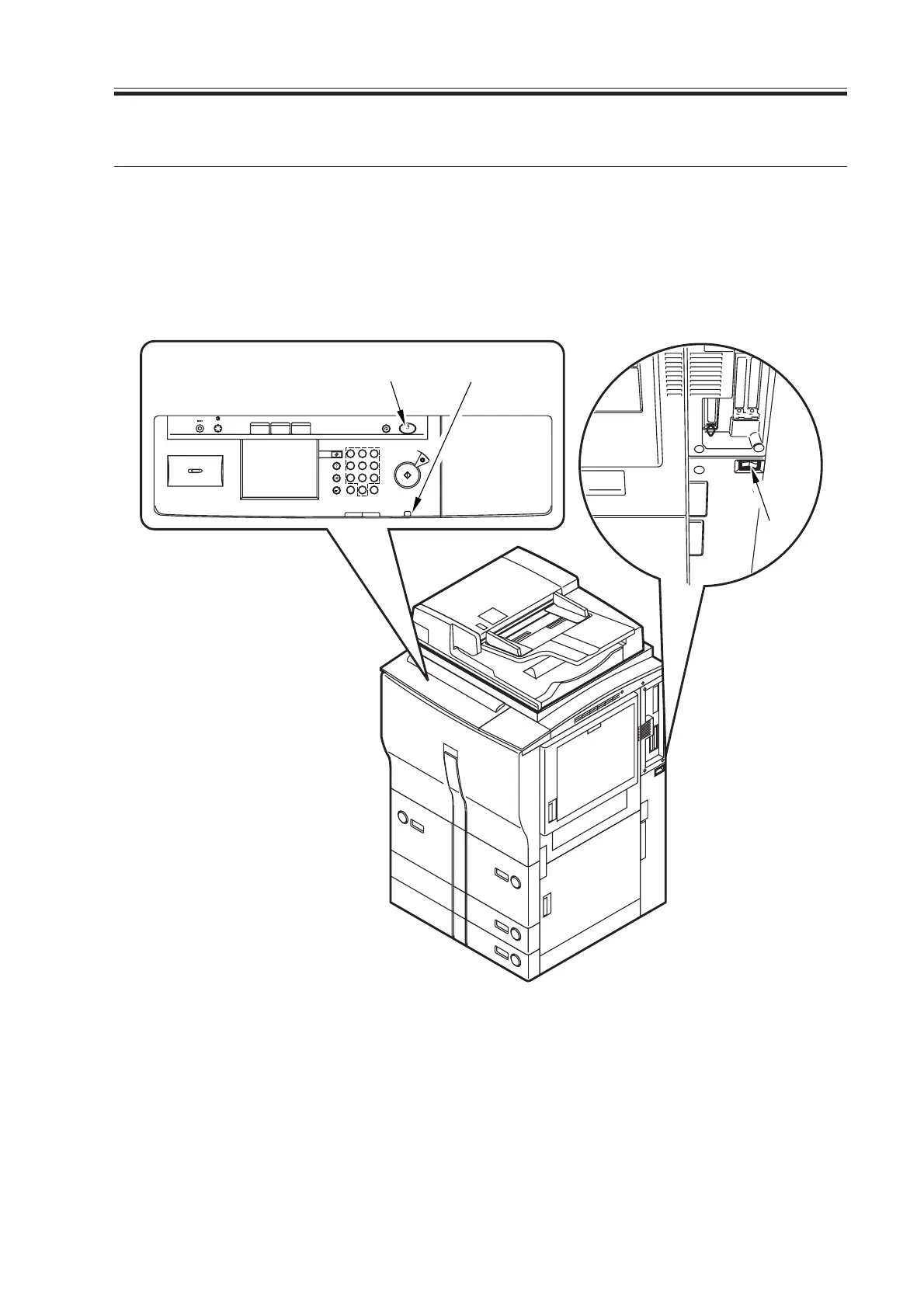
The machine possesses two switches: main power switch and control panel power switch.
Normally, it is supplied with power when the main power switch is turned on (i.e., other
than in energy saver mode, low power mode, or sleep mode).
[1] Control panel power switch
[2] Main power lamp
[3] Main power switch
F01-401-01 Arrangement of Switches
[3]
COPY Mail BOX SCAN
ON/OFF
Reset
Guide
Interrupt
Clear
Error
Processing/Data
Power
Start
Stop
123
456
789
0CID
Display Contrast
Energy Saver
Additional Function
Counter Check
[1] [2]
Download Free Service Manual at http://printer1.blogspot.com



 To Next Page