COPYRIGHT
©
2000 CANON INC. 2000 2000 2000 2000 CANON iR5000/iR6000 REV.0 JULY 2000
CHAPTER 3 INSTALLATION
3-7 S
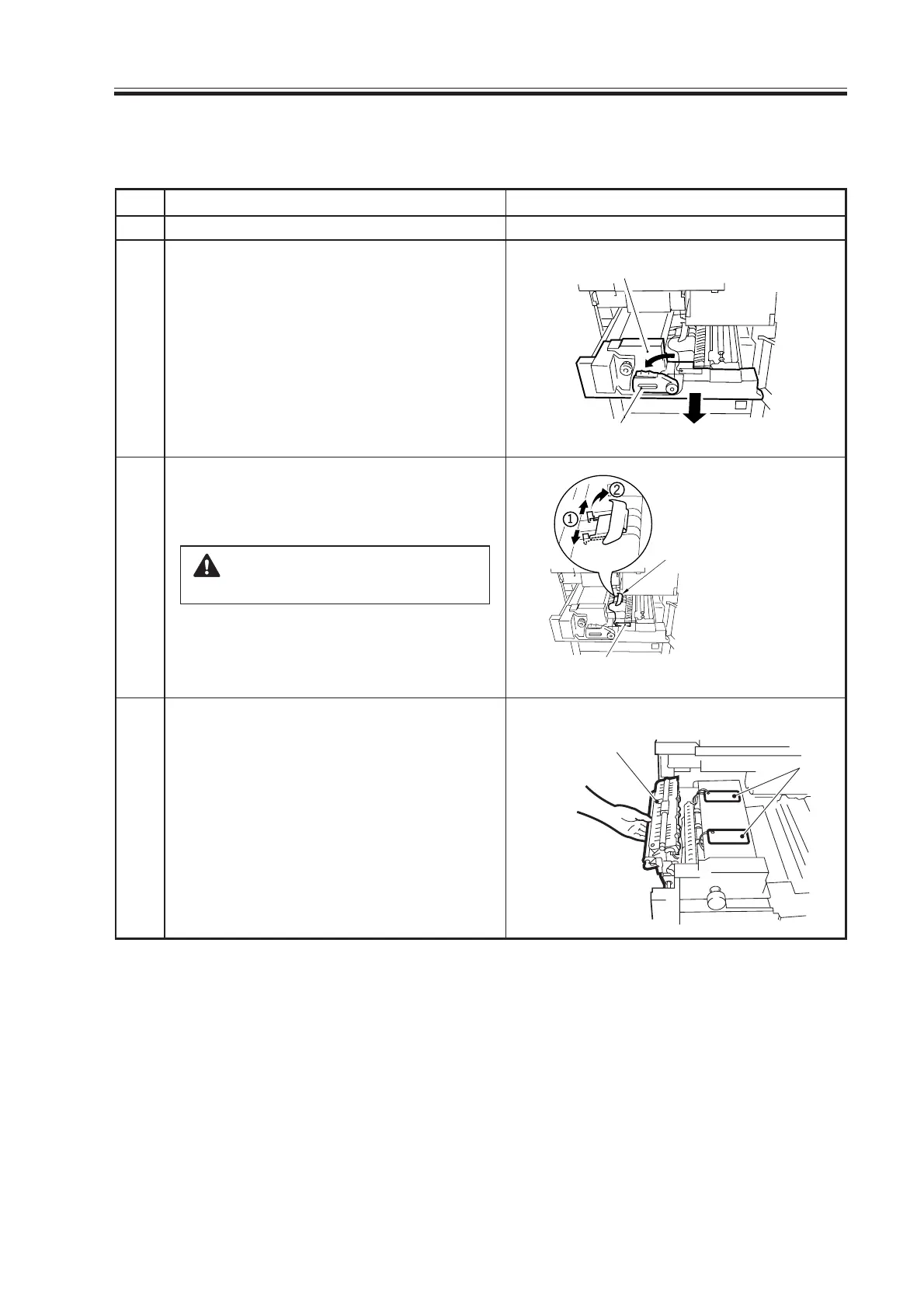
2.5 Mounting the Fixing Assembly
Checks/remarksStep
1
2
3
4
Work
Open the front cover.
Shift the fixing/feeding assembly releas-
ing lever in the direction of the arrow
(left) to free the transfer/separation
charging assembly.
Slide out the fixing/feeding assembly to
the front.
Remove the separation claw releasing
member and the tag from the fixing/feed-
ing assembly.
Remove the tape and glue from
the feeding belt.
Remove the retaining tape of the tag, and
open the fixing/delivery assembly.
Fixing/feeding assembly
Releasing lever
Ta g
Separation claw
releasing member
Tags
Fixing/
delivery assembly
Download Free Service Manual at http://printer1.blogspot.com



 To Next Page