COPYRIGHT
©
2000 CANON INC. 2000 2000 2000 2000 CANON iR5000/iR6000 REV.0 JULY 2000
CHAPTER 3 INSTALLATION
3-25 S
6. Installing the Control Card IV
Checks/remarksStep
1
2
3
4
5
6
Work
Remove the three screws and detach the upper
cover.
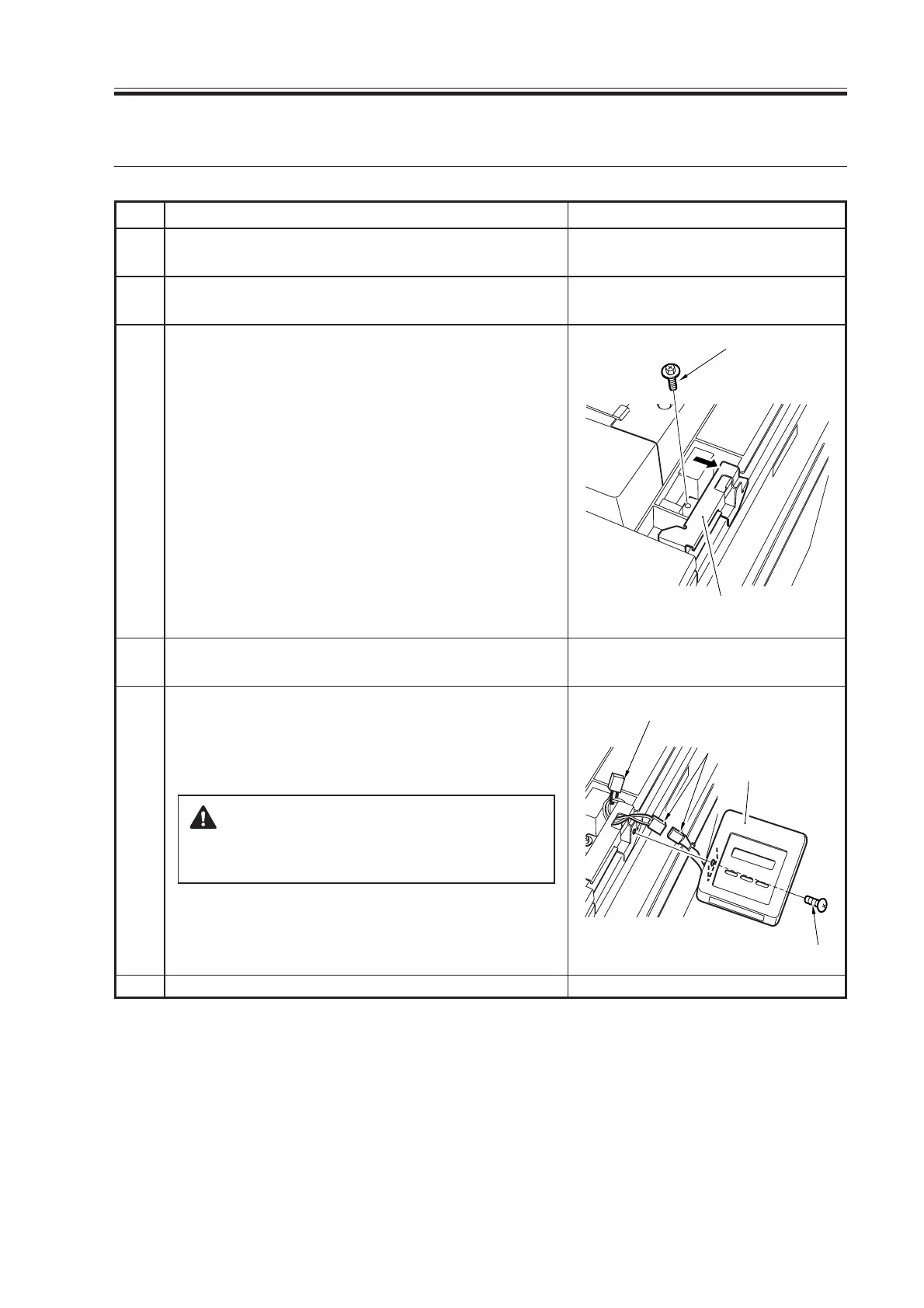
Remove the screw and detach the upper cover
support plate.
Shift the screw hole position so that the control
card base is more or less outside the machine;
then mount the upper cover support plate.
Mount the Control Card IV to the upper cover
support plate with one screw.
Disconnect the shorting connector from the cable
and connect it to the cable of the Control Card
IV.
Be sure to store away the shorting con-
nector. It will be used when removing the
Control Card IV for repairs or the like.
Mount the upper cover.
[1]
[2]
[3]
[4]
[5]
[6]
Download Free Service Manual at http://printer1.blogspot.com



 To Next Page