COPYRIGHT
©
2000 CANON INC. 2000 2000 2000 2000 CANON iR5000/iR6000 REV.0 JULY 2000
CHAPTER 4 IMAGE FORMATION SYSTEM
4-73 P
7.9 Developing Assembly
The machine’s developing as-
sembly is not equipped with a
cover to protect the developing
cylinder.
If you must remove the develop-
ing assembly, be sure to exer-
cise care not to damage the de-
veloping cylinder.
When the developing assembly
is outside the machine, be sure
not to mount the developing as-
sembly locking assembly. The
toner collecting in the path from
the hopper to the developing as-
sembly can start to move astray
because of the vibration occur-
ring during inspection or repair
work.
7.9.1 Removing the Developing Assembly from the Machine
1) Open the right upper cover, and remove
the mounting screw; then, detach the
door stopper tape.
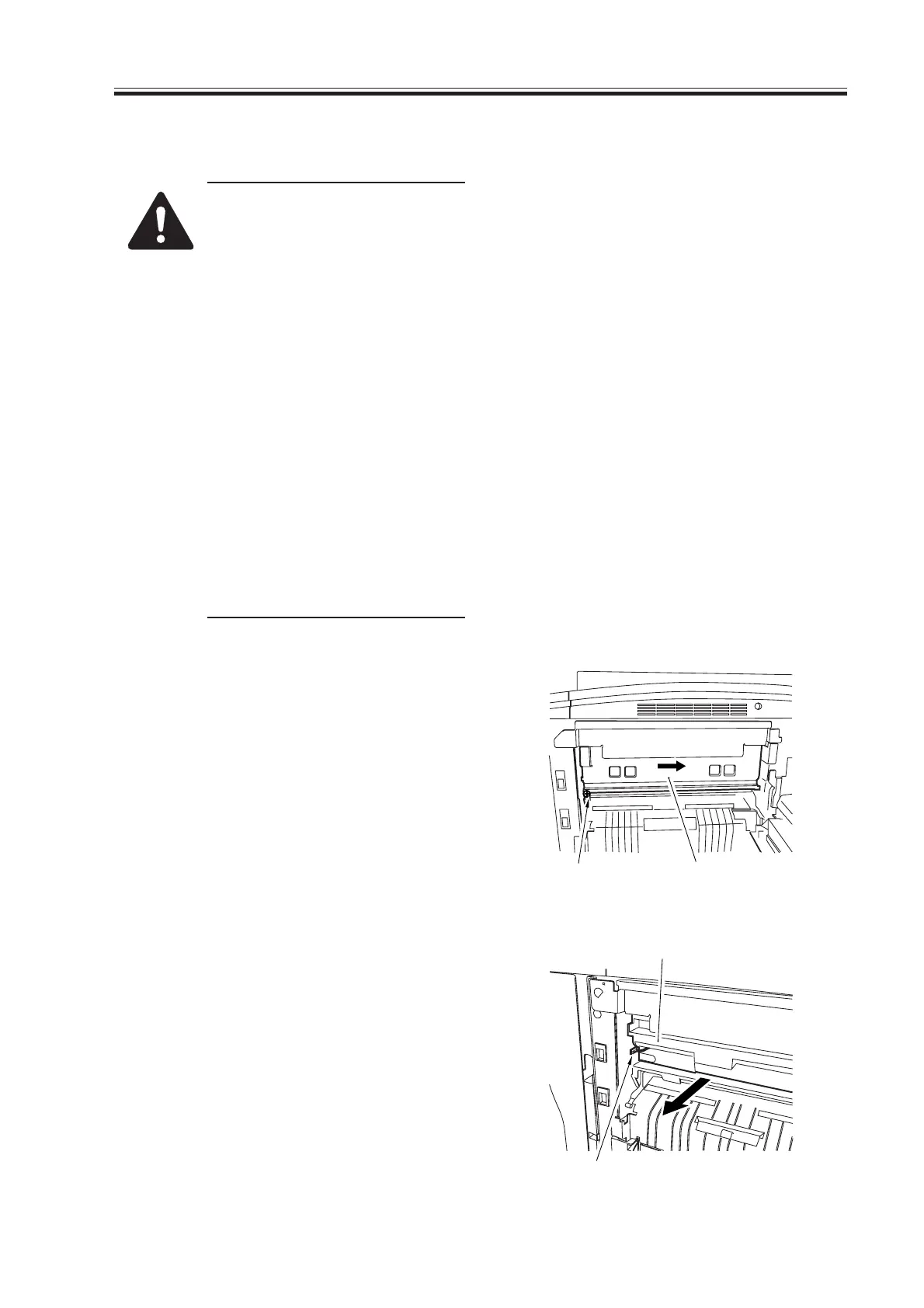
2) Remove the mounting screw [1], and
push the developing locking assembly
[2] in the direction of the arrow to de-
tach.
F04-709-01
3) Disconnect the connector [3], and take
the developing assembly [4] out of the
machine slowly.
F04-709-02
[1]
[2]
[3]
[4]
Download Free Service Manual at http://printer1.blogspot.com



 To Next Page