COPYRIGHT
©
2000 CANON INC. 2000 2000 2000 2000 CANON iR5000/iR6000 REV.0 JULY 2000
CHAPTER 7 EXTERNALS AND CONTROLS
7-22 P
[2] [1]
[3] [6][5]
[3]
[3]
[4]
[7]
[10][9]
[7]
[7]
[7]
[8]
5.4.2 Main Controller Box and the Main Controller PCB
1) Remove the rear upper cover.
2) Remove the right rear upper cover.
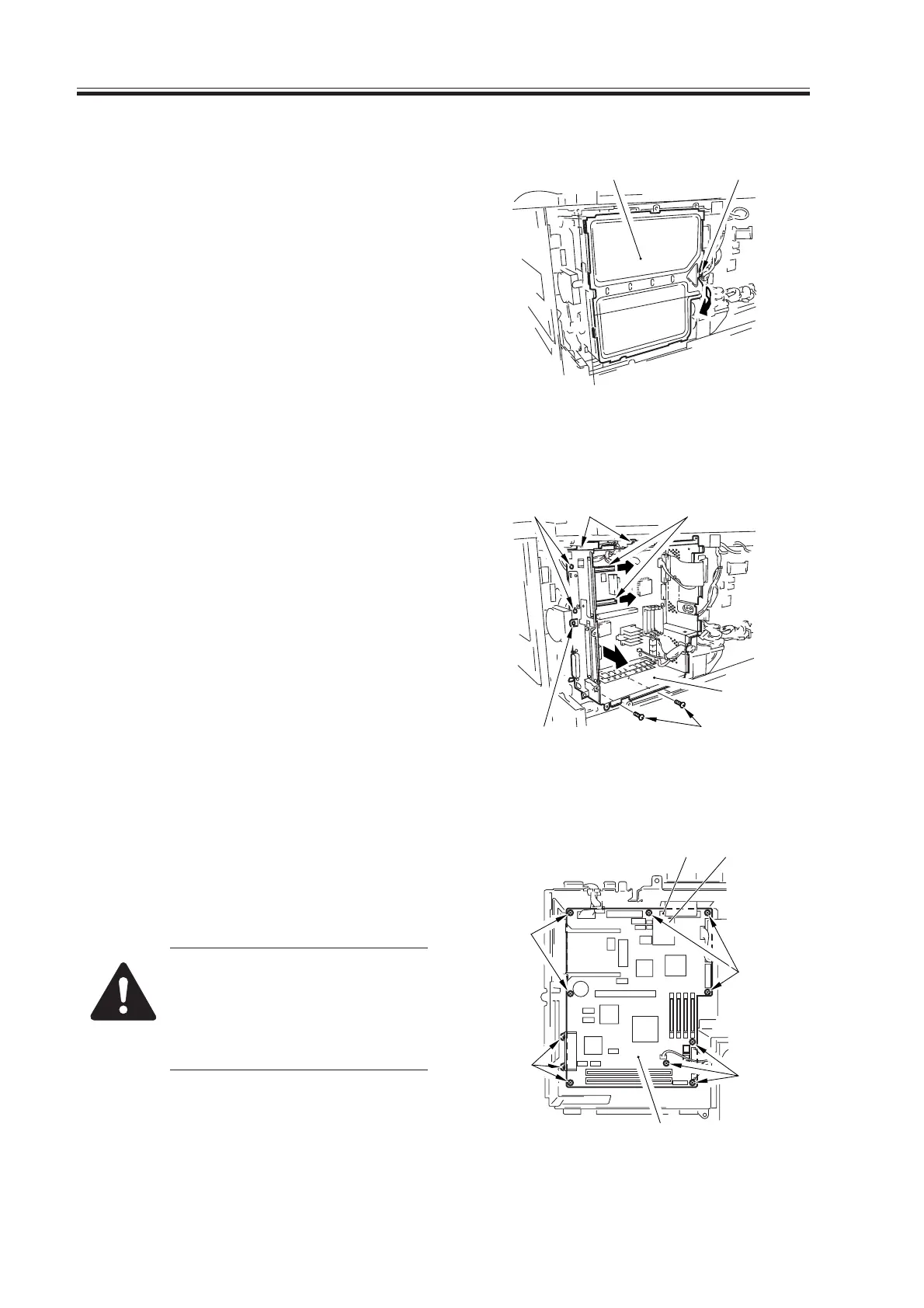
3) Remove the screw [1], and detach the
controller cover [2].
F07-504-03
4) Remove the five screws [3], and slide
out the main controller box [4].
5) When removing the main controller box
[4], disconnect all connectors of the
main controller PCB in advance.
6) Remove the two screws [5], and detach
the two PCB guides [6].
F07-504-04
7) Disconnect the ten connectors, and re-
move the 11 screws [7]; then, detach the
main controller PCB [8].
When replacing the main con-
troller PCB, remove the screw
[9], and be sure to replace the
counter memory PCB [10] with
a new one.
F07-504-05
Download Free Service Manual at http://printer1.blogspot.com



 To Next Page