Setting Page
133
Enter a preset name. Be sure to enter a preset name in [Preset Name (alphanumeric characters)].
[Show in Viewers]
Select [Enable] to allow the Camera Viewers to use the preset.
If the preset position is outside the restrict view area, (a warning icon) is displayed on the left.
The preset is saved in the camera.
Click [Clear] to discard the settings and restore the settings saved in the camera. However, note that presets only registered to the
preset list by clicking [Register] are all discarded.
Deleting a Preset
Select the preset to delete in the preset list, and click [Delete]. Click [Apply] to delete the preset from the camera.
[Home] (home position) cannot be deleted.
Previewing a Preset
Select a preset in the preset list, and click [Preview]. The preset settings are displayed in the video display area.
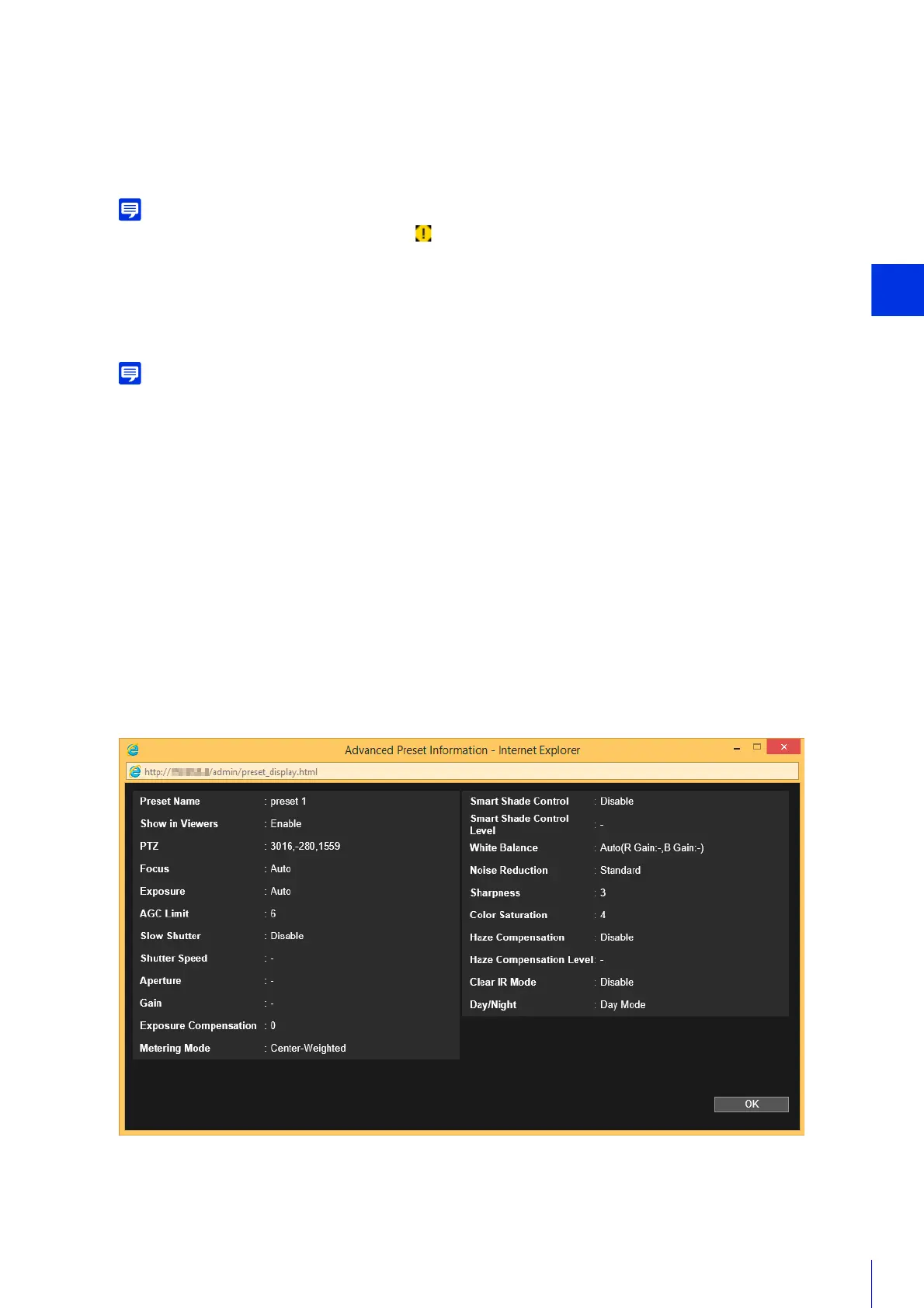
Checking Advanced Preset Information
Displays the information of the presets registered in the camera.
Select the preset to check the advanced information from the preset list, and click [Show Detailed Information].
Check the detailed information, and click [OK].
4
Click [Register].
5
To register multiple presets, repeat steps 1 – 4.
6
Click [Apply].



 To Next Page