SECTION 88 -- ACCESSORIES -- CHAPTER 1
88-2
LEFT SWATHBOARD KIT
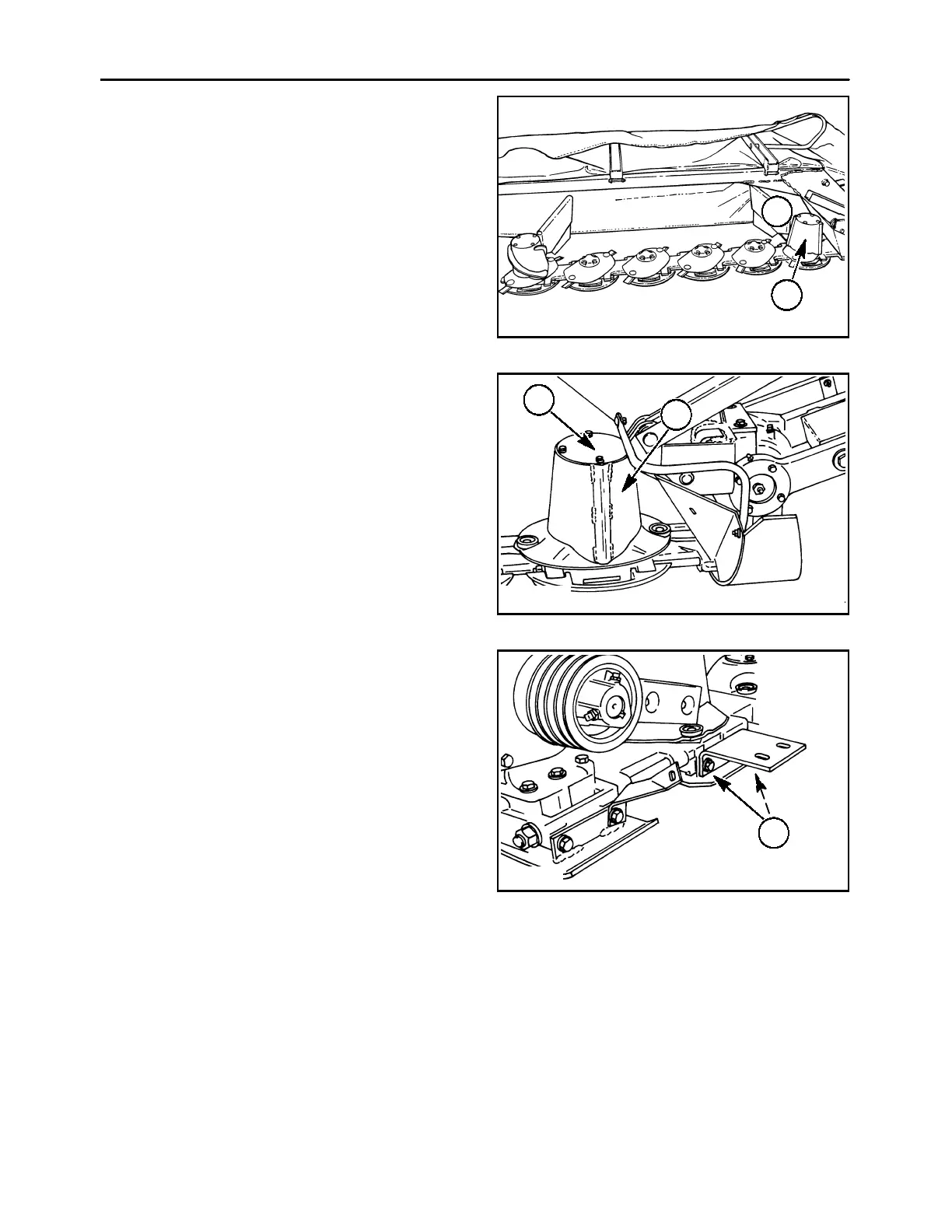
The left swathboard kit consists of a drum, 1, to install
on the #1 disc, and a swathboard, 2, which mounts
behind the #1 disc and drum. This moves the crop
inward on the left side, providing a certain
“windrowing” effect, and may make it possible for the
tractor to straddle the cut crop. The windrow size is
not adjustable.
A3680-27r
2
1
1
To install the left swathboard kit, remove the cap from
the top of the #1 disc by removing the four 1/2″ x1″
cap screws and cupped lock washers. Install drum,
1, using four 1/2″ x1-1/4″ cap screws and hardened
washers through the drum, disc and hub. Torque the
retaining bolts to 113 N∙m (83 ft. lbs.). Mount top cov-
er, 2, on top of the drum using four 3/8″ x3/4″ cap
screws and lock washers.
IMPORTANT: Use of incorrect disc retaining hard-
ware may cause cutter bar lockup and potential dam-
age, or may prevent proper retention of discs.
A4121-15
1
2
2
The swathboard mount plate is shipped with the
mower, and is not included in the left swathboard kit.
If not on the mower, it will need to be purchased sepa-
rately and installed.
Remove the two 1/2″ x1-1/4″ cap screws and
cupped lock washers, 1, that attach the skid shoe to
the module. Install the mount plate as shown, and se-
cure the mount plate and skid shoe to the module us-
ing two 1/2″ x1-1/2″ cap screws and cupped lock
washers at 1.
IMPORTANT: Use of incorrect length cap screws
may cause disc module damage, or may prevent
proper retention of skid shoe and mount.
A3971-5
1
3



 To Next Page