5
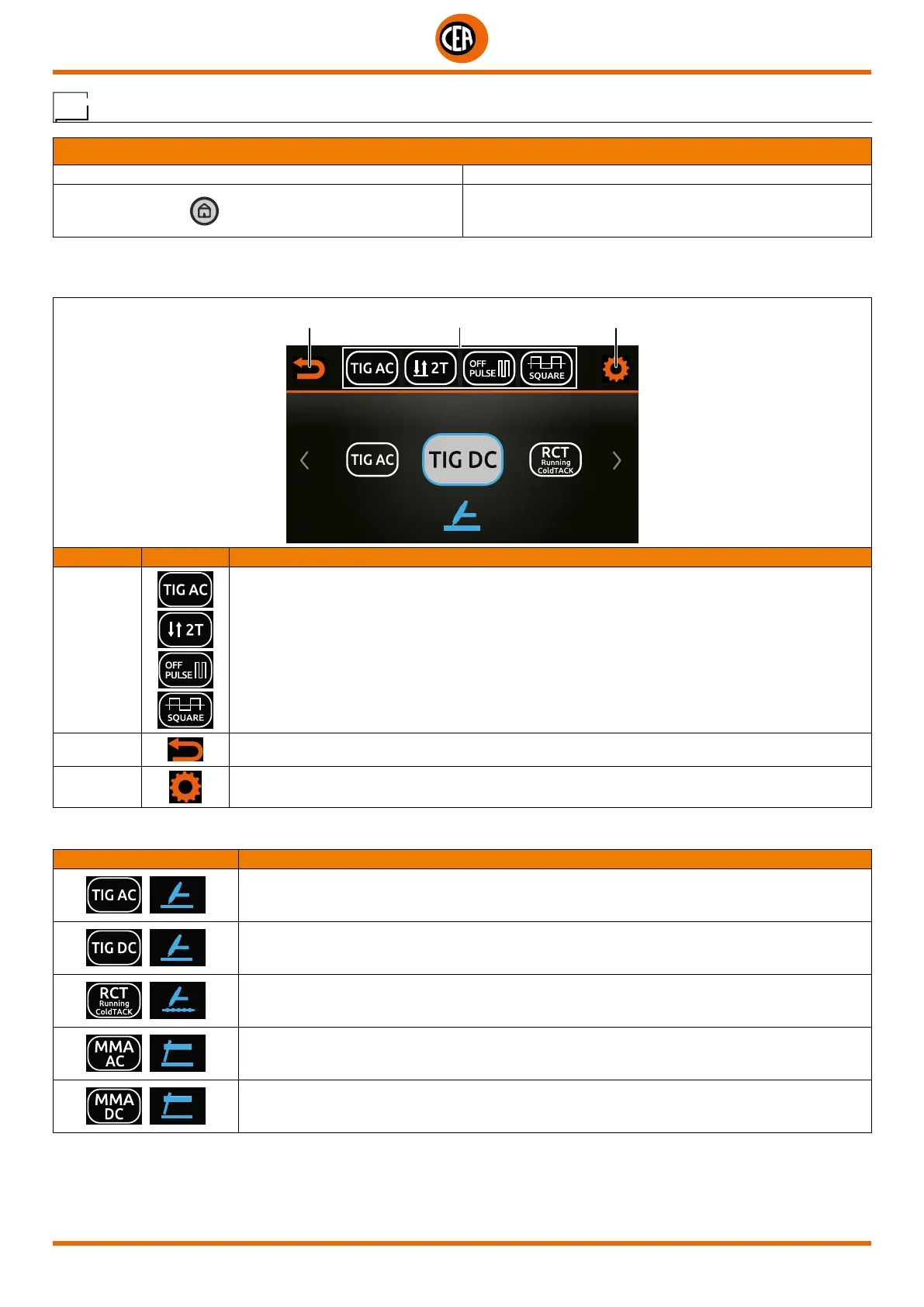
The welding process parameter selection area is divided into the following sections:
WELDING PROCESS DESCRIPTION
TIG AC - TIG AC welding with HF ignition.
TIG DC - TIG DC welding with various types of HF ignition.
RCT RCT Running Cold TACK - TIG DC welding with a RCT Running Cold TACK process that
makes it possible to form very cold weld seams.
MMA AC - ELECTRODE welding in AC.
MMA DC - ELECTRODE welding in DC.
WELDING PROCESS
2 31
POSITION SYMBOL DESCRIPTION
1
Area for selecting the welding process parameters:
• Welding process.
• Type of ignition.
• Welding mode.
• Type of pulsation.
• Type of AC welding wave.
2
Go back to the previous screen.
3
Go to the CONFIGURATION menu.
Welding process configuration menu
WELDING PROCESS CONFIGURATION MENU
ACTION RESULT
Push the HOME key from the WELD page. Welding PROCESS configuration page.
Configuring the welding process follows a logical path. Each choice made in the previous step changes the options available in the next
step.













 To Next Page