Chapter 6 - Parameter Description
6-21
)03A05+"2'; !'%' 6!'
"("!&"
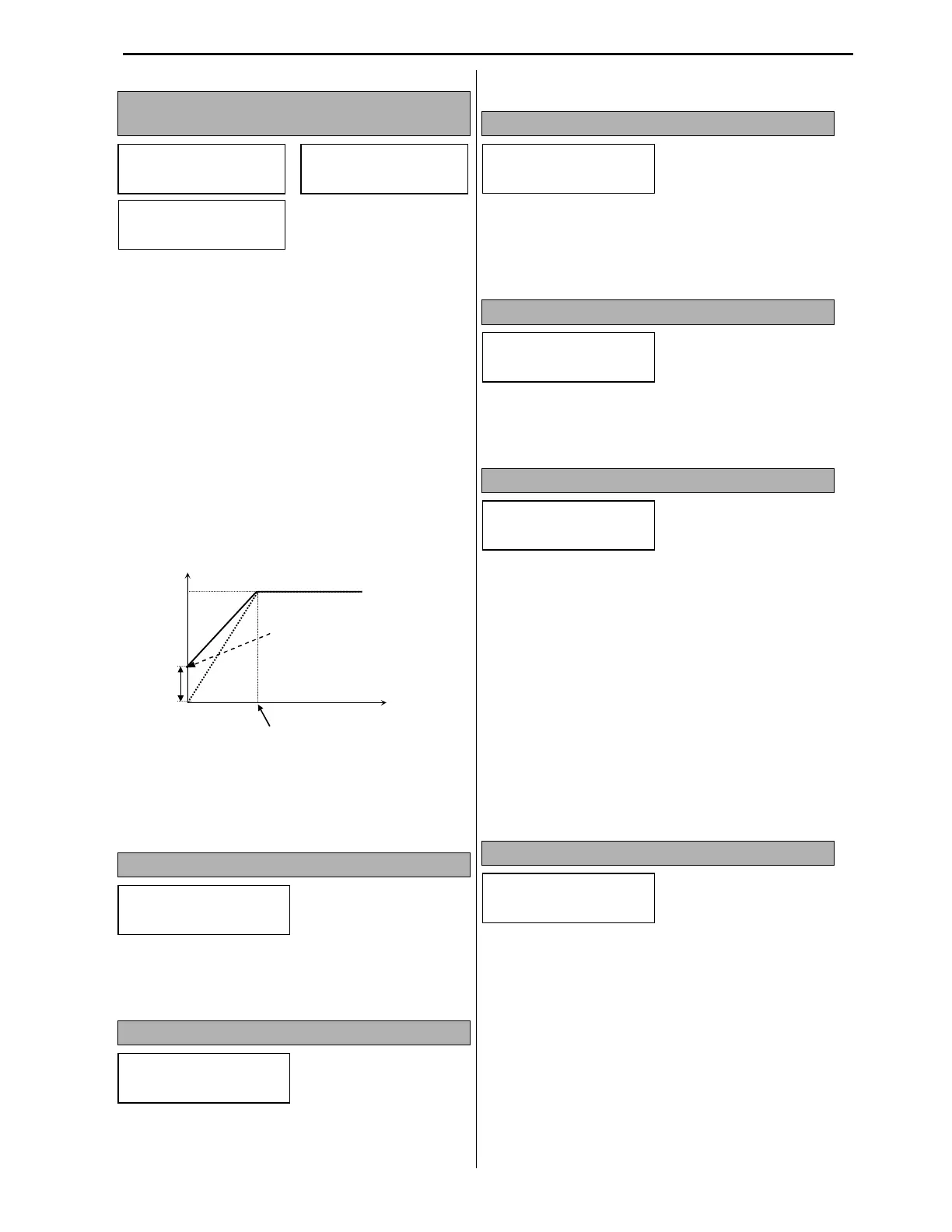
This function is used to increase the starting torque
at low speed by increasing the VFD output voltage.
If the boost value is set too high, it may cause
motor flux saturation and VFD over current trip.
The longer distance to the motor the higher value
should be set for torque boost for constant torque
applications.
Manual Torque Boost- When FG2-67 is set to
Manual, the torque boost values are set in FG2-68
Forward Boost and FG2-69 Reverse Boost. The
Torque Boost value is a percentage of SET-08
Motor Voltage.
If FG1-40 V/F Pattern is set to User V/F, the torque
boost function is disabled.
Auto Torque Boost- When FG2-67 is set to Auto,
VFD provides a torque boost level calculated based
on the load characteristic.
If FG2-60 is set to Sensorless mode, the Auto
Torque boost is disabled.
)4*+("!
FG2-80 allows VFD to show the selected parameter
in DRV group as a default at power up. Default
selection is 0 for DRV-00 Main Display.
)4+" !
FG2-81 determines what value VFD will show in
DRV-20 User Display. There are two choices:
output Voltage or kWatts. The default selection is
Voltage.
)4+> (""!
FG2-82 shows the VFD firmware version number.
If VFD parameters were saved to a keypad with
earlier software version, the VFD with newer
software version will not accept these parameters.
)43+("!-F
FG2-87 is a scaling value for VFD FG1-54
wattmeter parameter. The range is from 0.1 to
400.0%.
)5*+" "
FG2-90 has three selections: Default, All
Parameters and Different Parameters.
Default- VFD shows only active parameters. If
some parameters are shown only when some mode
is enabled, the VFD will not show these parameters
if their mode is disabled.
All Parameters- VFD shows all available
parameters regardless of their activation by some
modes.
Different Parameters- VFD shows only
parameters that were changed from default settings.
This mode is very helpful for VFD operation
problem trouble shooting.
)5+" " @<&=
FG2-91 allows saving all the VFD parameters to a
keypad. When VFD is at stop mode and FG2-91is
set to Yes, the VFD parameters will be saved to
both VFD and Keypad memories. It is
recommended to use this parameter to save all
parameter changes to a keypad when system is
adjusted for proper operation. When saving process
is done, the display will show No again.
FG2
Torque Boost
67 Manual
FG2
Fwd Boost
68 2.0 %
FG2
Rev Boost
69 2.0 %
Frequency
FG2-68 and FG2-69
Value
Output Voltage
Base Freq.
FG2
PowerOn Disp
80 0
FG2
User Disp
81 Voltage
FG2
CERUS S/W
82 Ver. 1.0
FG2
Power Set
87 100.0 %
FG2
Para. Disp
90 Default
FG2
Para. Read
91 No



 To Next Page