CDC-2000
操作手冊
Operational Manual
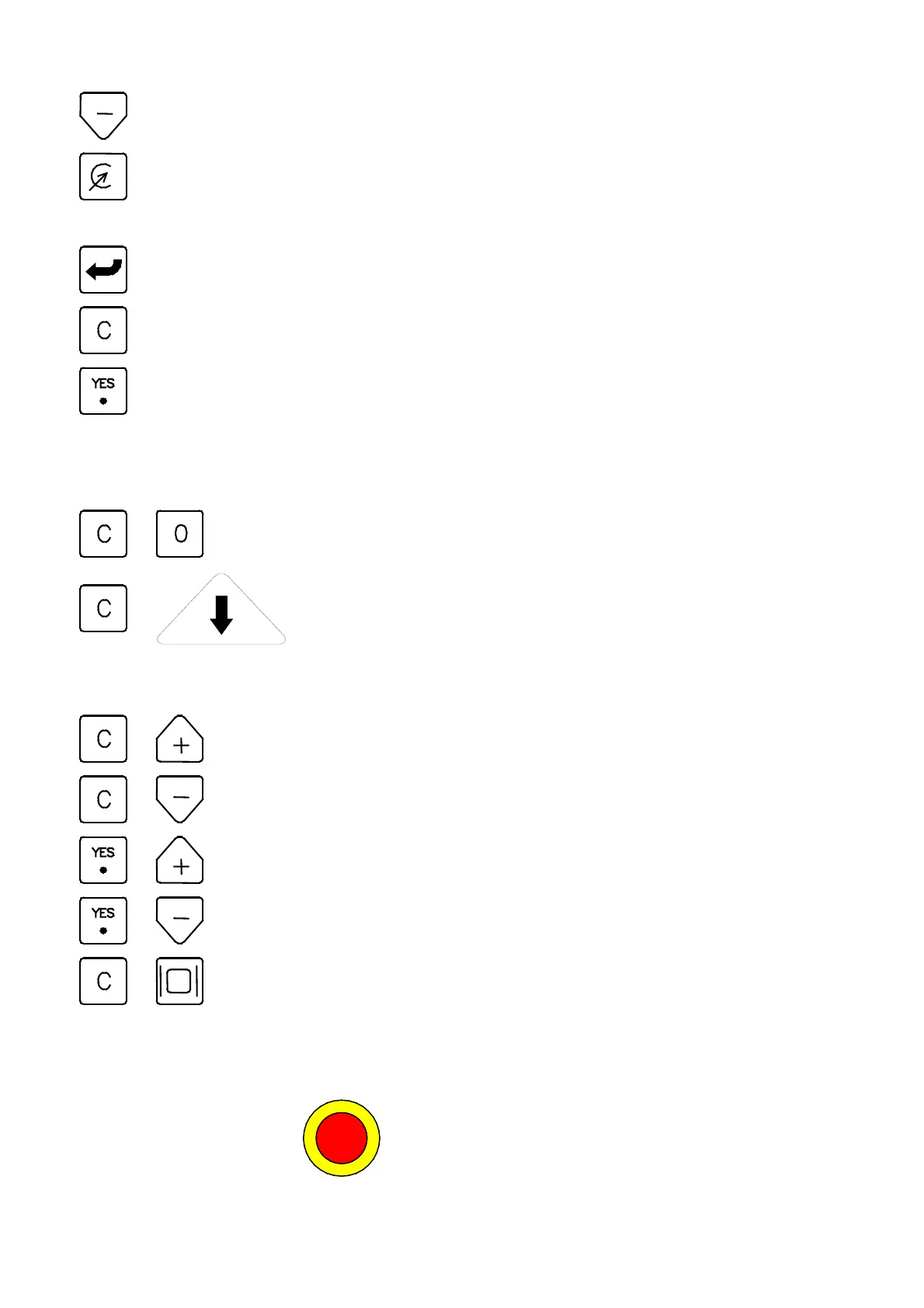
: Function selection,
“
open
”
or
“
close
”
or decreased by
“
-1
”
.
: 1.Auto calculation.
2.This button is used to call the Memorial Display when no cursor appears.
: Confirmation of right digit input.
: Cancellation of wrong digit input.
: Reconfirmation of data input.
1.4. Combined Operational Keys :
+ : Memorize the current Menu.
+ : When the pressure and speed curves are on screen, press this
button to display standard display curve. Referred to Menu (48)
of 2.15.
+ : Back up 1.
+ : Back up 2.
+ : Back up 3.
+ : Back up 4.
+ : Print the current Menu, don
’
t use it when no printer. Otherwise,
The CDC-2000 will stop to work.
1.5. Power Operational Keys:
1) To Push the E-stop
to turn off the power of the Controller; to rotate the
04/08/13
6



 To Next Page