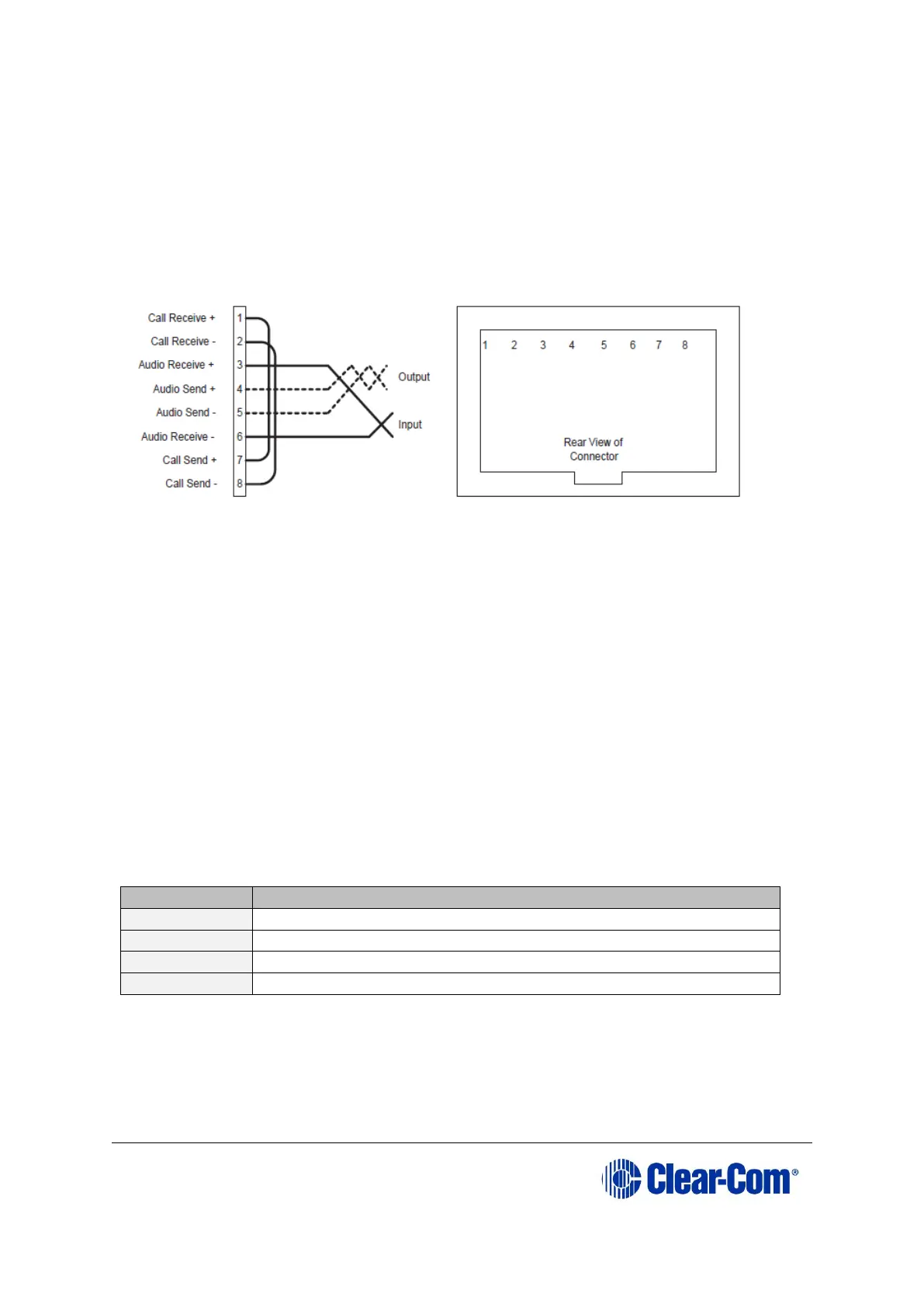
The CALL SEND output can be connected to the CALL REC input to tell the
system software that this is a directly connected port.
EHX allows the changing of the audio output reference level between -24, -21, -
18, -15, -12, -9, -6, -3, 0, +3, +6, +9, +12 and +14 dB.
With a +12dB output reference level, it is possible to drive a 200 - 400 Ohm
headset directly with a port output for such uses as direct IFB feed.
The EHX configuration software allows the changing of the audio input reference
level between -12, -9, -6, -3, 0, +3, +6, +9, +11 dB.
Figure 4-6: Direct matrix frame port connection
Clear-Com recommends the use of shielded cable.
Note: The Eclipse HX Installation Guide gives complete details about wiring audio
devices to the matrix. The installation manual also discusses RJ-45 cables and
other types of cable required for system installation.
4.6 Wiring panels to the matrix frame
Eclipse HX uses a 4-pair (analog) or single-pair (digital) wiring scheme between
the matrix and panels. All Eclipse HX user panels (V-Series and i-Series panels)
have built-in RJ-45 connectors.
4.6.1 4-Pair analog
Four-pair analog wiring is performed with shielded CAT5 RJ-45 cable:











 To Next Page