All content © 2020, cmotion GmbH. All specications are subject to change without further notice.
http://www.cmotion.eu
page 32 of 120
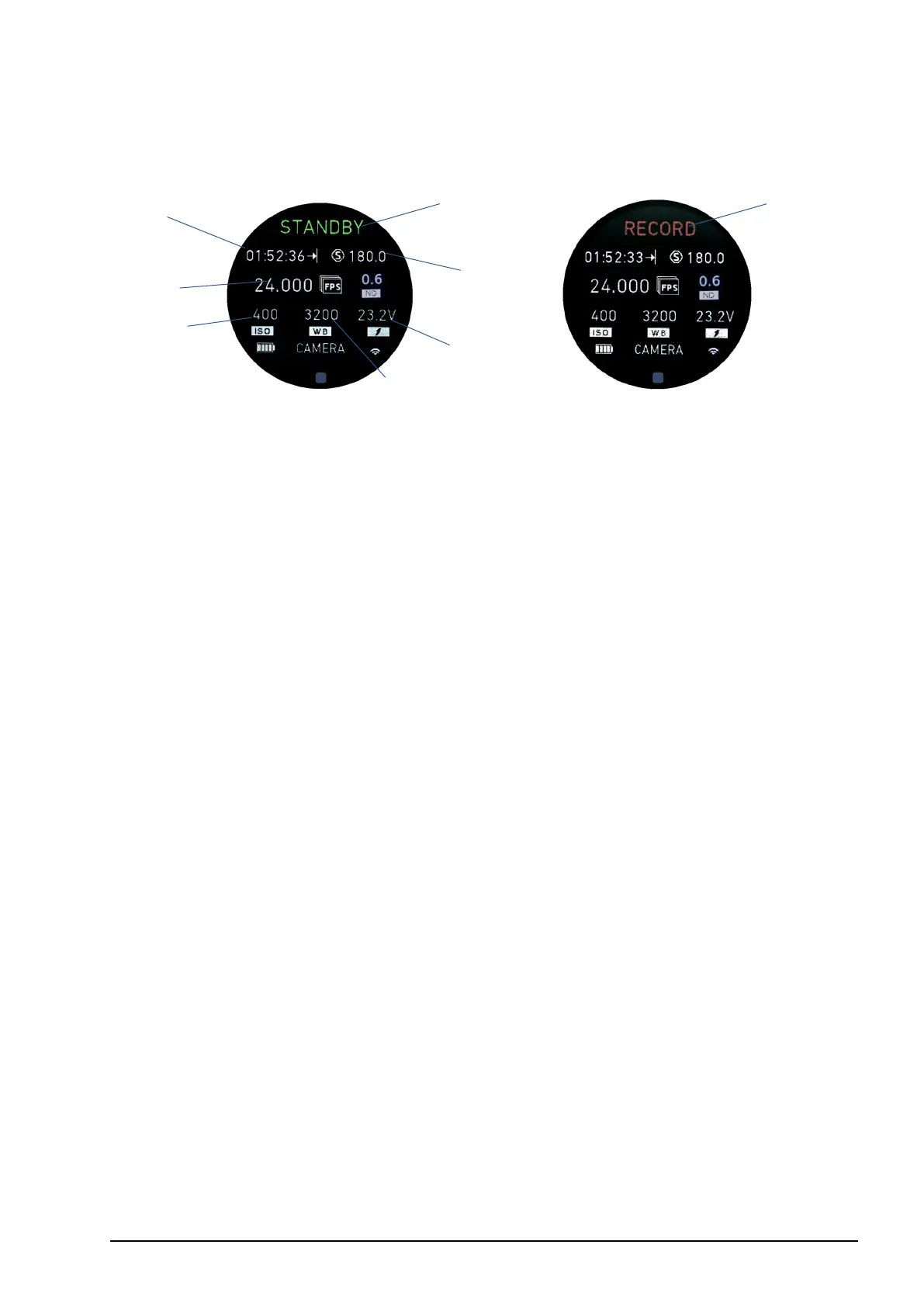
6.1.3. Camera main screen
1 Camera record information
2 Remaining record time
3 Shutter speed or angle
4 Frames per second (FPS)
5 ND Filter (where available)
6 ISO
7 White balance
8 Camera battery status
The camera information main screen will be available automatically as soon as a camera
is detected in the daisy-chain. The camera needs to be connected to the CAM interface
of the cPRO motor or the cPRO camin. Camera status information can be displayed
for the most popular cameras including ARRI, RED, SONY, BLACKMAGIC and CANON.
Depending on the camera brand and model, numerous functions including start-stop,
record feedback, camera status, tally and camera settings control are available. (License
required to control camera settings. Available with Software Release Package v3.0 or
higher). For further information, please refer to section “6.2.3.6. CAMERA” on page 84
in this manual.
1
4
7
2
3
1
6
8



 To Next Page