All content © 2020, cmotion GmbH. All specications are subject to change without further notice.
http://www.cmotion.eu
page 91 of 120
6.2.3.7.5.3. Speed mode
When the AF ramp mode is assigned to Speed mode, a dedicated speed can be
assigned to shift focus from one target to the other at a constant lens feed rate. The
motor speed will adapt automatically to allow for a constant focus pull in relation to the
lens scale. In order to set the speed for an automatic focus pull between two targets,
please refer to section “6.2.3.7.7. AF Ramp speed” on page 93
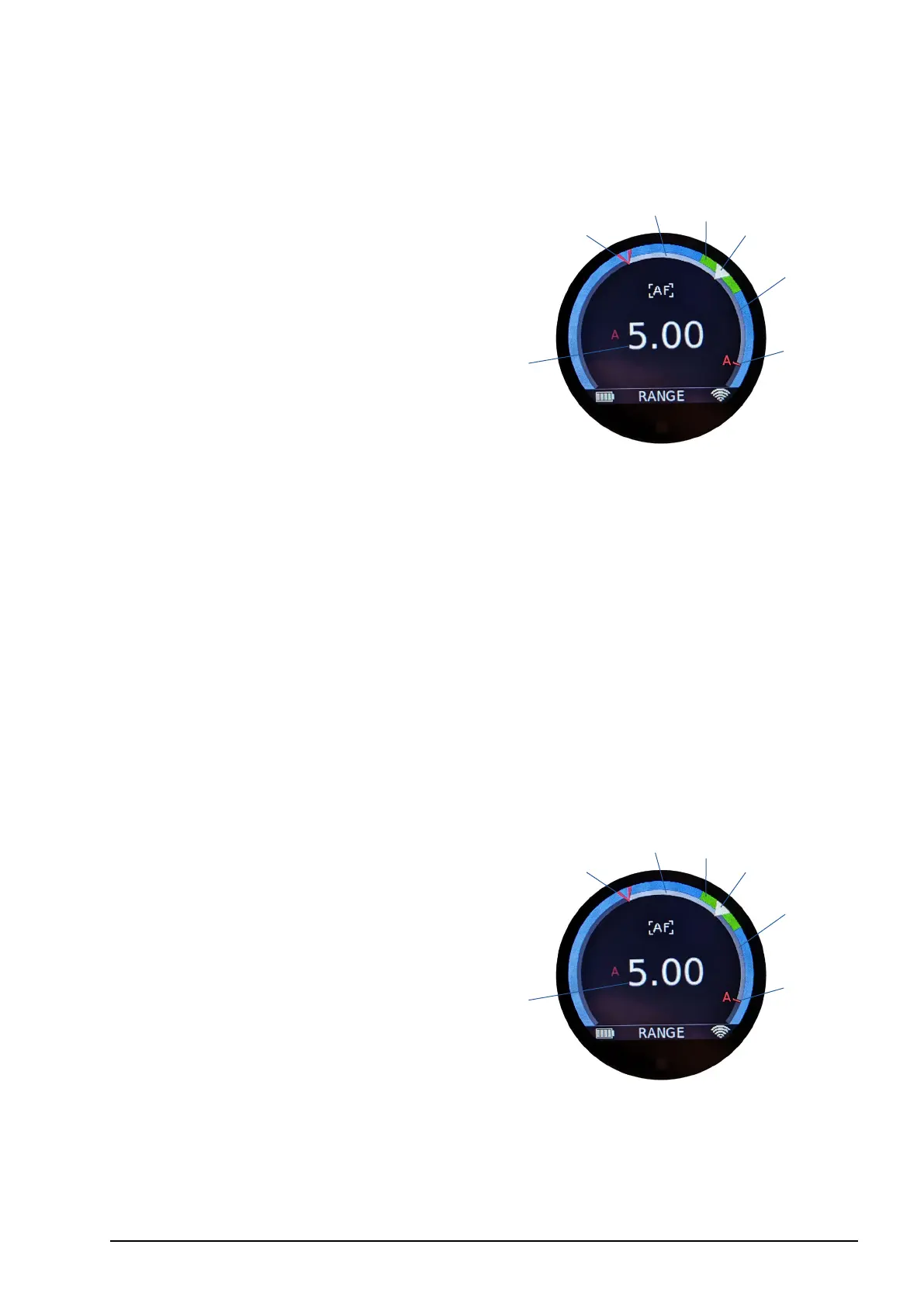
1 Measured rangender distance (value)
2 Measured rangender distance (position)
3 Actual focus position (white)
4 Actual knob position (red)
5 Target direction indicator
6 Ramp progress bar
7 DOF range
As soon as a user button assigned to Target A, B, C or M has been pressed, autofocus
will be activated and the focus ramp will start automatically. On the rangender main
screen, the selected target will be highlighted using the target direction indicator. The
time ramp will also be visualized. After the ramp has nished, the target will continue to
be tracked.
Pressing another assigned target button will start another speed ramp to the next target
automatically.* You can exit the ramp mode by turning the autofocus o (e.g. AF toggle)
or by pressing Target M. This allows you to switch to manual focus control as soon as
the speed ramp is completed.
* available with compatible rangenders oering more than one target
6.2.3.7.5.4. Manual mode
Manual mode is a unique cPRO LCS feature. It allows you to assign a controller from the
CONTROLS menu (knob, slider or thumb wheel) to control the AF ramp manually.
1 Measured rangender distance (value)
2 Measured rangender distance (position)
3 Actual focus position (white)
4 Actual knob position (red)
5 Target direction indicator
6 Ramp progress bar
7 DOF range
As soon as a user button assigned to Target A, B, C or M has been pressed, autofocus
will be activated. Focus control will remain on the manual focus controller (e.g. focus
knob) until the controller assigned to the ramp axis (e.g. slider) is physically moved from
one end stop to the other. On the rangender main screen, the selected target will be
highlighted using the target direction indicator and the manual ramp will be visualized.
After the ramp has nished, the target will continue to be tracked.
2
4
7
1
3
6
5
2
4
7
1
3
6
5



 To Next Page